Vue3 Ajax(axios)
Vue recommends using axios for ajax requests.
Axios is a Promise-based HTTP library that can be used in browsers and node.js.
GitHub open-source address:https://github.com/axios/axios
Installation Methods
Using CDN:
<script src="https://unpkg.com/axios/dist/axios.min.js"></script>
or
<script src="https://lf26-cdn-tos.bytecdntp.com/cdn/expire-1-M/axios/0.26.0/axios.min.js" type="application/javascript"></script>
Using npm:
$ npm install axios
Using Bower:
$ bower install axios
Using Yarn:
$ yarn add axios
Usage Methods
Import the default exported axios object from the Axios module:
import axios from 'axios';
1. Making a GET request
Making a request for a user with a given ID:
Example
.then(function (response) {
// Success handling
console.log(response);
})
.catch(function (error) {
// Error handling
console.log(error);
})
.finally(function () {
// Always executed
});
The above request can also be implemented like this:
Example
params: {
ID: 12345
}
})
.then(function (response) {
console.log(response);
})
.catch(function (error) {
console.log(error);
})
.finally(function () {
// Always executed
});
If you want to use async/await, add the async keyword to the outer function/method.
Example
try {
const response = await axios.get('/user?ID=12345');
console.log(response);
} catch (error) {
console.error(error);
}
}
Note:async/await is part of ECMAScript 2017 and is not supported in Internet Explorer and older browsers, so use it with caution.
2. Making a POST request
Example
firstName: 'Fred',
lastName: 'Flintstone'
})
.then(function (response) {
console.log(response);
})
.catch(function (error) {
console.log(error);
});
Executing multiple concurrent requests:
Example
return axios.get('/user/12345');
}
function getUserPermissions() {
return axios.get('/user/12345/permissions');
}
Promise.all([getUserAccount(), getUserPermissions()])
.then(function (results) {
const acct = results[0];
const perm = results[1];
});
Browser Support
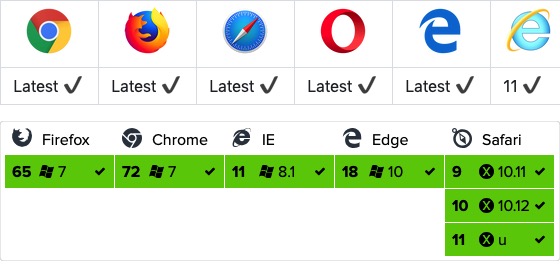
GET Method
We can simply read JSON data:
GET Example
Try it Yourself »
Usageresponse.dataRead JSON data:
GET Example
Try it Yourself »
The format for passing parameters in the GET method is as follows:
Parameter Description
POST Method
POST Example
Try it Yourself »
The format for passing parameters in the POST method is as follows:
Parameter Description
Performing Multiple Concurrent Requests
Example
axios API
You can create a request by passing relevant configuration to axios.
Example
Aliases for Request Methods
For convenience, the official docs provide aliases for all supported request methods, and you can use these aliases directly to make requests:
axios.request(config)
axios.get(url[, config])
axios.delete(url[, config])
axios.head(url[, config])
axios.post(url[, data[, config]])
axios.put(url[, data[, config]])
axios.patch(url[, data[, config]])
Note:When using alias methods, the url, method, and data properties do not need to be specified in the configuration.
Concurrency
Helper functions for handling concurrent requests:
axios.all(iterable)
axios.spread(callback)
Creating an Instance
You can create a new axios instance with custom configuration:
axios.create([config])
const instance = axios.create({
  baseURL: 'https://some-domain.com/api/',
  timeout: 1000,
  headers: {'X-Custom-Header': 'foobar'}
});
Instance Methods
The following instance methods are available. The specified configuration will be merged with the instance's configuration:
axios#request(config)
axios#get(url[, config])
axios#delete(url[, config])
axios#head(url[, config])
axios#post(url[, data[, config]])
axios#put(url[, data[, config]])
axios#patch(url[, data[, config]])
Request Configuration Options
The following are the configuration options available when creating a request. Note that only url is required. If method is not specified, the request will default to the get method.
{
  // `url` 是用于请求的服务器 URL
  url: "/user",

  // `method` 是创建请求时使用的方法
  method: "get", // 默认是 get

  // `baseURL` 将自动加在 `url` 前面,除非 `url` 是一个绝对 URL。
  // 它可以通过设置一个 `baseURL` 便于为 axios 实例的方法传递相对 URL
  baseURL: "https://some-domain.com/api/",

  // `transformRequest` 允许在向服务器发送前,修改请求数据
  // 只能用在 "PUT", "POST" 和 "PATCH" 这几个请求方法
  // 后面数组中的函数必须返回一个字符串,或 ArrayBuffer,或 Stream
  transformRequest: [function (data) {
    // 对 data 进行任意转换处理

    return data;
  }],

  // `transformResponse` 在传递给 then/catch 前,允许修改响应数据
  transformResponse: [function (data) {
    // 对 data 进行任意转换处理

    return data;
  }],

  // `headers` 是即将被发送的自定义请求头
  headers: {"X-Requested-With": "XMLHttpRequest"},

  // `params` 是即将与请求一起发送的 URL 参数
  // 必须是一个无格式对象(plain object)或 URLSearchParams 对象
  params: {
    ID: 12345
  },

  // `paramsSerializer` 是一个负责 `params` 序列化的函数
  // (e.g. https://www.npmjs.com/package/qs, http://api.jquery.com/jquery.param/)
  paramsSerializer: function(params) {
    return Qs.stringify(params, {arrayFormat: "brackets"})
  },

  // `data` 是作为请求主体被发送的数据
  // 只适用于这些请求方法 "PUT", "POST", 和 "PATCH"
  // 在没有设置 `transformRequest` 时,必须是以下类型之一:
  // - string, plain object, ArrayBuffer, ArrayBufferView, URLSearchParams
  // - 浏览器专属:FormData, File, Blob
  // - Node 专属: Stream
  data: {
    firstName: "Fred"
  },

  // `timeout` 指定请求超时的毫秒数(0 表示无超时时间)
  // 如果请求花费了超过 `timeout` 的时间,请求将被中断
  timeout: 1000,

  // `withCredentials` 表示跨域请求时是否需要使用凭证
  withCredentials: false, // 默认的

  // `adapter` 允许自定义处理请求,以使测试更轻松
  // 返回一个 promise 并应用一个有效的响应 (查阅 [response docs](#response-api)).
  adapter: function (config) {
    /* ... */
  },

  // `auth` 表示应该使用 HTTP 基础验证,并提供凭据
  // 这将设置一个 `Authorization` 头,覆写掉现有的任意使用 `headers` 设置的自定义 `Authorization`头
  auth: {
    username: "janedoe",
    password: "s00pers3cret"
  },

  // `responseType` 表示服务器响应的数据类型,可以是 "arraybuffer", "blob", "document", "json", "text", "stream"
  responseType: "json", // 默认的

  // `xsrfCookieName` 是用作 xsrf token 的值的cookie的名称
  xsrfCookieName: "XSRF-TOKEN", // default

  // `xsrfHeaderName` 是承载 xsrf token 的值的 HTTP 头的名称
  xsrfHeaderName: "X-XSRF-TOKEN", // 默认的

  // `onUploadProgress` 允许为上传处理进度事件
  onUploadProgress: function (progressEvent) {
    // 对原生进度事件的处理
  },

  // `onDownloadProgress` 允许为下载处理进度事件
  onDownloadProgress: function (progressEvent) {
    // 对原生进度事件的处理
  },

  // `maxContentLength` 定义允许的响应内容的最大尺寸
  maxContentLength: 2000,

  // `validateStatus` 定义对于给定的HTTP 响应状态码是 resolve 或 reject  promise 。如果 `validateStatus` 返回 `true` (或者设置为 `null` 或 `undefined`),promise 将被 resolve; 否则,promise 将被 rejecte
  validateStatus: function (status) {
    return status >= 200 && status < 300; // 默认的
  },

  // `maxRedirects` 定义在 node.js 中 follow 的最大重定向数目
  // 如果设置为0,将不会 follow 任何重定向
  maxRedirects: 5, // 默认的

  // `httpAgent` 和 `httpsAgent` 分别在 node.js 中用于定义在执行 http 和 https 时使用的自定义代理。允许像这样配置选项:
  // `keepAlive` 默认没有启用
  httpAgent: new http.Agent({ keepAlive: true }),
  httpsAgent: new https.Agent({ keepAlive: true }),

  // "proxy" 定义代理服务器的主机名称和端口
  // `auth` 表示 HTTP 基础验证应当用于连接代理,并提供凭据
  // 这将会设置一个 `Proxy-Authorization` 头,覆写掉已有的通过使用 `header` 设置的自定义 `Proxy-Authorization` 头。
  proxy: {
    host: "127.0.0.1",
    port: 9000,
    auth: : {
      username: "mikeymike",
      password: "rapunz3l"
    }
  },

  // `cancelToken` 指定用于取消请求的 cancel token
  // (查看后面的 Cancellation 这节了解更多)
  cancelToken: new CancelToken(function (cancel) {
  })
}
Response Structure
The response of an axios request contains the following information:
{
  // `data` 由服务器提供的响应
  data: {},

  // `status`  HTTP 状态码
  status: 200,

  // `statusText` 来自服务器响应的 HTTP 状态信息
  statusText: "OK",

  // `headers` 服务器响应的头
  headers: {},

  // `config` 是为请求提供的配置信息
  config: {}
}
When using then, you will receive a response like this:
axios.get("/user/12345")
  .then(function(response) {
    console.log(response.data);
    console.log(response.status);
    console.log(response.statusText);
    console.log(response.headers);
    console.log(response.config);
  });
When usingcatch, or passingrejection callbackasthenthe second argument, the response can be accessed via theerrorobject.
Default Configuration Values
You can specify default configuration values that will be used for every request.
Global axios defaults:
axios.defaults.baseURL = 'https://api.example.com';
axios.defaults.headers.common['Authorization'] = AUTH_TOKEN;
axios.defaults.headers.post['Content-Type'] = 'application/x-www-form-urlencoded';
Custom instance defaults:
// 创建实例时设置配置的默认值
var instance = axios.create({
  baseURL: 'https://api.example.com'
});

// 在实例已创建后修改默认值
instance.defaults.headers.common['Authorization'] = AUTH_TOKEN;
Configuration Precedence Order
Configuration will be merged with an order of precedence. The order is: the library defaults found in lib/defaults.js, then the instance's defaults property, and finally the request's config parameter. The latter takes precedence over the former. Here is an example:
// 使用由库提供的配置的默认值来创建实例
// 此时超时配置的默认值是 `0`
var instance = axios.create();

// 覆写库的超时默认值
// 现在,在超时前,所有请求都会等待 2.5 秒
instance.defaults.timeout = 2500;

// 为已知需要花费很长时间的请求覆写超时设置
instance.get('/longRequest', {
  timeout: 5000
});
Interceptors
Intercept requests or responses before they are handled by then or catch.
// 添加请求拦截器
axios.interceptors.request.use(function (config) {
    // 在发送请求之前做些什么
    return config;
  }, function (error) {
    // 对请求错误做些什么
    return Promise.reject(error);
  });

// 添加响应拦截器
axios.interceptors.response.use(function (response) {
    // 对响应数据做点什么
    return response;
  }, function (error) {
    // 对响应错误做点什么
    return Promise.reject(error);
  });
If you want to remove an interceptor later, you can do it like this:
var myInterceptor = axios.interceptors.request.use(function () {/*...*/});
axios.interceptors.request.eject(myInterceptor);
You can add interceptors to a custom axios instance.
var instance = axios.create();
instance.interceptors.request.use(function () {/*...*/});
Error handling:
axios.get('/user/12345')
  .catch(function (error) {
    if (error.response) {
      // 请求已发出,但服务器响应的状态码不在 2xx 范围内
      console.log(error.response.data);
      console.log(error.response.status);
      console.log(error.response.headers);
    } else {
      // Something happened in setting up the request that triggered an Error
      console.log('Error', error.message);
    }
    console.log(error.config);
  });
You can use the validateStatus configuration option to define a custom range of HTTP status codes that cause errors.
axios.get('/user/12345', {
  validateStatus: function (status) {
    return status < 500; // 状态码在大于或等于500时才会 reject
  }
})
Cancellation
Cancel requests using a cancel token.
Axios's cancel token API is based oncancelable promises proposal
You can create a cancel token using the CancelToken.source factory method, like this:
var CancelToken = axios.CancelToken;
var source = CancelToken.source();

axios.get('/user/12345', {
  cancelToken: source.token
}).catch(function(thrown) {
  if (axios.isCancel(thrown)) {
    console.log('Request canceled', thrown.message);
  } else {
    // 处理错误
  }
});

// 取消请求(message 参数是可选的)
source.cancel('Operation canceled by the user.');
You can also create a cancel token by passing an executor function to the CancelToken constructor:
var CancelToken = axios.CancelToken;
var cancel;

axios.get('/user/12345', {
  cancelToken: new CancelToken(function executor(c) {
    // executor 函数接收一个 cancel 函数作为参数
    cancel = c;
  })
});

// 取消请求
cancel();
Note: You can use the same cancel token to cancel multiple requests.
Using application/x-www-form-urlencoded in Requests
axios will serialize JavaScript objects to JSON by default. If you want to use the application/x-www-form-urlencoded format, you can use the following configuration.
Browser
In a browser environment, you can use the URLSearchParams API:
const params = new URLSearchParams();
params.append('param1', 'value1');
params.append('param2', 'value2');
axios.post('/foo', params);
URLSearchParams is not supported by all browsers.
In addition, you can use the qs library to encode the data:
const qs = require('qs');
axios.post('/foo', qs.stringify({ 'bar': 123 }));

// Or in another way (ES6),

import qs from 'qs';
const data = { 'bar': 123 };
const options = {
  method: 'POST',
  headers: { 'content-type': 'application/x-www-form-urlencoded' },
  data: qs.stringify(data),
  url,
};
axios(options);
Node.js Environment
In node.js, you can use the querystring module:
const querystring = require('querystring');
axios.post('http://something.com/', querystring.stringify({ foo: 'bar' }));
Of course, as in the browser, you can also use the qs library.
Promises
axios depends on the native ES6 Promise implementation tobe supported.。
If your environment does not support ES6 Promise, you can usepolyfill。
TypeScript Support
axios includes TypeScript definitions.
import axios from "axios";
axios.get("/user?ID=12345");
Other Extensions