Vue3 Directory Structure
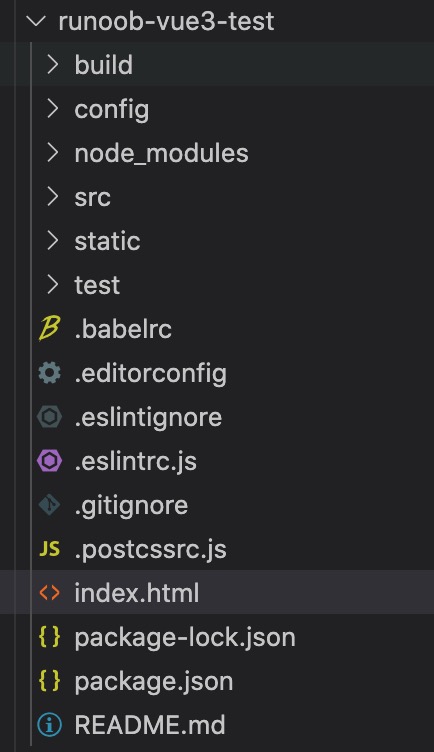
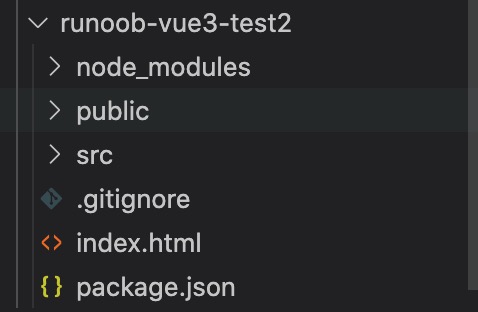
In the previous chapter, we used npm to install the project (Vue-cli and Vite). We opened the directory in an IDE (Vscode, Atom, etc.), and the structure is as follows:
Command-line tool vue-cli (example-vue3-test):
Vite(example-vue3-test2)
A standard Vue 3 project can usually be divided into three layers:
- Project root directory:Build tools and project configuration
- public directory:Static resources that are not involved in the build
- src directory:Almost all business code is here; daily development is basically done in this directory.
Typical Vue project structure:
vue-project/
├── public/                  # 静态资源,直接复制到构建输出目录
│   └── favicon.ico          # 网站图标
├── src/
│   ├── assets/              # 静态资源(如图片、字体、CSS)
│   │   └── logo.png
│   ├── components/          # 可复用的通用组件
│   │   └── CommonHeader.vue
│   ├── composables/         # 可复用的 Composition API 逻辑(可选)
│   │   └── useFetch.js
│   ├── router/              # 路由配置
│   │   └── index.js
│   ├── stores/              # Pinia 状态管理(或 store/ 用于 Vuex)
│   │   └── index.js
│   ├── utils/               # 工具函数(如请求封装、格式化)
│   │   └── request.js
│   ├── views/               # 页面级组件(对应路由页面)
│   │   ├── HomeView.vue
│   │   └── AboutView.vue
│   ├── App.vue              # 根组件
│   └── main.js              # 入口文件(创建 Vue 应用)
├── index.html               # HTML 入口模板
├── vite.config.js           # Vite 配置文件
├── package.json             # 项目依赖与脚本
├── .gitignore               # Git 忽略文件
├── .env                     # 环境变量(开发)
├── .env.production          # 环境变量(生产)
└── README.md                # 项目说明
Directory Explanation
| Path | Description |
|---|---|
| public/ | Stores static resources that will not be processed by the build tool; they are directly copied to the dist directory, commonly used for favicon, robots.txt, etc. |
| public/favicon.ico | Website icon (favicon) |
| src/ | Main directory for project source code; all development code is placed here |
| src/assets/ | Stores static resources such as images, fonts, and global CSS; they will be processed by Vite (supports import) |
| src/components/ | Stores reusable common components (such as buttons, cards, layout components) |
| src/composables/ | Stores reusable Composition API logic functions (the code reuse approach recommended by Vue 3) |
| src/router/ | Vue Router configuration directory, usually contains index.js to define the route table |
| src/stores/ | Pinia state management directory (officially recommended by Vue 3), stores each store module |
| src/utils/ | Stores utility functions, such as axios wrappers, time formatting, constants, etc. |
| src/views/ | Stores page-level components, usually corresponding one-to-one with routes (route pages) |
| src/App.vue | The root component of the Vue application, containing<router-view>and other entry render points |
| src/main.js | Project entry file, creates the Vue application instance, mounts plugins (router, pinia, etc.) and mounts to #app |
| index.html | HTML template file, containing<div></div>mount point |
| vite.config.js | Vite build tool configuration file; can customize plugins, aliases, proxy, etc. |
| package.json | Project dependencies, script commands (such as dev, build, preview) |
| .gitignore | Git ignore file; usually ignores node_modules, dist, .env, etc. |
| .env / .env.production | Environment variable file, used to configure API addresses, etc. for different environments (Vite variables starting with VITE_) |
| README.md | Project documentation |
As the project grows, you may also need to add these folders:
- src/layouts/: Different page layouts (such as AdminLayout.vue, GuestLayout.vue).
- src/plugins/: Custom Vue plugins (such as automatic global component registration).
- src/directives/: Custom directives (such as v-loading).
- src/types/: Global TypeScript type declarations.
- tests/ortests/: Unit/E2E tests (Vitest + Vue Test Utils).
- src/api/: Separate API interface call modules (more granular than utils/request).
Next, we take example-vue3-test2 as an example, open the src/APP.vue file in the directory, and the code is as follows (explanations are in the comments):
src/APP.vue File Code
<template>
<img alt="Vue logo" src="./assets/logo.png" />
<HelloWorld msg="Hello Vue 3.0 + Vite" />
</template>
<!-- Vue code -->
<script>
/* Import the HelloWorld component from src/components/HelloWorld.vue */
import HelloWorld from './components/HelloWorld.vue'
export default {
name: 'App',
components: {
HelloWorld
}
}
</script>
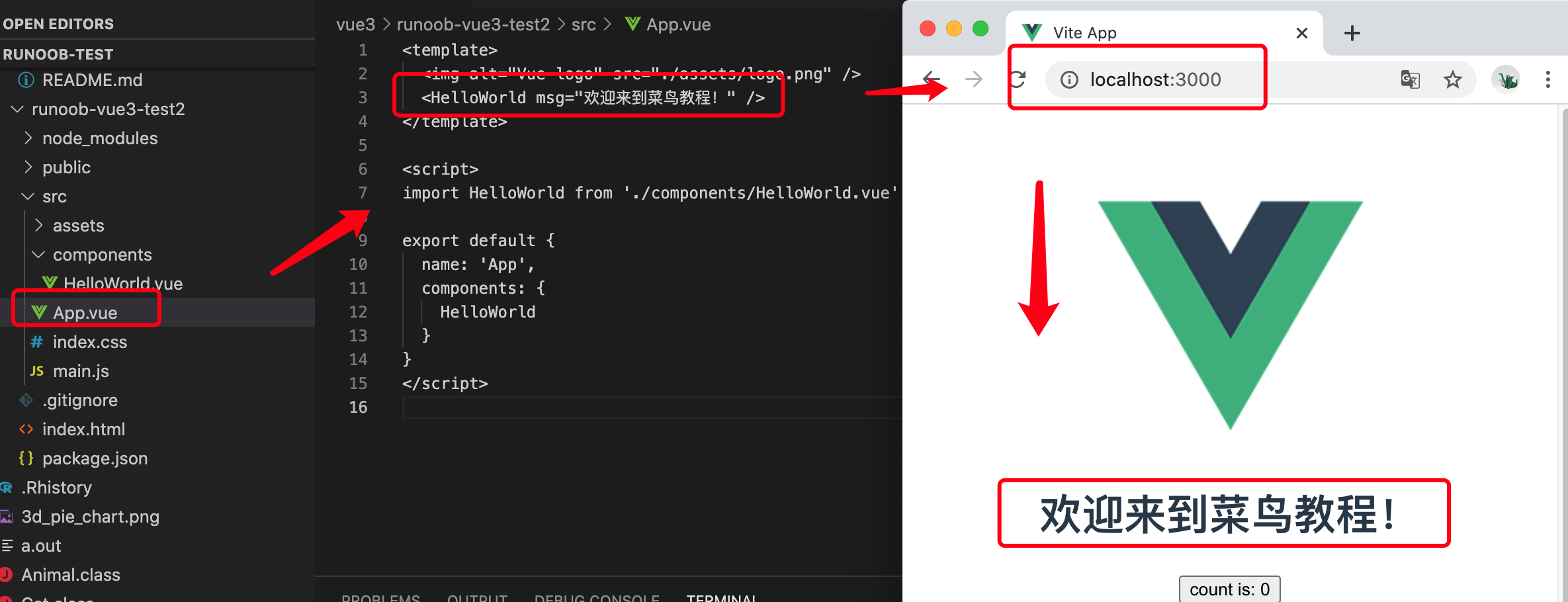
Next, we can try to modify the initialized project and change src/APP.vue to the following code:
src/APP.vue File Code
<img alt="Vue logo" src="./assets/logo.png" />
<HelloWorld msg="Welcome to Example Tutorial!" />
</template>
<script>
import HelloWorld from './components/HelloWorld.vue'
export default {
name: 'App',
components: {
HelloWorld
}
}
</script>
Open the pagehttp://localhost:3000/, it usually auto-refreshes after modification, and the display effect is as follows: