Vibe Coding Introduction
Vibe Coding (ambient programming) is a brand-new human-computer collaborative programming paradigm.
The core idea of Vibe Coding is: we no longer write code line by line, but instead usenatural languageto tell AI what you want. AI generates the code for you, and you just need to test, adjust, and accept the result.
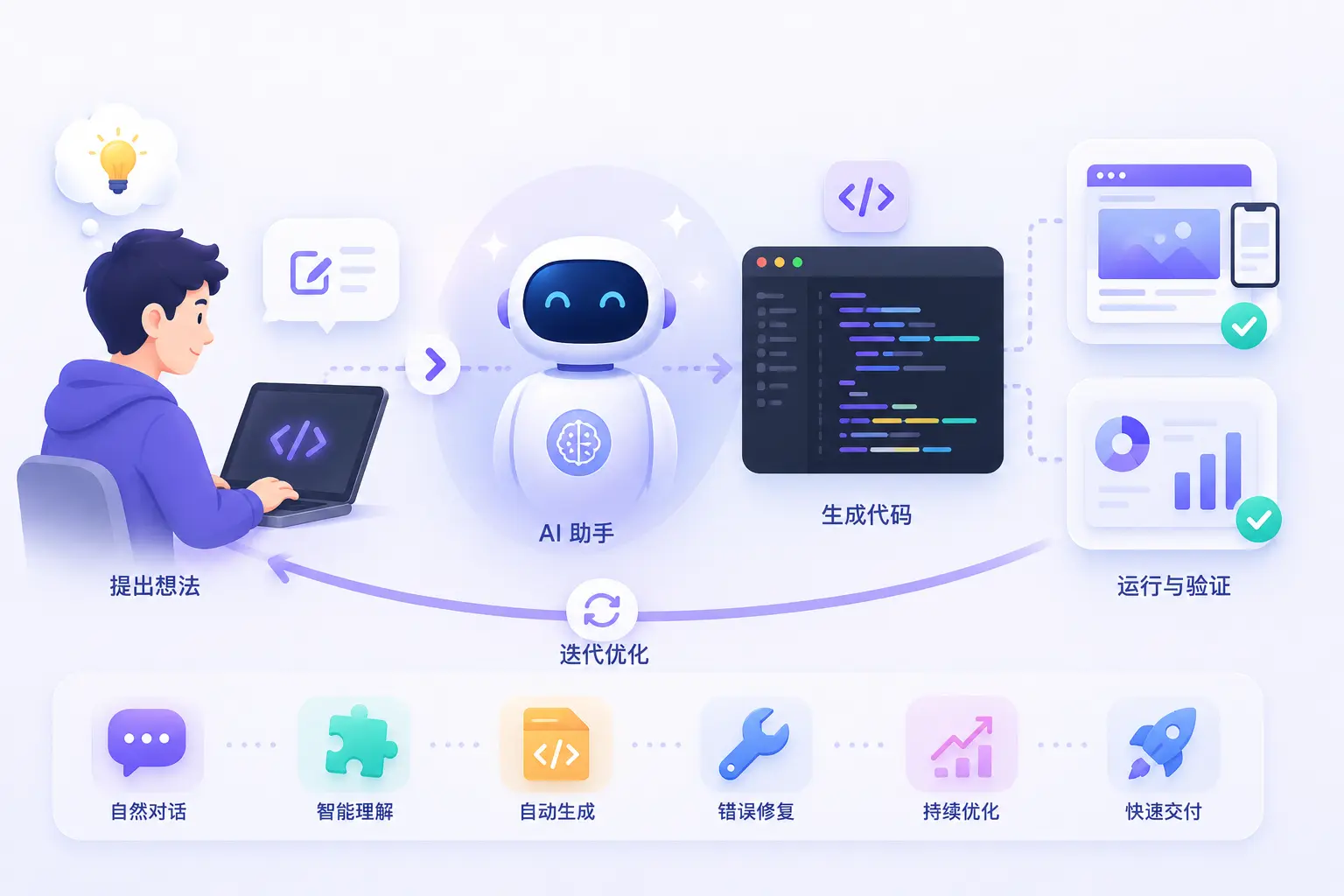
Core Concepts
In traditional programming, developers need to spend a lot of time memorizing syntax rules, consulting documentation, and writing every line of code.
In Vibe Coding mode, developers describe their ideas and business logic in everyday language, and the AI assistant automatically generates compliant, high-quality code within seconds based on those descriptions.
Vibe Coding greatly lowers the programming barrier, allowing developers to focus more on product design and feature implementation.
Vibe CodingThe term was first proposed by former Tesla AI director and OpenAI co-founder Andrej Karpathy in February 2025.
He summarized this new way of programming in one sentence:
「I just vibe. I don't even touch the keyboard sometimes. I just talk to the AI, it writes the code, I review it, and we iterate.」
In other words: you just describe your "vibe", AI writes the code, you review it, and then iterate back and forth.
Simply put, Vibe Coding means: you tell AI in plain language what feature you want, and AI writes the code for you. You don't need to worry about syntax details, memorize API parameters, or manually debug every error—AI handles all of that.
Our role shifts from "code writer" to "requirement describer"—or, from programmer to product manager + architect.

Vibe Coding doesn't let AI replace your thinking; it lets AI handle low-value repetitive work so you can focus on the more creative parts: understanding problems, designing architecture, and verifying results.
In simple terms:
- Traditional programming: Human thinks → Human writes code → Computer executes
- Vibe Coding: Human thinks → Human describes →AI writes code→ Computer executes
| Dimension | Traditional programming | Vibe Coding |
|---|---|---|
| Core skills | Memorizing syntax, algorithm design, manually debugging code | Logical expression, prompt design, result verification |
| Development speed | Limited by typing speed and time spent consulting documentation | Extremely fast; AI can generate complex logic in seconds |
| Time to start | Requires weeks or months to learn basic syntax | Can start writing your first program within minutes |
| Error handling | Requires manually checking logs and debugging line by line | Feed error messages directly to AI for automatic analysis and fixing |
Why did Vibe Coding emerge?
As large language models (such as various AI coding assistants) improve, AI can now understand human natural language and generate high-quality code. This gave rise to a new division of labor:
| Role | Responsibility |
|---|---|
| Human | Describing requirements, judging quality, proposing changes |
| AI | Writing code, fixing errors, explaining logic |
This allowspeople who can't write code to also build software, and also greatly improves programmers' efficiency.
Basic workflow of Vibe Coding
We can understand it with a simple flowchart:

The whole process is like chatting with a programmer friend: we state the requirement, it writes the code, and if something is wrong, we ask for changes until we're satisfied.
First example (Hello Vibe Coding)
Suppose you want to make aguess the numbermini-game, but you don't know how to code. In Vibe Coding, you just tell AI this:
You input (requirement description):
帮我写一个 Python 小游戏:程序随机生成 1 到 100 的数字,让我猜,猜大了提示「太大了」,猜小了提示「太小了」,猜中了就结束。
AI output (auto-generated code):
Example
answer = random.randint(1, 100)
while True:
guess = int(input("Please enter a number you guess (1-100): "))
if guess > answer:
print("Too big")
elif guess < answer:
print("Too small")
else:
print("Congratulations, you guessed it!")
break
We don't need to knowrandomwhat it is,whilehow to write it—As long as you describe it clearly, AI can help you implement it, and that's the charm of Vibe Coding.
Advantages of Vibe Coding
- Low barrier to entry: People who don't know programming syntax can also create programs.
- Fast: Code that would take hours to write can be generated in minutes.
- Focus on creativity: You can put your energy intowhat you want to doinstead ofhow to write it.
- Easy to iterate: Not satisfied? Have AI rewrite it anytime—the cost is extremely low.
Things to note about Vibe Coding
Though useful, beginners should keep the following points in mind:
- AI can make mistakes: The generated code may not be fully correct—you need to run tests to verify.
- Describe clearly: The more specific you are, the more accurate AI's code will be. Vague requirements often lead to vague results.
- Security and privacy: Don't hand sensitive information (such as passwords and keys) directly to AI.
- Knowing a bit of basics helps: You can play even without any coding knowledge, but having some programming fundamentals helps you better judge whether AI's output is correct.
The real boundaries of AI capabilities
Understanding what AI is good at and not good at is a prerequisite for using it efficiently.
Areas where AI excels
| Area | Typical scenarios | Efficiency improvements |
|---|---|---|
| Boilerplate code generation | CRUD APIs, config files, Dockerfile, project scaffolding | 5-10x |
| Unit test writing | Generate test cases for existing functions, covering edge cases | 5-10x |
| Code refactoring | Extract functions, eliminate duplication, add type annotations, migrate APIs | 3-5x |
| Code explanation | Understanding unfamiliar codebases, explaining complex logic, generating documentation | 3-5x |
| Bug localization | Analyze error messages, trace stacks, locate root causes | 2-4x |
| Documentation generation | API docs, README, comments, changelogs | 5-10x |
| Format conversion | Data cleaning, JSON/CSV/XML conversion, migration scripts | 5-10x |
AI's limitations
| Area | Why AI is not good at this | Recommendation |
|---|---|---|
| System architecture decisions | Architecture requires weighing multiple dimensions (performance, cost, maintainability, team capability), and AI lacks global context | AI can list options and trade-offs, but the final decision is yours to make |
| Deep performance tuning | Performance issues typically depend on profiler data and actual workload characteristics; AI cannot access the runtime environment | Let AI analyze profiler output, but you need to verify the optimization plan |
| Undocumented internal APIs | AI's training data does not include your company's private internal APIs | Provide internal documentation to AI via context references |
| Security auditing | AI can find common vulnerabilities, but it cannot replace a professional security audit process | Use AI for initial screening, but critical systems still require manual audits |
| Complex business logic | AI doesn't understand your business domain knowledge and may generate code that is "technically correct but business-wise wrong" | The spec for business logic must be written by you; AI is only responsible for implementation |
Learning advice
For beginners, the best approach ishands-on practice:
- Get an AI coding assistant tool.
- Start with a very simple requirement (e.g., build a calculator).
- Describe requirements in natural language, and observe the code AI provides.
- Run it, modify it, and gradually learn how to "express yourself clearly."
- While using it, pick up the basic concepts of code along the way.
Other extensionsRemember:Vibe Coding doesn't mean you don't need to learn programming; it means starting your programming journey in a more relaxed way.