OpenCode Coding Plan
There are many LLM providers on the market now. Abroad there are Anthropic, OpenAI, Grok, Gemini, etc., but accessing overseas services is inconvenient now. Domestically there are DeepSeek, Qwen, ZLM, MiniMax, etc.
When we use Claude Code to write code, the most expensive part is tokens. Overseas access is inconvenient and expensive. Domestic providers now offer monthly subscription plans. If you use it long-term, it is recommended to buy a monthly plan for better value.
This article introduces Alibaba Cloud Bailian's Coding Plan, a subscription service designed specifically for AI coding tools. It integrates top LLMs such as Qwen, GLM, Kimi, MiniMax, and is compatible with mainstream AI coding assistants (such as OpenCode, Claude Code, OpenClaw, etc.). It uses a fixed monthly fee model, costs far less than pay-as-you-go APIs, and completely eliminates the risk of overdue charges.
Coding Plan core advantages:
- One-click access to top models: No need to call Bailian API yourself; directly use the strongest models in your familiar coding tools.
- Extremely low cost: Fixed monthly fee (Lite ¥40/month, Pro ¥200/month). First-month limited-time offer is only ¥7.9 / ¥39.9.
- Worry-free security: Direct API connections are prohibited; only for use with interactive coding tools to avoid abuse and ban risks.
- Image understanding support: qwen3.5-plus and kimi-k2.5 support uploading screenshots/design images to directly generate code.
Recommended models(Officially adapted):
- qwen3.5-plus (supports image understanding, recommended first choice)
- kimi-k2.5 (supports image understanding)
- glm-5
- MiniMax-M2.5
Coding Plan supports the following tools: Cursor, Claude Code, OpenClaw, OpenCode, Cline (VS Code extension), Kilo Code / Kilo CLI, Qwen Code, Codex, etc.
Subscribe to Ark Coding Plan
Visit ArkCoding Plan PromotionSubscribe to the plan as needed. If your usage is not high, the Lite version is enough. If your usage is very heavy, you can use the Pro version.
Coding Plan/Agent PlanFirst two months at 25% of the original price
Promotion period: 2026.06.08-2026.08.07
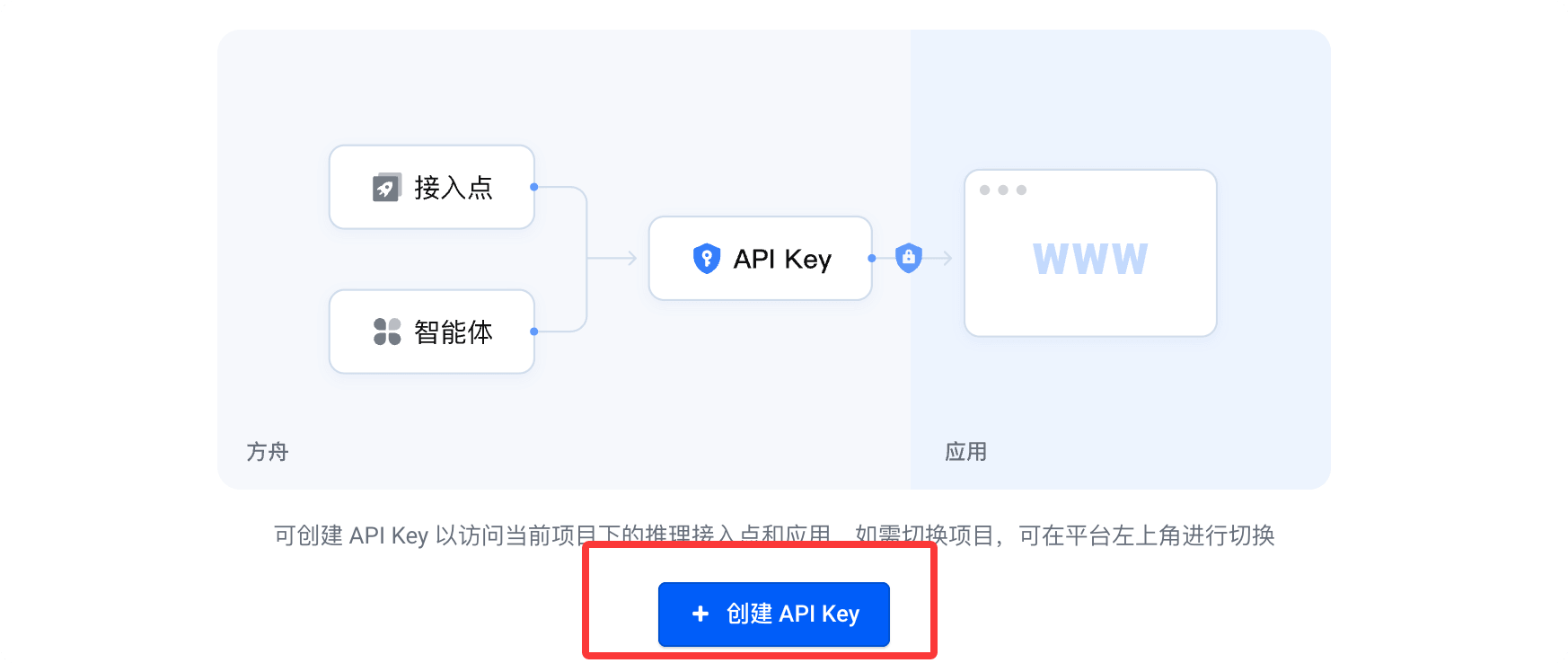
After successful purchase, clickCreate your API Key:
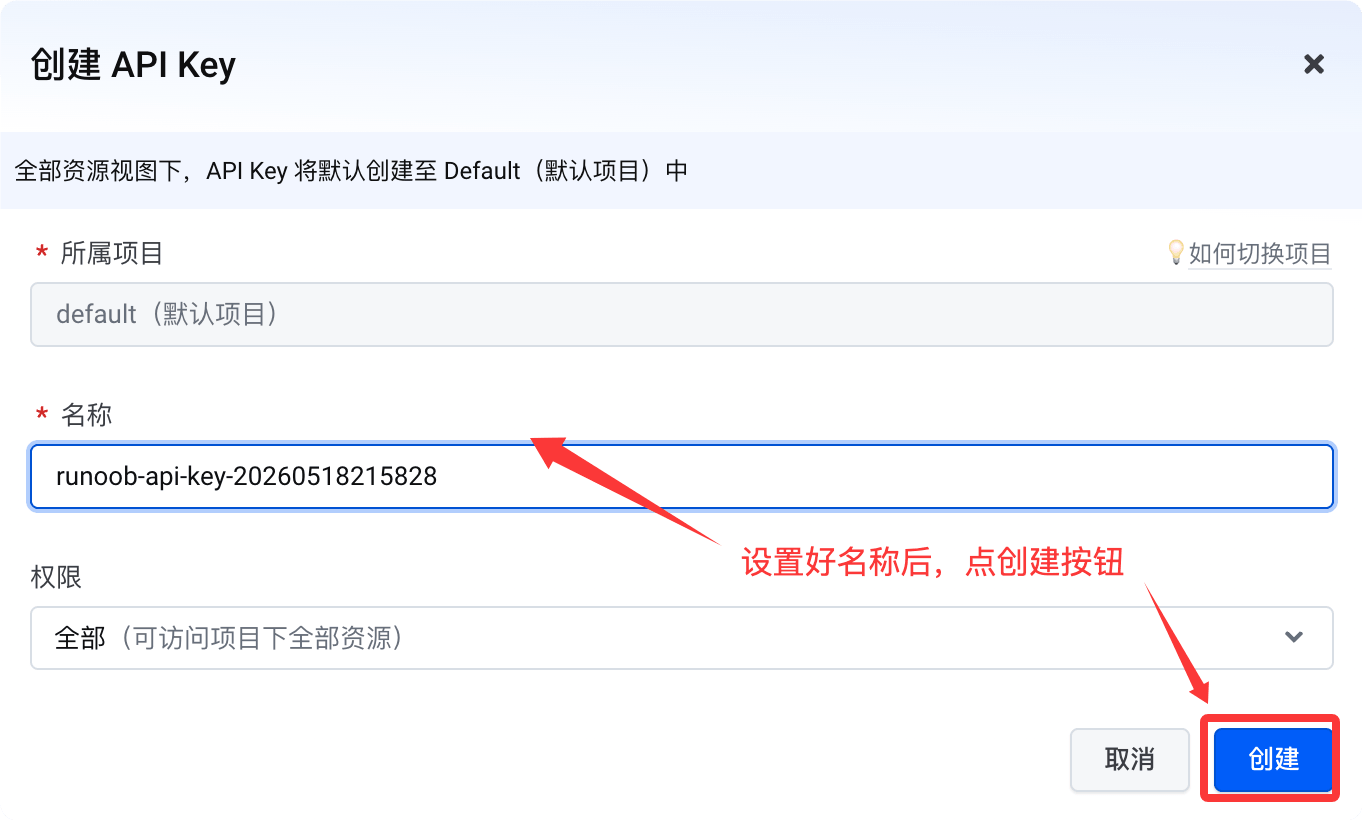
Then click the Create button:
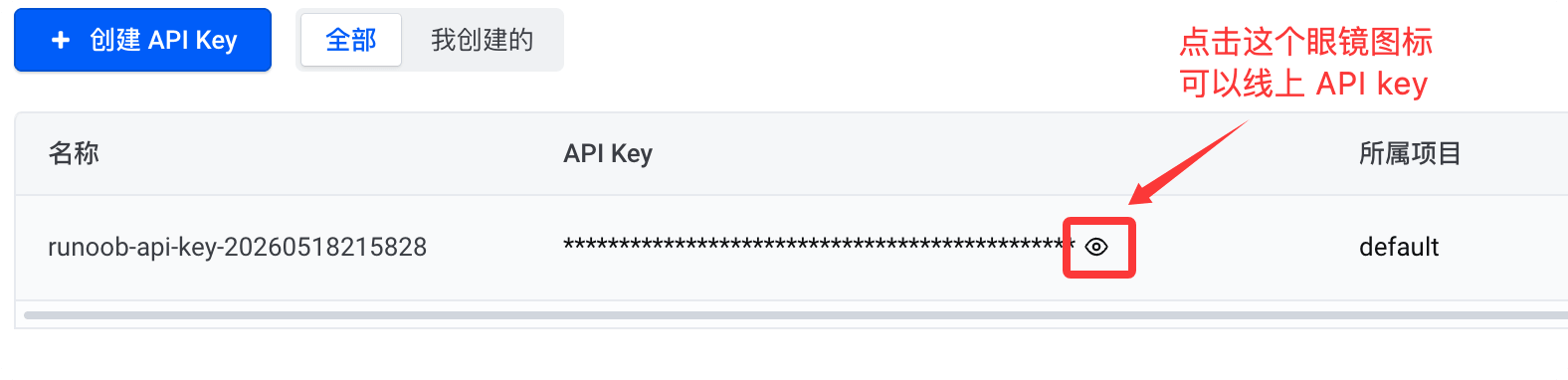
Click the small eye icon below to see the API key. When you need to use it, just copy it:
Ark Coding Planis an AI coding subscription service for developers, enabling efficient development. Core advantages are as follows:
- Rich model selection: Supports mainstream LLMs and embedding models, covering popular series such as Doubao, DeepSeek, Kimi, GLM, MiniMax.
- Wide tool compatibility: Compatible with mainstream AI coding tools such as Claude Code, Cursor, Cline, OpenCode, Codex CLI.
- Shared quota: Multiple tools share the plan quota, allowing flexible switching to suit different development scenarios.
- Flexible plans: Provides multiple tiers including Lite / Pro to meet needs from light to high-intensity development.
- Stable and highly available: Multi-tenant isolation and resource scheduling ensure stability and smoothness even during peak hours.
Different tools require different Base URLs depending on the compatible protocol:
- Tools compatible with the Anthropic API protocol:https://ark.cn-beijing.volces.com/api/coding
- Tools compatible with the OpenAI API protocol:https://ark.cn-beijing.volces.com/api/coding/v3
Note:Do not use https://ark.cn-beijing.volces.com/api/v3 : This Base URL will not consume your Coding Plan quota; instead, it will incur additional charges.
Configure OpenCode
Edit the OpenCode configuration file:
- macOS / Linux:
~/.config/opencode/opencode.json - Windows:
C:\Users\您的用户名\.config\opencode\opencode.json
Modify configuration items
Replace the following content according to your actual situation:
<ARK_API_KEY>:Get your API Keymodel: Replace with the model name you need to use
The specific models are: doubao-seed-2.0-code, doubao-seed-2.0-pro, doubao-seed-2.0-lite, doubao-seed-code, minimax-m2.5, glm-4.7, deepseek-v3.2, kimi-k2.5.
The opencode.json configuration is as follows, using ark-code-latest as an example:
{
  "$schema": "https://opencode.ai/config.json",
  "model": "volcengine-plan/ark-code-latest",
  "provider": {
    "volcengine-plan": {
      "npm": "@ai-sdk/openai-compatible",
      "name": "Volcano Engine",
      "options": {
        "baseURL": "https://ark.cn-beijing.volces.com/api/coding/v3",
        "apiKey": "<ARK_API_KEY>"
      },
      "models": {
        "ark-code-latest": {
          "name": "ark-code-latest",
          "limit": {
            "context": 256000,
            "output": 4096
          },
          "modalities": {
            "input": [
              "text",
              "image"
            ],
            "output": [
              "text"
            ]
          }
        },
        "doubao-seed-code": {
          "name": "doubao-seed-code",
          "limit": {
            "context": 256000,
            "output": 4096
          },
          "modalities": {
            "input": [
              "text",
              "image"
            ],
            "output": [
              "text"
            ]
          }
        },
        "glm-4.7": {
          "name": "glm-4.7",
          "limit": {
            "context": 200000,
            "output": 4096
          },
          "modalities": {
            "input": [
              "text"
            ],
            "output": [
              "text"
            ]
          }
        },
        "deepseek-v3.2": {
          "name": "deepseek-v3.2",
          "limit": {
            "context": 128000,
            "output": 4096
          }
        },
        "doubao-seed-2.0-code": {
          "name": "doubao-seed-2.0-code",
          "limit": {
            "context": 256000,
            "output": 4096
          },
          "modalities": {
            "input": [
              "text",
              "image"
            ],
            "output": [
              "text"
            ]
          }
        },
        "doubao-seed-2.0-pro": {
          "name": "doubao-seed-2.0-pro",
          "limit": {
            "context": 256000,
            "output": 4096
          },
          "modalities": {
            "input": [
              "text",
              "image"
            ],
            "output": [
              "text"
            ]
          }
        },
        "doubao-seed-2.0-lite": {
          "name": "doubao-seed-2.0-lite",
          "limit": {
            "context": 256000,
            "output": 4096
          },
          "modalities": {
            "input": [
              "text",
              "image"
            ],
            "output": [
              "text"
            ]
          }
        },
        "minimax-m2.5": {
          "name": "minimax-m2.5",
          "limit": {
            "context": 200000,
            "output": 4096
          },
          "modalities": {
            "input": [
              "text"
            ],
            "output": [
              "text"
            ]
          }
        },
        "kimi-k2.5": {
          "name": "kimi-k2.5",
          "limit": {
            "context": 256000,
            "output": 4096
          },
          "modalities": {
            "input": [
              "text",
              "image"
            ],
            "output": [
              "text"
            ]
          }
        }
      }
    }
  }
}
Notes: Under the provider.volcengine-plan.models node, there are two places where the model name must remain consistent:
- Object key name
- name field value
Both places must use the same Model Name; both are required.
Enable image understanding capability (optional)
To enable image recognition / multimodal input for the model, add the following to the model configuration:
"modalities": {
  "input": ["text", "image"],
  "output": ["text"]
}
Getting started
After completing the configuration, start OpenCode:
opencode
Then enter:
/models
Select the configured model to start using it.
For more information, refer to:https://www.volcengine.com/docs/82379/2188958
Subscribe to Alibaba Coding Plan
Coding Plan is basically too hard to grab, and it is also being removed. Alibaba has now switched to Token Plan. See:Alibaba Cloud Bailian Token Plan
- OpenAI compatible:https://token-plan.cn-beijing.maas.aliyuncs.com/compatible-mode/v1
- Anthropic compatible:https://token-plan.cn-beijing.maas.aliyuncs.com/apps/anthropic
You need to first purchase the Bailian Coding Plan:https://www.aliyun.com/benefit/scene/codingplan
If your usage is very high, you can use the Pro version. It has 5 times the quota of the Lite version and supports the same models:

After purchasing the Coding Plan, you canCoding Planon the page, get the Coding Plan-specific API Key (format: sk-sp-xxxxx).
More popular applications also have corresponding documentation:

Afterwards, you need to configure one of the following Base URLs in your AI tool (varies by tool):
- Anthropic compatible protocol:https://coding.dashscope.aliyuncs.com/apps/anthropic
- OpenAI compatible protocol (usable with OpenClaw):https://coding.dashscope.aliyuncs.com/v1
Notes:The Coding Plan-specific API Key and Base URL are not interchangeable with Bailian's pay-as-you-go API Key (sk-xxxxx) and Base URL (https://dashscope.aliyuncs.com/xxxxxx). Do not mix them.
If you can't get one, you can directly purchase a resource pack, which is more cost-effective:https://cn.aliyun.com/benefit?from_alibabacloud=&userCode=i5mn5r7m

Configure Coding Plan in OpenCode
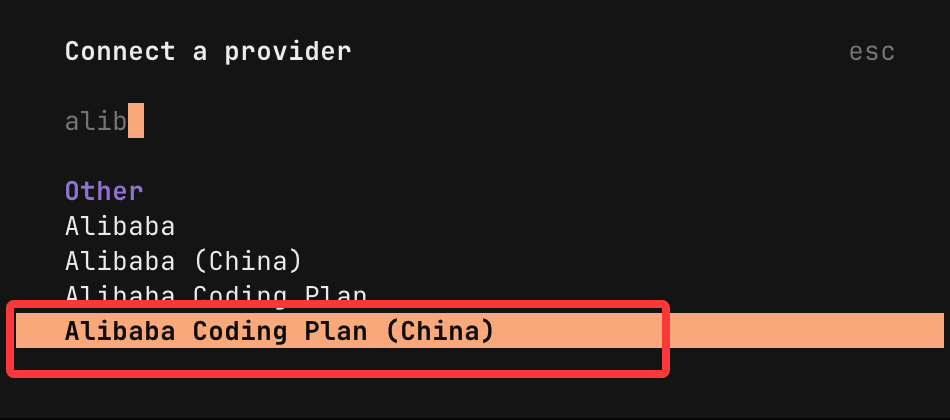
In the input box, enter/connectand press Enter.
InConnect a Provider In the list's search box, enteralibabato search, select Alibaba Coding Plan (China), and press Enter.
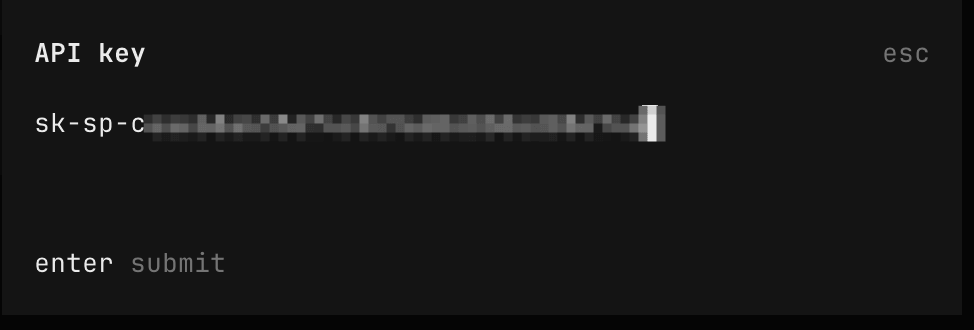
Enter the API Key we applied for and press Enter:
Then we can enter/modelto view the models supported by Coding Plan, and select the one you need:
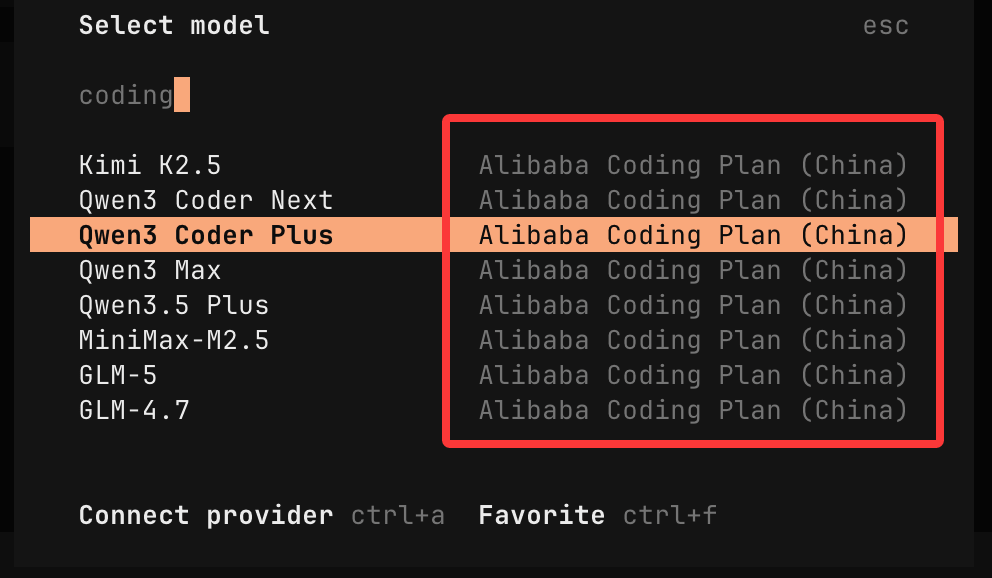
Interface settings
Configuration file settings
Please create and open the configuration file opencode.json at the following path:
- macOS / Linux: ~/.config/opencode/opencode.json
- Windows: C:\Users\YourUsername\.config\opencode\opencode.json
Write the following configuration to the file. Key configuration items:
- baseURL:https://coding.dashscope.aliyuncs.com/apps/anthropic/v1, please do not use the Bailian general-purpose address.
- apiKey: Replace YOUR_API_KEY withCoding Plana dedicated API Key in the format sk-sp-xxx.
Note:After saving the configuration file, exit and restart OpenCode for the new configuration to take effect.
{
    "$schema": "https://opencode.ai/config.json",
    "provider": {
        "bailian-coding-plan": {
            "npm": "@ai-sdk/anthropic",
            "name": "Model Studio Coding Plan",
            "options": {
                "baseURL": "https://coding.dashscope.aliyuncs.com/apps/anthropic/v1",
                "apiKey": "YOUR_API_KEY"
            },
            "models": {
                "qwen3.5-plus": {
                    "name": "Qwen3.5 Plus",
                    "modalities": {
                        "input": ["text", "image"],
                        "output": ["text"]
                    },
                    "options": {
                        "thinking": {
                            "type": "enabled",
                            "budgetTokens": 8192
                        }
                    },
                    "limit": {
                        "context": 1000000,
                        "output": 65536
                    }
                },
                "qwen3-max-2026-01-23": {
                    "name": "Qwen3 Max 2026-01-23",
                    "modalities": {
                        "input": ["text"],
                        "output": ["text"]
                    },
                    "limit": {
                        "context": 262144,
                        "output": 32768
                    }
                },
                "qwen3-coder-next": {
                    "name": "Qwen3 Coder Next",
                    "modalities": {
                        "input": ["text"],
                        "output": ["text"]
                    },
                    "limit": {
                        "context": 262144,
                        "output": 65536
                    }
                },
                "qwen3-coder-plus": {
                    "name": "Qwen3 Coder Plus",
                    "modalities": {
                        "input": ["text"],
                        "output": ["text"]
                    },
                    "limit": {
                        "context": 1000000,
                        "output": 65536
                    }
                },
                "MiniMax-M2.5": {
                    "name": "MiniMax M2.5",
                    "modalities": {
                        "input": ["text"],
                        "output": ["text"]
                    },
                    "options": {
                        "thinking": {
                            "type": "enabled",
                            "budgetTokens": 8192
                        }
                    },
                    "limit": {
                        "context": 204800,
                        "output": 131072
                    }
                },
                "glm-5": {
                    "name": "GLM-5",
                    "modalities": {
                        "input": ["text"],
                        "output": ["text"]
                    },
                    "options": {
                        "thinking": {
                            "type": "enabled",
                            "budgetTokens": 8192
                        }
                    },
                    "limit": {
                        "context": 202752,
                        "output": 16384
                    }
                },
                "glm-4.7": {
                    "name": "GLM-4.7",
                    "modalities": {
                        "input": ["text"],
                        "output": ["text"]
                    },
                    "options": {
                        "thinking": {
                            "type": "enabled",
                            "budgetTokens": 8192
                        }
                    },
                    "limit": {
                        "context": 202752,
                        "output": 16384
                    }
                },
                "kimi-k2.5": {
                    "name": "Kimi K2.5",
                    "modalities": {
                        "input": ["text", "image"],
                        "output": ["text"]
                    },
                    "options": {
                        "thinking": {
                            "type": "enabled",
                            "budgetTokens": 8192
                        }
                    },
                    "limit": {
                        "context": 262144,
                        "output": 32768
                    }
                }
            }
        }
    }
}
Description:budgetTokens controls the maximum Token budget for the model's thinking process. If set too low, the model's thinking process may be interrupted.
Usage
Run the following command in the terminal to enter OpenCode.
opencode
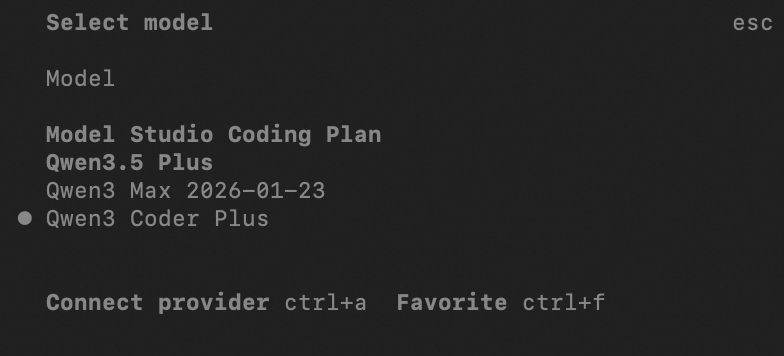
Enter the following in the command line:/models, enter Model Studio Coding Plan to search, and select a model to use it.

Other ExtensionsFor more information, refer to:https://help.aliyun.com/zh/model-studio/opencode-coding-plan