Vibe Coding Mindset
The Thinking Difference Between Traditional Programming and Vibe Coding
The thinking path of traditional programming is:
I have a requirement → What syntax do I need? → How do I write the code? → Write it out → Debug
The thinking path of Vibe Coding is:
我有需求 → 我该怎么描述这个需求?→ AI 生成代码 → 我验证结果 → 继续调整描述
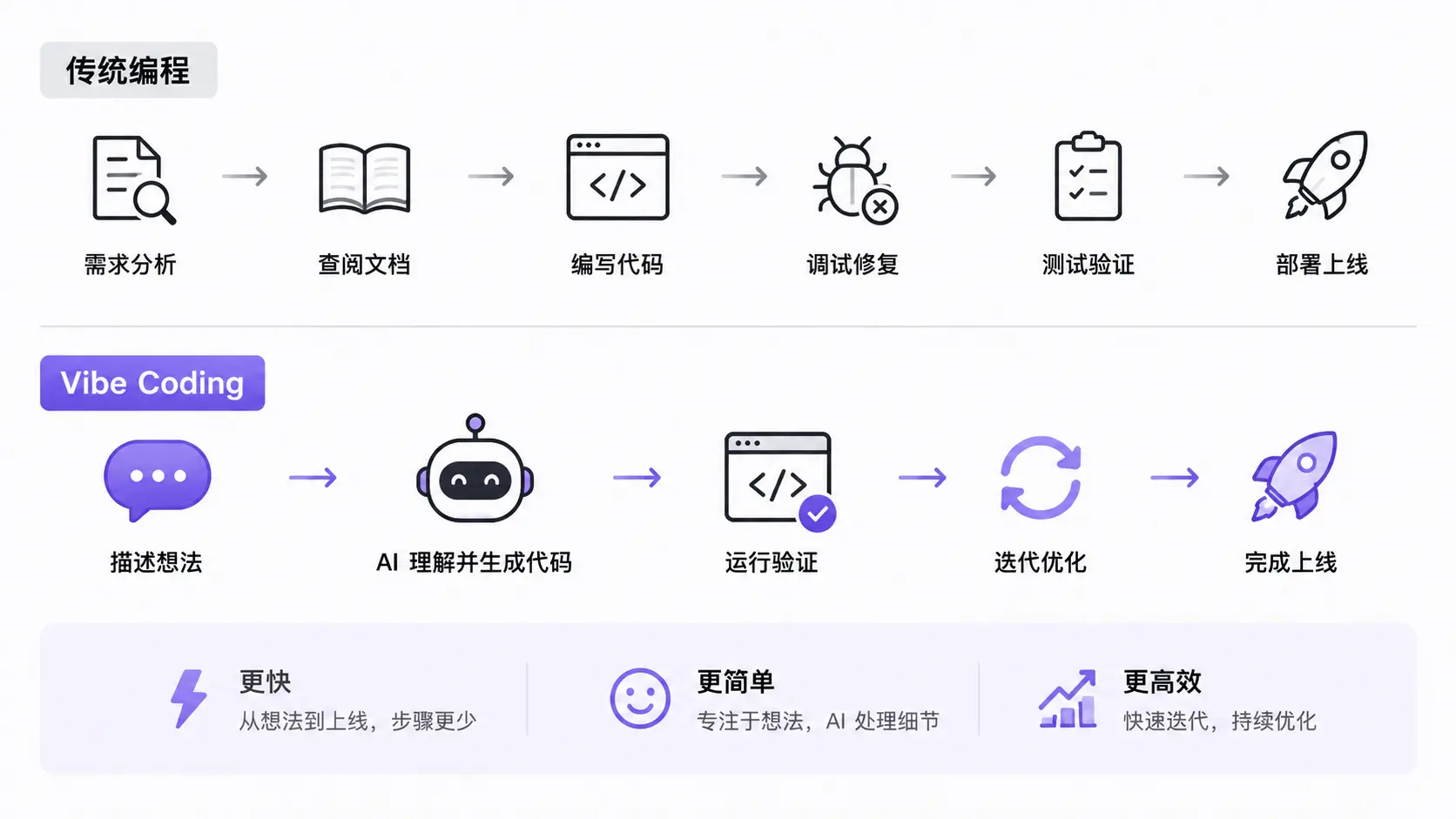
The core difference is: traditional programming iswriting code, while Vibe Coding isdescribing requirements。
Experience the Difference with an Example
Suppose you want to build auser registration formto validate username and password.
Traditional programming mindset:
用什么框架?React 还是 Vue?
表单验证库用哪个?Formik 还是 React Hook Form?
正则表达式怎么写?
状态管理怎么设计?
Vibe Coding mindset:
What does the user need to do on this form?
What input fields are there? What are the validation rules?
What should be displayed when validation fails?
Where should it redirect to after successful validation?
The former's thinking revolves around how to implement, while the latter's thinking revolves around what the user needs.
Vibe Coding elevates your thinking from technical implementation to product design. You don't need to know how to write regular expressions, but you must knowUsernames must be at least 3 characters— this rule.
Three Core Mindsets of Vibe Coding
Mindset 1: You Are the Director, Not the Actor
A director doesn't need to play every role personally; what a director needs is:
-
Know what the scene should express (clear requirements).
-
Be able to judge whether the actors perform well (result verification).
-
Be able to give specific adjustment instructions (precise feedback).
In Vibe Coding, AI is your acting team, and you are the director.
Wrong approach: Let AI do whatever it wants, set no boundaries, check no results, and end up with something that "looks good but can't be used."
-
Right approach: Give AI clear scenarios, roles, and standards; check every output; and give specific feedback on anything unsatisfactory.
Mindset 2: Iteration Is Better Than Getting It Right All at Once
Traditional development pursues writing it right in one go; Vibe Coding pursues rapid iteration until it's right.
A typical Vibe Coding iteration process:
第 1 轮:先让 AI 做一个能跑的版本,即使很简陋
第 2 轮:添加核心功能,让它能用
第 3 轮:修复明显的 bug 和体验问题
第 4 轮:优化细节和边缘情况
第 5 轮:添加测试和文档
Each round you verify, give feedback, and adjust; each round AI improves based on the previous round.
Key principle:First get it working, then make it good, and finally refine it.
Mindset 3: Description Ability > Programming Ability
In Vibe Coding, your most important skill is not writing code, but clearly describing what you want.
A good requirement description includes five elements:
| Element | Description | Example |
|---|---|---|
| Goal | What to do | Create a user login form |
| Constraints | What limitations exist | Use React + TypeScript, do not introduce third-party UI libraries |
| Input | What data it receives | Username (3-20 characters) and password (6 or more characters) |
| Output | What result it produces | When validation passes, call the API; when it fails, display an error message |
| Acceptance Criteria | What counts as passing | Clicking submit with an empty username displays "Please enter a username" |
Practice: Experience the Difference Between the Two Mindsets
Below is a hands-on exercise. Describe the same task in two different ways and see how AI's output differs.
Method 1: Vague Description (Common for Beginners)
Help me make a counter
AI might give you a simple counter, but it might:
Have no styling; it's just a plain number and buttons.
-
Use a framework you don't know.
-
Not handle negative numbers.
-
Have no reset feature.
Method 2: Structured Description (Vibe Coding Approach)
帮我做一个计数器组件,要求:
- 目标:一个带加减按钮的数字计数器
- 约束:使用 HTML + CSS + 原生 JavaScript,单文件
- 输入:初始值 0,最小值 0(不能减到负数),最大值 99
- 输出:显示当前数字,两个按钮(+ 和 -),一个重置按钮
- 验收标准:
  - 点 + 数字加 1,到 99 后按钮变灰不可点击
  - 点 - 数字减 1,到 0 后按钮变灰不可点击
  - 点重置回到 0
  - 数字变化时有短暂的放大动画
  - 深色背景,白色卡片,圆角设计
Send both descriptions to AI separately and compare the differences in output.
You'll find that the code from a structured description is far higher in quality and usability than that from a vague description.
AI can't read your mind. The more specific your description, the closer the output matches your expectations. This isn't a limitation of AI, but the boundary of your abilities.
When to Use Vibe Coding and When Not to
Vibe Coding is not a silver bullet. The following scenario comparison can help you decide:
| Suitable for Vibe Coding | Not Suitable for Vibe Coding |
|---|---|
| Prototype validation, quickly producing an MVP | Core systems with extreme performance and security requirements |
| CRUD business logic | Low-level modules requiring precise control over memory and algorithms |
| UI components and page layouts | Changes requiring deep understanding of existing complex codebases |
| Data transformation and formatting | Financial/medical code involving compliance and regulations |
| Test case generation | Original algorithms requiring patent protection |
| Documentation and comment generation | Encryption modules requiring security audits |
How to Describe Bugs to AI
When there's a problem with your code, describing the bug to AI also requires structured thinking.
Don't say "this code has a problem"; instead:
我在运行以下代码时遇到了问题:
[粘贴代码]

预期行为:点击按钮后数字应该加 1
实际行为:点击按钮后数字没有变化,控制台报错:
  Uncaught TypeError: count is not defined

我的环境:Chrome 浏览器,直接在 HTML 文件中运行
This description includes:
-
Code: AI can see the complete context.
-
Expected vs. actual: AI knows what the goal is and where the gap is.
-
Error message: This is the most valuable clue; AI can directly locate the problem.
-
Environment: Helps AI provide targeted solutions.