HTML canvas arcTo()Method
Examples
Create an arc between two tangent lines on the canvas:
JavaScript:
var c=document.getElementById("myCanvas");
var ctx=c.getContext("2d");
ctx.beginPath();
ctx.moveTo(20,20); //Create starting point
ctx.lineTo(100,20); //Create horizontal line
ctx.arcTo(150,20,150,70,50); //Create arc
ctx.lineTo(150,120); //Create vertical line
ctx.stroke(); //Draw it
Try it yourself »
Browser Support
The numbers in the table specify the first browser version that supports the method.
| Method | |||||
|---|---|---|---|---|---|
| arcTo() | Yes | 9.0 | Yes | Yes | No |
Definition and Usage
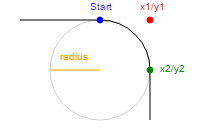
The arcTo() method creates an arc/curve between two tangent lines on the canvas.
Tip:Please usestroke()method to draw the exact arc on the canvas.
| JavaScript Syntax: | context.arcTo(x1,y1,x2,y2,r); |
|---|
Parameter Values
| Parameter | Description |
|---|---|
| x1 | The x-coordinate of the intersection of the two tangent lines. |
| y1 | The y-coordinate of the intersection of the two tangent lines. |
| x2 | The x-coordinate of a point on the second tangent line. |
| y2 | The y-coordinate of a point on the second tangent line. |
| r | The radius of the arc. |
The x and y coordinates of any point on the first line are the position of the last point; in this example, they are100,20. By(x1,y1),(x2,y2),(100,20)The three points can determine the positions of the two lines, and then the radius determines the position of the arc.
 HTML canvas Reference Other Extensions