HTTP Methods: GET vs POST
The two most commonly used HTTP methods are: GET and POST.
What is HTTP?
The Hypertext Transfer Protocol (HTTP) is designed to enable communication between clients and servers.
HTTP works as a request-response protocol between a client and a server.
A web browser may be the client, and a web application on a computer may also act as the server.
Example: The client (browser) submits an HTTP request to the server; the server returns a response to the client. The response contains status information about the request and may also contain the requested content.
Two HTTP Request Methods: GET and POST
When making request-response between a client and a server, the two most commonly used methods are: GET and POST.
- GET- Request data from a specified resource.
- POST- Submit data to be processed to a specified resource.
GET parameters are generally displayed in the URL, while POST submitted via a form does not show them in the URL, making POST more concealed:
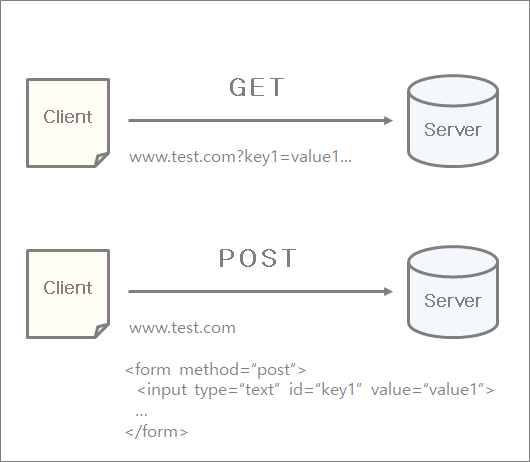
GET Method
Note that the query string (name/value pairs) is sent in the URL of a GET request:
Some other notes about GET requests:
- GET requests can be cached
- GET requests remain in browser history
- GET requests can be bookmarked
- GET requests should not be used when handling sensitive data
- GET requests have length restrictions
- GET requests should only be used to retrieve data
POST Method
Note that the query string (name/value pairs) is sent in the HTTP message body of a POST request:
Host: example.com
name1=value1&name2=value2
Some other notes about POST requests:
- POST requests are never cached
- POST requests do not remain in browser history
- POST cannot be bookmarked
- POST requests have no restrictions on data length
Compare GET vs POST
The following table compares the two HTTP methods: GET and POST.
| GET | POST | |
|---|---|---|
| Back button/Refresh | Harmless | Data will be re-submitted (the browser should inform the user that the data will be re-submitted). |
| Bookmark | Can be bookmarked | Cannot be bookmarked |
| Cache | Can be cached | Cannot be cached |
| Encoding type | application/x-www-form-urlencoded | application/x-www-form-urlencoded or multipart/form-data. Use multipart encoding for binary data. |
| History | Parameters remain in browser history. | Parameters are not saved in browser history. |
| Restrictions on data length | Yes, there is a limit. When sending data, the GET method appends data to the URL; the URL length is limited (the maximum URL length is 2048 characters). | No limit. |
| Restrictions on data types | Only ASCII characters are allowed. | No restrictions. Binary data is also allowed. |
| Security | Compared to POST, GET is less secure because the data sent is part of the URL. Never use GET when sending passwords or other sensitive information! |
POST is more secure than GET because parameters are not saved in browser history or web server logs. |
| Visibility | Data is visible to everyone in the URL. | Data is not displayed in the URL. |
Other HTTP Request Methods
The following table lists some other HTTP request methods:
| Method | Description |
|---|---|
| HEAD | Same as GET, but returns only HTTP headers, not the document body. |
| PUT | Uploads a representation of the specified URI. |
| DELETE | Deletes the specified resource. |
| OPTIONS | Returns the HTTP methods supported by the server. |
| CONNECT | Converts the request connection to a transparent TCP/IP tunnel. |