Python State Pattern
The core idea of the State Pattern is to encapsulate an object's state into independent classes and delegate the object's behavior to the current state object. When the object's state changes, it switches to a different state object, thereby changing its behavior.
Why do we need the State Pattern?
Without using the State Pattern, we usually use a large number ofif-elseorswitch-casestatements to handle behavior in different states. This approach has several problems:
- Code bloat: As the number of states increases, conditional statements become increasingly complex
- Difficult to maintain: Modifying the behavior of one state may affect other states
- Violates the Open-Closed Principle: Adding a new state requires modifying existing code
The State Pattern solves these problems by encapsulating each state into an independent class.
Structure of the State Pattern
Main Roles
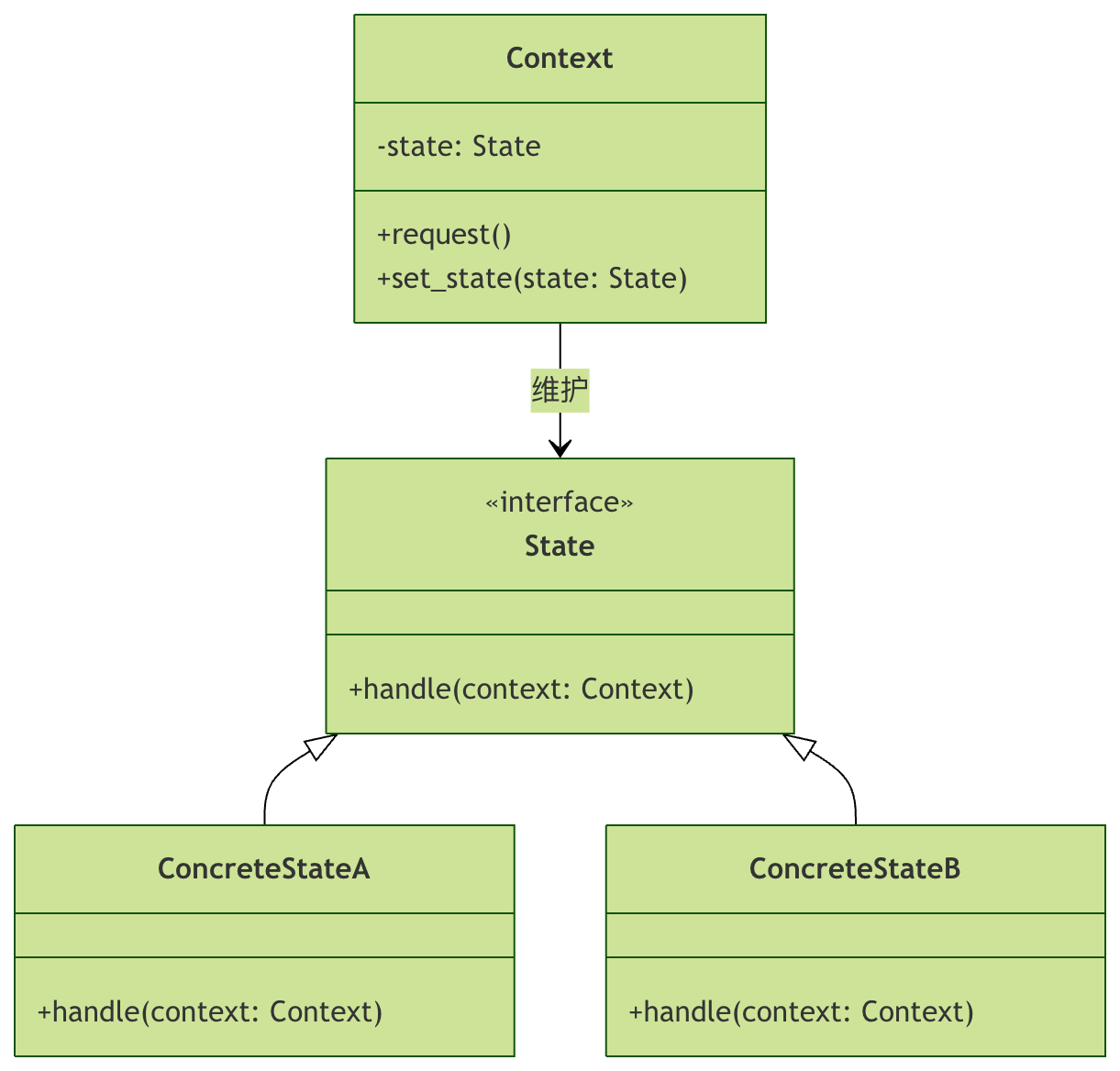
The State Pattern consists of three core roles:
- Context (context): Maintains an instance of a concrete state object; this instance defines the current state
- State (state interface): Defines an interface for encapsulating behavior associated with a particular state of the Context
- ConcreteState (concrete state): Implements the State interface; each concrete state class implements a behavior related to a state of the Context
UML Class Diagram
Implementation of the State Pattern
Basic Implementation Steps
Let's understand the implementation of the State Pattern through a simple example. Suppose we have an elevator system where the elevator has different states: open, closed, moving, and stopped.
Step 1: Define the State Interface
Example
class ElevatorState(ABC):
"""Elevator state interface"""
@abstractmethod
def open_doors(self):
"""Open door operation"""
pass
@abstractmethod
def close_doors(self):
"""Close door operation"""
pass
@abstractmethod
def move(self):
"""Move operation"""
pass
@abstractmethod
def stop(self):
"""Stop operation"""
pass
Step 2: Implement Concrete State Classes
Example
"""Open state"""
def open_doors(self):
print("The door is already open")
return self
def close_doors(self):
print("Closing the door...")
return DoorClosedState()
def move(self):
print("Error: The door is still open, cannot move")
return self
def stop(self):
print("The elevator has stopped")
return self
class DoorClosedState(ElevatorState):
"""Closed state"""
def open_doors(self):
print("Opening the door...")
return DoorOpenState()
def close_doors(self):
print("The door is already closed")
return self
def move(self):
print("The elevator starts moving...")
return MovingState()
def stop(self):
print("The elevator has stopped")
return self
class MovingState(ElevatorState):
"""Moving state"""
def open_doors(self):
print("Error: The elevator is moving, cannot open the door")
return self
def close_doors(self):
print("The door is already closed")
return self
def move(self):
print("The elevator is moving")
return self
def stop(self):
print("The elevator is stopping...")
return DoorClosedState()
Step 3: Create the Context Class
Example
"""Elevator context class"""
def __init__(self):
# Initial state is closed door state
self._state = DoorClosedState()
@property
def state(self):
"""Get current state"""
return self._state
def set_state(self, state):
"""Set new state"""
self._state = state
print(f"State switched to: {state.__class__.__name__}")
def open_doors(self):
"""Open door operation"""
print("Performing open door operation...")
self.set_state(self._state.open_doors())
def close_doors(self):
"""Close door operation"""
print("Performing close door operation...")
self.set_state(self._state.close_doors())
def move(self):
"""Move operation"""
print("Performing move operation...")
self.set_state(self._state.move())
def stop(self):
"""Stop operation"""
print("Performing stop operation...")
self.set_state(self._state.stop())
Step 4: Use the State Pattern
Example
elevator = Elevator()
# Test state transitions
print("=== Elevator State Transition Test ===")
elevator.open_doors() # Switch from closed state to open state
elevator.close_doors() # Switch back from open state to closed state
elevator.move() # Switch from closed state to moving state
elevator.stop() # Switch back from moving state to closed state
print("\n=== Test illegal operation ===)
elevator.open_doors() # Open the door normally
elevator.move() # Try to move while the door is open (should raise an error)
Run Result
=== 电梯状态转换测试 ===
执行开门操作...
正在开门...
状态已切换为: DoorOpenState
执行关门操作...
正在关门...
状态已切换为: DoorClosedState
执行移动操作...
电梯开始移动...
状态已切换为: MovingState
执行停止操作...
电梯停止中...
状态已切换为: DoorClosedState

=== 测试非法操作 ===
执行开门操作...
正在开门...
状态已切换为: DoorOpenState
执行移动操作...
错误:门还开着,不能移动
状态已切换为: DoorOpenState
Advanced Applications of the State Pattern
State Pattern with Shared State
In some cases, multiple contexts may need to share the same state object. We can achieve state sharing through the Singleton pattern.
Example
"""Singleton metaclass"""
_instances = {}
def __call__(cls, *args, **kwargs):
if cls not in cls._instances:
cls._instances[cls] = super().__call__(*args, **kwargs)
return cls._instances[cls]
class SharedDoorOpenState(ElevatorState, metaclass=Singleton):
"""Shared open state (Singleton)"""
def open_doors(self):
print("The door is already open")
return self
def close_doors(self):
print("Closing the door...")
return SharedDoorClosedState()
def move(self):
print("Error: The door is still open, cannot move")
return self
def stop(self):
print("The elevator has stopped")
return self
class SharedDoorClosedState(ElevatorState, metaclass=Singleton):
"""Shared closed state (Singleton)"""
def open_doors(self):
print("Opening the door...")
return SharedDoorOpenState()
def close_doors(self):
print("The door is already closed")
return self
def move(self):
print("The elevator starts moving...")
return SharedMovingState()
def stop(self):
print("The elevator has stopped")
return self
class SharedMovingState(ElevatorState, metaclass=Singleton):
"""Shared moving state (Singleton)"""
def open_doors(self):
print("Error: The elevator is moving, cannot open the door")
return self
def close_doors(self):
print("The door is already closed")
return self
def move(self):
print("The elevator is moving")
return self
def stop(self):
print("The elevator is stopping...")
return SharedDoorClosedState()
State Pattern and State Machines
The State Pattern is often used in combination with state machines. Below is a more complex state machine example:
Example
"""Vending machine state interface"""
@abstractmethod
def insert_coin(self, machine, amount):
"""Insert coin"""
pass
@abstractmethod
def select_product(self, machine, product):
"""Select product"""
pass
@abstractmethod
def dispense(self, machine):
"""Dispense product"""
pass
@abstractmethod
def refund(self, machine):
"""Refund"""
pass
class WaitingState(VendingMachineState):
"""Waiting for coin state"""
def insert_coin(self, machine, amount):
print(f"Inserted {amount} yuan")
machine.balance += amount
return HasMoneyState()
def select_product(self, machine, product):
print("Please insert coin first")
return self
def dispense(self, machine):
print("Please insert coin and select a product first")
return self
def refund(self, machine):
print("No amount to refund")
return self
class HasMoneyState(VendingMachineState):
"""Coin inserted state"""
def insert_coin(self, machine, amount):
print(f"Continue inserting {amount} yuan")
machine.balance += amount
return self
def select_product(self, machine, product):
if product.price <= machine.balance:
print(f"Product selected: {product.name}")
machine.selected_product = product
return ProductSelectedState()
else:
print("Insufficient balance, please continue inserting coins or select a cheaper product")
return self
def dispense(self, machine):
print("Please select a product first")
return self
def refund(self, machine):
print(f"Refund {machine.balance} yuan")
machine.balance = 0
return WaitingState()
class ProductSelectedState(VendingMachineState):
"""Product selected state"""
def insert_coin(self, machine, amount):
print("Product already selected, cannot insert more coins")
return self
def select_product(self, machine, product):
print("Product already selected, please complete the current transaction first")
return self
def dispense(self, machine):
product = machine.selected_product
change = machine.balance - product.price
print(f"Dispensing: {product.name}")
if change > 0:
print(f"Change: {change} yuan")
machine.balance = 0
machine.selected_product = None
return WaitingState()
def refund(self, machine):
print(f"Refund {machine.balance} yuan")
machine.balance = 0
machine.selected_product = None
return WaitingState()
class Product:
"""Product class"""
def __init__(self, name, price):
self.name = name
self.price = price
class VendingMachine:
"""Vending machine"""
def __init__(self):
self._state = WaitingState()
self.balance = 0
self.selected_product = None
def set_state(self, state):
self._state = state
def insert_coin(self, amount):
print(f"Operation: Insert coin {amount} yuan")
self.set_state(self._state.insert_coin(self, amount))
def select_product(self, product):
print(f"Operation: Select product {product.name}")
self.set_state(self._state.select_product(self, product))
def dispense(self):
print("Operation: Request product dispensing")
self.set_state(self._state.dispense(self))
def refund(self):
print("Operation: Request refund")
self.set_state(self._state.refund(self))
Pros and Cons of the State Pattern
Advantages
- Single Responsibility Principle: Put code related to a particular state in independent classes
- Open-Closed Principle: Introduce new states without modifying existing state classes and context
- Eliminate conditional statements: Eliminate huge conditional branch statements through polymorphic calls
- Clear state transitions: Make state transitions more explicit, reducing errors caused by state transitions
Disadvantages
- Possible over-design: If the number of states is small or rarely changes, using the State Pattern may be overly complex
- Increased number of state classes: Each state requires a corresponding class, which may lead to an increase in the number of classes
- Context and State Coupling: The context needs to know all concrete state classes in order to perform state transitions
Practice Exercises
Exercise 1: Improve the Elevator System
Try adding the following features to the elevator system:
- Add a "Maintenance" state, in which all operations are prohibited
- Add a floor selection feature, where floors can only be selected in the stopped state
- Implement automatic state transitions for floor arrival
Exercise 2: Implement a Traffic Light System
Use the State pattern to implement a traffic light system with three states: red light, green light, and yellow light. The state transition rules are as follows:
- Red light → Green light (after 30 seconds)
- Green light → Yellow light (after 25 seconds)
- Yellow light → Red light (after 5 seconds)
Exercise 3: Game Character States
Design a state system for a game character, including the following states:
- Normal state: can move and attack
- Poisoned state: continuously loses health, movement speed halved
- Stunned state: cannot move or attack
- Invincible state: immune to damage
Summary
The State pattern is a powerful design pattern, particularly suitable for scenarios where an object's behavior depends on its state, and where there are many states with complex transitions. By encapsulating each state as an independent class, the State pattern makes code clearer, easier to maintain, and easier to extend.
Key Points:
- The State pattern eliminates conditional statements by encapsulating states as objects
- The context delegates state-related behavior to the current state object
- State transitions can be triggered by the context or by the state objects themselves
- Reasonable use of the State pattern can greatly improve code maintainability