Python Iterator Pattern
Imagine you have a jar full of candies of various colors. You want to taste these candies one by one, but you don't want to pour out all the candies at once. At this point, you reach into the jar and take out one candy at a time—this process is iteration.
In programming,the Iterator Patternis a design pattern that provides a way to sequentially access the elements of a collection object without exposing its internal representation.
Core Concepts
The Iterator Pattern consists of two main components:
- Iterator: Responsible for defining the interface for accessing and traversing elements
- Iterable: Provides a method for creating iterators
In Python, the Iterator Pattern has been deeply integrated into the core features of the language, making our programming more elegant and intuitive.
Why Do We Need Iterators?
Limitations of the Traditional Approach
Let's first look at an example that does not use iterators:
Example
class BookCollection:
def __init__(self):
self.books = ["Python Introduction", "Introduction to Algorithms", "Design Patterns", "Data Structures"]
def get_books(self):
return self.books
# Use this collection
collection = BookCollection()
books = collection.get_books()
# Traverse books - exposes internal implementation details
for i in range(len(books)):
print(books[i])
Problem analysis:
- Client code needs to know the internal structure of the collection (a list)
- If the internal implementation of the collection changes (e.g., from a list to a dictionary), all client code needs to be modified
- The traversal logic is tightly coupled to the collection implementation
Advantages of Iterators
Example
for book in collection:
print(book)
Benefits of using iterators:
- Encapsulation: Hides the internal implementation of the collection
- Unified interface: Different collection types can use the same traversal method
- Flexibility: You can easily change the implementation of a collection
- Multiple traversals supported: Multiple traversal operations can be performed simultaneously
The Iterator Protocol in Python
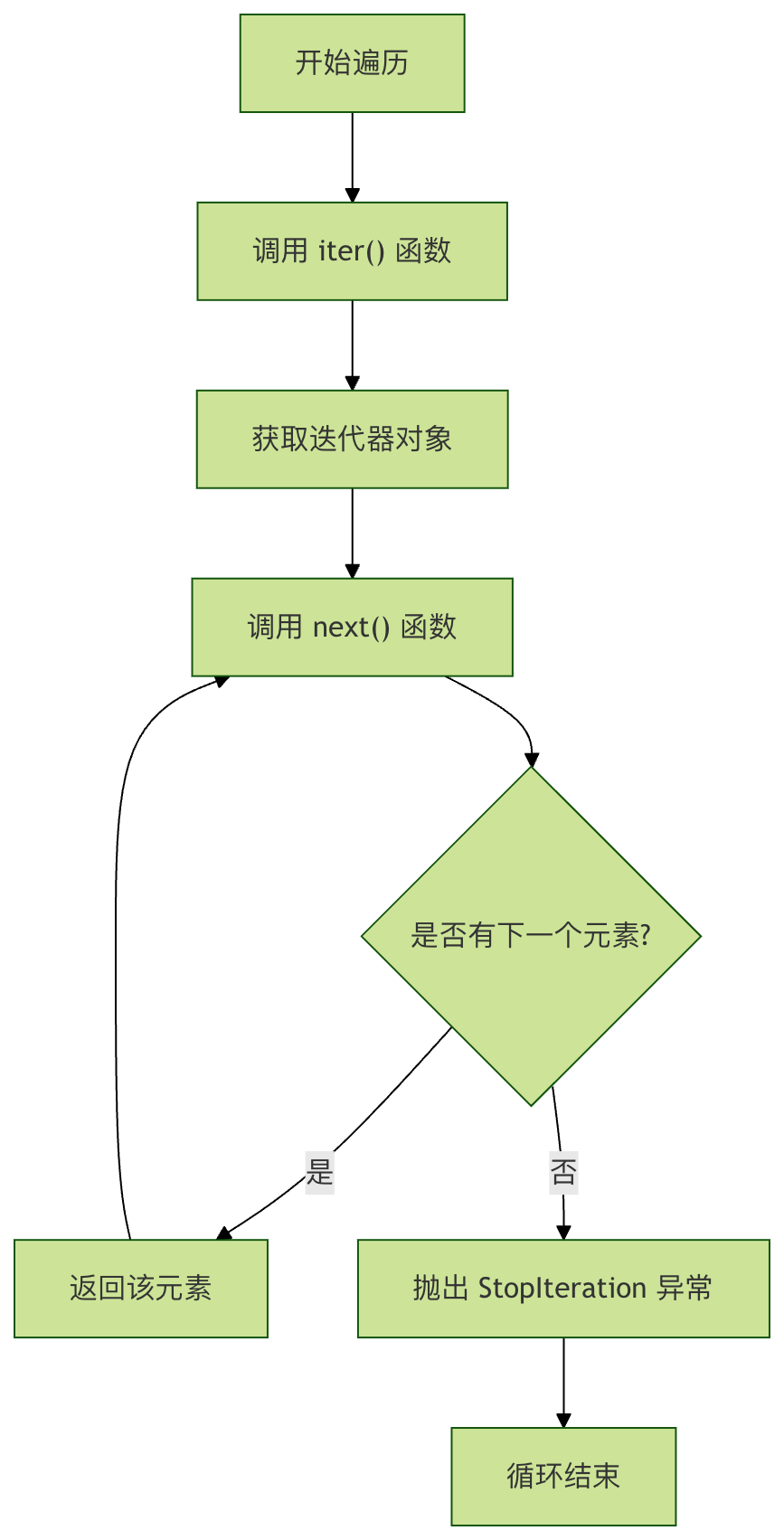
Python implements the iterator protocol through two special methods:
__iter__()Method
- Returns an iterator object
- An iterable object must implement this method
__next__()Method
- Returns the next element in the sequence
- When there are no more elements, raise
StopIterationan exception
Let's understand how iterators work through a flowchart:
Creating Custom Iterators
Method 1: Implementing an Iterator with a Class
Let's create a custom book iterator:
Example
"""Book iterator class"""
def __init__(self, books):
self.books = books
self.index = 0
def __iter__(self):
"""Return the iterator itself"""
return self
def __next__(self):
"""Return the next book, or raise StopIteration if there are no more books"""
if self.index < len(self.books):
book = self.books[self.index]
self.index += 1
return book
else:
raise StopIteration
class BookCollection:
"""Iterable book collection class"""
def __init__(self):
self.books = ["Python Introduction", "Introduction to Algorithms", "Design Patterns", "Data Structures"]
def __iter__(self):
"""Return an iterator instance"""
return BookIterator(self.books)
# Use the custom iterator
collection = BookCollection()
for book in collection:
print(f"Reading: {book}")
Output:
正在阅读: Python入门
正在阅读: 算法导论
正在阅读: 设计模式
正在阅读: 数据结构
Method 2: Using Generator Functions
Python provides a more concise way—generator functions:
Example
def __init__(self):
self.books = ["Python Introduction", "Introduction to Algorithms", "Design Patterns", "Data Structures"]
def __iter__(self):
"""Create an iterator using a generator function"""
for book in self.books:
yield book
# The usage is exactly the same
collection = BookCollection()
for book in collection:
print(f"Reading: {book}")
Advantages of generators:
- Cleaner code
- Automatically handles state saving
- Better performance
Practical Use Cases for Iterators
Scenario 1: Paginated Data Reading
Example
"""Simulate a paginated data iterator"""
def __init__(self, total_items, page_size=3):
self.total_items = total_items
self.page_size = page_size
self.current_page = 0
def __iter__(self):
return self
def __next__(self):
start = self.current_page * self.page_size
end = start + self.page_size
if start >= self.total_items:
raise StopIteration
# Simulate reading a page of data from the database
page_data = list(range(start, min(end, self.total_items)))
self.current_page += 1
return page_data
# Use the paginated iterator
paginator = PaginatedData(10, 3) # 10 records in total, 3 per page
for page_num, page_data in enumerate(paginator, 1):
print(f"Page {page_num} data: {page_data}")
Output:
第1页数据: [0, 1, 2]
第2页数据: [3, 4, 5]
第3页数据: [6, 7, 8]
第4页数据: [9]
Scenario 2: Generating Infinite Sequences
Example
"""Fibonacci sequence iterator"""
def __init__(self, max_count=10):
self.max_count = max_count
self.count = 0
self.a, self.b = 0, 1
def __iter__(self):
return self
def __next__(self):
if self.count >= self.max_count:
raise StopIteration
result = self.a
self.a, self.b = self.b, self.a + self.b
self.count += 1
return result
# Generate the Fibonacci sequence
fib = FibonacciIterator(8)
print("Fibonacci sequence:", list(fib))
Output:
斐波那契数列: [0, 1, 1, 2, 3, 5, 8, 13]
Built-in Iterator Utilities
Python provides a rich set of built-in functions for working with iterators:
iter()andnext()Function
Example
# Use the iterator manually
iterator = iter(numbers)
print(next(iterator)) # Output: 1
print(next(iterator)) # Output: 2
print(next(iterator)) # Output: 3
enumerate()Function
Example
for index, fruit in enumerate(fruits):
print(f"Index {index}: {fruit}")
zip()Function
Example
scores = [85, 92, 78]
for name, score in zip(names, scores):
print(f"{name} score: {score}")
Iterator vs Iterable
It's important to understand the difference between these two concepts:
| Feature | Iterable | Iterator |
|---|---|---|
| Definition | Implements__iter__()the object of the method |
Implements__iter__()and__next__()the object of the method |
| Purpose | Can be iterated | Actually performs the iteration operation |
| State | Usually stateless | Maintains iteration state (current position, etc.) |
| Example | Lists, tuples, dictionaries, strings | iter()The returned object |
Relationship Diagram
Example
A[Iterable] -->|calls iter| B[Iterator]
B -->|repeatedly calls next| C[Element by element]
C --> D[Until StopIteration]
Best Practices and Common Mistakes
Best Practices
- Use generators to simplify code
Example
def countdown(n):
while n > 0:
yield n
n -= 1
# Not recommended: manually implement an iterator class
- Leverage built-in functions
Example
squares = (x*x for x in range(10)) # Generator expression
# Not recommended
class SquareIterator:
# ... verbose implementation
Common Mistakes
Mistake 1: Confusing iterators and iterables
Example
# Error: the list itself is not an iterator
try:
next(numbers) # TypeError: 'list' object is not an iterator
except TypeError as e:
print(f"Error: {e}")
# Correct: obtain the iterator first
iterator = iter(numbers)
print(next(iterator)) # Output: 1
Error 2: Continuing to use an exhausted iterator
Example
iterator = iter(numbers)
print(list(iterator)) # Output: [1, 2, 3]
print(list(iterator)) # Output: [] - iterator exhausted!
Practical Exercises
Exercise 1: Creating a Custom Iterator
Create aCountdownclass that implements an iterator counting down from a specified number to 1:
Example
def __init__(self, start):
self.start = start
def __iter__(self):
# Your code here
current = self.start
while current > 0:
yield current
current -= 1
# Test your implementation
for num in Countdown(5):
print(num) # Should output: 5, 4, 3, 2, 1
Exercise 2: File Line Iterator
Create an iterator that reads a file line by line and adds a line number before each line:
Example
def __init__(self, filename):
self.filename = filename
def __iter__(self):
with open(self.filename, 'r', encoding='utf-8') as file:
for line_num, line in enumerate(file, 1):
yield f"{line_num}: {line.rstrip()}"
Summary
The iterator pattern is an extremely important concept in Python programming; it allows us to:
- Uniform access: traverse different data structures in the same way
- Implementation encapsulation: hide the internal structure of collections
- Lazy evaluation: generate data only when needed, saving memory
- Composability: works perfectly with features such as generators and comprehensions
Remember this simple principle:Any object that implements__iter__()the method is iterable, and any object that implements__next__()the method is an iterator.