Python Design Patterns
Design patterns are for common problems in software developmentreusable solutions. They are not complete designs that can be directly converted into code, but rather for solving specific problemstemplates or blueprints。
Core Value of Design Patterns
Design patterns are like standard blueprints in the construction field, providing the following benefits for software development:
- Improve code reusability: Avoid reinventing the wheel
- Enhance code maintainability: Make the code structure clearer
- Promote team collaboration: Provide a unified programming language and way of thinking
- Improve code quality: Solutions tested in practice are more reliable
Analogy of Design Patterns in Daily Life
Imagine you are going to build a house:
- Primitive way: Designing from scratch every time is error-prone and inefficient
- Using design patterns: Use standard architectural drawings, knowing the standard layouts for living room, kitchen, and bedroom
Design patterns are the "standard architectural drawings" of software development.
Types of Design Patterns
According to the classic book"Design Patterns - Elements of Reusable Object-Oriented Software" (Chinese translation: "Design Patterns: Reusable Object-Oriented Software Elements")According to its definition, there are 23 classic design patterns. These patterns can be divided into three major categories based on their focuses: Creational Patterns, Structural Patterns, and Behavioral Patterns. Additionally, in enterprise-level development, there is also a commonly used class of architectural design patterns.
| Number | Pattern & Description | Includes |
|---|---|---|
| 1 | Creational Patterns Used to solve object creation problems, encapsulating instantiation logic, hiding concrete implementation details, making the system more flexible and extensible when creating objects. |
|
| 2 | Structural Patterns Focus on the composition and collaboration of classes and objects, helping us build flexible, reusable, and extensible system structures. |
|
| 3 | Behavioral Patterns Focus on communication and responsibility assignment between objects, enhancing system flexibility and maintainability by encapsulating algorithms, states, or request logic. |
|
| 4 | Enterprise-Level Architectural Patterns These patterns are commonly used in layered architectures of large systems, focusing on collaboration between the presentation layer and the business logic layer. |
|
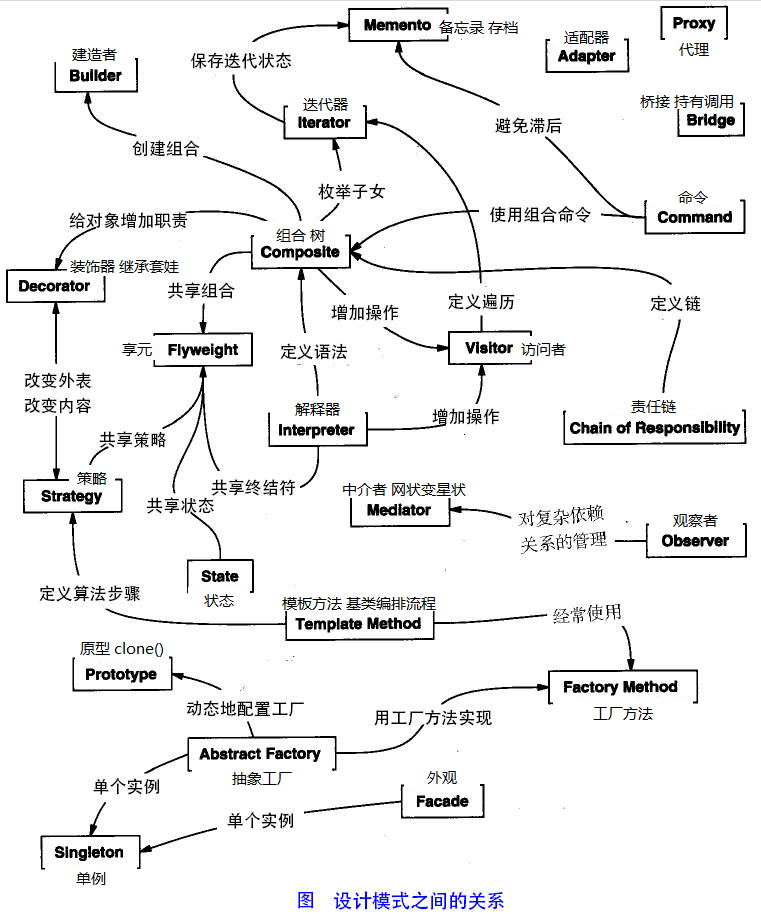
The image below shows the relationships and hierarchical structure among various design patterns:
Advantages of Design Patterns
- Provide a unified design language, enabling developers to quickly communicate design intent.
- Provide mature, reusable solutions to common problems.
- Reduce system coupling and improve code maintainability and extensibility.
- Reduce redundant design, improving development efficiency and code quality.
- Help new members quickly understand the system architecture and design philosophy.
Six Principles of Design Patterns
1. Open-Closed Principle
Open for extension, closed for modification. Software should adapt to changes by extending new functionality rather than modifying existing code. The core of implementing this principle lies in using abstractions (interfaces or base classes) to define stable behavior.
2. Liskov Substitution Principle
Subclasses should be able to replace any place where a base class appears. Inheritance is meaningful only when derived classes can completely replace the base class. This principle ensures the correctness of polymorphism and is an important complement to the Open-Closed Principle.
3. Dependency Inversion Principle
High-level modules should not depend on low-level modules; both should depend on abstractions. Concrete implementations should depend on interfaces or abstract classes rather than directly on concrete classes. This principle makes the system easier to extend and test.
4. Interface Segregation Principle
A class should not depend on interfaces it does not need. Large interfaces should be split into smaller, more specific ones to reduce coupling and improve flexibility.
5. Law of Demeter
Also known as the "Principle of Least Knowledge": an object should minimize its interactions with other objects. In other words, a class should only know about objects directly related to itself, thereby reducing system complexity.
6. Composite Reuse Principle
Prefer using composition or aggregation relationships for reuse over inheritance. Inheritance creates strong coupling, while composition allows flexible replacement of dependencies at runtime, achieving more elegant structural design.
Common Design Pattern Examples in Python
Let's understand the application of design patterns in Python through a few concrete examples.
Singleton Pattern
The Singleton pattern ensures a class has only one instance and provides a global access point.
Example
_instance = None
def __new__(cls):
if cls._instance is None:
cls._instance = super().__new__(cls)
print("Creating new database connection")
return cls._instance
def connect(self):
print("Connecting to database")
# Usage example
db1 = DatabaseConnection()
db2 = DatabaseConnection()
print(f"Are db1 and db2 the same instance? {db1 is db2}") # Output: True
Application Scenarios:
- Database Connection Pool
- Configuration Manager
- Logger
Factory Pattern
The Factory Pattern provides an interface for creating objects, allowing subclasses to decide which class to instantiate.
Example
# Abstract Product
class Notification(ABC):
@abstractmethod
def send(self, message: str):
pass
# Concrete Product
class EmailNotification(Notification):
def send(self, message: str):
print(f"Sending email: {message}")
class SMSNotification(Notification):
def send(self, message: str):
print(f"Sending SMS: {message}")
# Factory Class
class NotificationFactory:
@staticmethod
def create_notification(notification_type: str) -> Notification:
if notification_type == "email":
return EmailNotification()
elif notification_type == "sms":
return SMSNotification()
else:
raise ValueError("Unsupported notification type")
# Usage Example
email = NotificationFactory.create_notification("email")
sms = NotificationFactory.create_notification("sms")
email.send("Your order has been shipped")
sms.send("Verification code: 123456")
Code Explanation:
Notificationis an abstract base class that defines the interfaceEmailNotificationandSMSNotificationis the concrete implementationNotificationFactoryis responsible for creating concrete notification objects
Observer Pattern
The Observer Pattern defines a one-to-many dependency between objects. When one object's state changes, all objects that depend on it are notified.
Example
# Observer Interface
class Observer(ABC):
@abstractmethod
def update(self, message: str):
pass
# Concrete Observer
class EmailSubscriber(Observer):
def __init__(self, name: str):
self.name = name
def update(self, message: str):
print(f"{self.name} received email notification: {message}")
class SMSSubscriber(Observer):
def __init__(self, name: str):
self.name = name
def update(self, message: str):
print(f"{self.name} received SMS notification: {message}")
# Subject (Observable)
class NewsPublisher:
def __init__(self):
self._subscribers = []
def subscribe(self, subscriber: Observer):
self._subscribers.append(subscriber)
def unsubscribe(self, subscriber: Observer):
self._subscribers.remove(subscriber)
def notify_subscribers(self, message: str):
for subscriber in self._subscribers:
subscriber.update(message)
# Usage Example
publisher = NewsPublisher()
# Create subscribers
alice = EmailSubscriber("Alice")
bob = SMSSubscriber("Bob")
# Subscribe to news
publisher.subscribe(alice)
publisher.subscribe(bob)
# Publish news
publisher.notify_subscribers("Python 3.12 has been released!")
# Unsubscribe
publisher.unsubscribe(alice)
publisher.notify_subscribers("This is a notification that only Bob can see")
Special Considerations for Design Patterns in Python
Python's Dynamic Nature
As a dynamic language, Python makes some design patterns simpler to implement:
Example
def create_payment(method):
payment_methods = {
'credit_card': CreditCardPayment,
'paypal': PayPalPayment,
'alipay': AlipayPayment
}
return payment_methods[method]()
# Use directly, no complex class hierarchy needed
payment = create_payment('alipay')
Built-in Support for the Decorator Pattern
Python has built-in decorator syntax, making the decorator pattern more elegant to implement:
Example
def wrapper(*args, **kwargs):
import time
start = time.time()
result = func(*args, **kwargs)
end = time.time()
print(f"{func.__name__} execution time: {end - start:.2f} seconds")
return result
return wrapper
@log_execution_time
def process_data(data):
# Simulate data processing
import time
time.sleep(1)
return f"Processed data: {data}"
# Usage
result = process_data("Sample data")