Python Mediator Pattern
The Mediator Pattern is a behavioral design pattern that reduces direct communication dependencies between objects by introducing a mediator object. Imagine an airport control tower in real life - all planes do not communicate directly with each other, but coordinate takeoffs, landings, and routes through the control tower, thus avoiding chaos and conflicts.
In software development, when there are complex interaction relationships among multiple objects, the Mediator Pattern can encapsulate these interactions in the mediator, thereby reducing coupling between objects.
Core Idea
The core idea of the Mediator Pattern is"Don't talk directly; coordinate through a mediator."It solves the complexity of many-to-many interactions between objects, making the system easier to maintain and extend.
Why Do We Need the Mediator Pattern?
Problem Scenario
Suppose we are developing a chat room system with multiple users who need to send messages to each other. Without a mediator, the code might look like this:
Example
def __init__(self, name):
self.name = name
self.other_users = [] # Need to know all other users
def send_message(self, message, to_user):
print(f"{self.name} sent to {to_user.name}: {message}")
to_user.receive_message(message, self)
def receive_message(self, message, from_user):
print(f{self.name} received a message from {from_user.name}: {message})
# Usage example
user1 = User(Xiaoming)
user2 = User(Xiaohong)
user3 = User(Xiaogang)
# Each user needs to know all other users
user1.other_users = [user2, user3]
user2.other_users = [user1, user3]
user3.other_users = [user1, user2]
user1.send_message(Hello!, user2)
Disadvantages of this design:
- High coupling between objects; each user needs to know all other users.
- Adding a new user requires modifying all existing users.
- Difficult to maintain; interaction logic is scattered across objects.
Solution
The Mediator Pattern solves this problem by introducing a chat room (mediator):
Example
def __init__(self):
self.users = {}
def register_user(self, user):
self.users[user.name] = user
user.chat_room = self
def send_message(self, message, from_user, to_user_name=None):
if to_user_name: # Private chat
if to_user_name in self.users:
self.users[to_user_name].receive_message(message, from_user)
else: # Group chat
for user_name, user in self.users.items():
if user_name != from_user.name:
user.receive_message(message, from_user)
class User:
def __init__(self, name):
self.name = name
self.chat_room = None
def send_message(self, message, to_user_name=None):
if self.chat_room:
self.chat_room.send_message(message, self, to_user_name)
def receive_message(self, message, from_user):
print(f{self.name} received a message from {from_user.name}: {message})
# Usage example
chat_room = ChatRoom()
user1 = User(Xiaoming)
user2 = User(Xiaohong)
user3 = User(Xiaogang)
chat_room.register_user(user1)
chat_room.register_user(user2)
chat_room.register_user(user3)
user1.send_message(Hello everyone!) # Broadcast message
user2.send_message(Hello Xiaoming!, Xiaoming) # Private chat
Implementation of the Mediator Pattern
Basic Structure
Let's understand the implementation of the Mediator Pattern through a more complete example:
Example
from typing import List
# Abstract Mediator
class Mediator(ABC):
@abstractmethod
def notify(self, sender: object, event: str, data: dict = None):
pass
# Concrete Mediator - Chat Room
class ChatRoomMediator(Mediator):
def __init__(self):
self.users: List[User] = []
def add_user(self, user):
self.users.append(user)
user.set_mediator(self)
def notify(self, sender, event, data=None):
if event == "send_message":
message = data.get("message")
target_user = data.get("target_user")
if target_user: # Private chat
for user in self.users:
if user.name == target_user:
user.receive_message(message, sender.name)
else: # Group chat
for user in self.users:
if user != sender:
user.receive_message(message, sender.name)
elif event == "user_joined":
message = fSystem: {sender.name} joined the chat room
for user in self.users:
if user != sender:
user.receive_message(message, System)
# Base Component Class
class BaseComponent:
def __init__(self):
self._mediator = None
def set_mediator(self, mediator: Mediator):
self._mediator = mediator
# Concrete Component - User
class User(BaseComponent):
def __init__(self, name):
super().__init__()
self.name = name
def send_message(self, message, target_user=None):
print(f{self.name} sent a message: {message})
self._mediator.notify(self, "send_message", {
"message": message,
"target_user": target_user
})
def join_chat(self):
self._mediator.notify(self, "user_joined")
def receive_message(self, message, from_name):
print(f{self.name} received a message from {from_name}: {message})
# Usage example
def main():
# Create the mediator
chat_room = ChatRoomMediator()
# Create a user
alice = User("Alice")
bob = User("Bob")
charlie = User("Charlie")
# Register users with the chat room
chat_room.add_user(alice)
chat_room.add_user(bob)
chat_room.add_user(charlie)
print(=== Chat Room Demo ===)
# Alice joins the chat room
alice.join_chat()
# Send message
alice.send_message(Hello everyone, I am Alice!)
bob.send_message(Welcome Alice!)
charlie.send_message(Hello Alice!, "Alice") # Private chat
# Bob sends a group message
bob.send_message(Is anyone online?)
if __name__ == "__main__":
main()
Output
=== 聊天室演示 ===
系统: Alice 加入了聊天室
Alice 发送消息: 大家好,我是 Alice!
Bob 收到来自 Alice 的消息: 大家好,我是 Alice!
Charlie 收到来自 Alice 的消息: 大家好,我是 Alice!
Bob 发送消息: 欢迎 Alice!
Alice 收到来自 Bob 的消息: 欢迎 Alice!
Charlie 收到来自 Bob 的消息: 欢迎 Alice!
Charlie 发送消息: Alice 你好!
Alice 收到来自 Charlie 的消息: Alice 你好!
Bob 发送消息: 有人在线吗?
Alice 收到来自 Bob 的消息: 有人在线吗?
Charlie 收到来自 Bob 的消息: 有人在线吗?
UML Structure of the Mediator Pattern
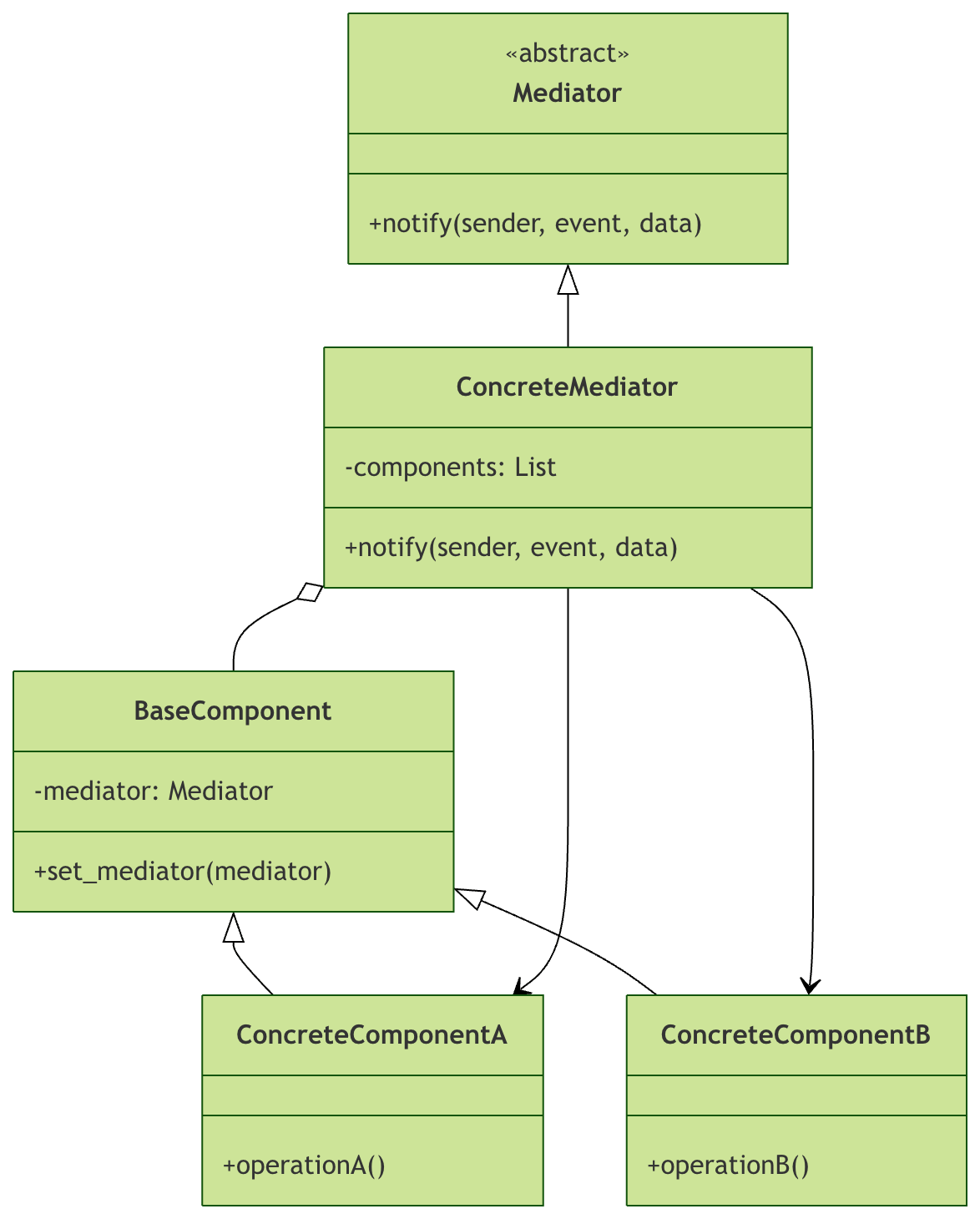
Structure Description
- Mediator (mediator interface): defines the communication interface
- ConcreteMediator (concrete mediator): implements coordination logic and knows all components
- BaseComponent (base component): contains a reference to the mediator
- ConcreteComponent (concrete component): implements concrete business logic
Real-World Application Scenarios
Scenario 1: GUI Application
In a graphical user interface, various controls (buttons, text boxes, checkboxes, etc.) coordinate interactions through a mediator:
Example
def __init__(self):
self.login_button = None
self.username_input = None
self.password_input = None
self.remember_checkbox = None
def notify(self, sender, event):
if event == "username_changed" or event == "password_changed":
# When username or password is entered, check whether the login button can be enabled
username = self.username_input.get_text()
password = self.password_input.get_text()
self.login_button.set_enabled(bool(username and password))
elif event == "login_clicked":
# Handle login logic
username = self.username_input.get_text()
password = self.password_input.get_text()
remember = self.remember_checkbox.is_checked()
print(fLogin: {username}, Remember me: {remember})
elif event == "remember_changed":
print(Remember me option changed)
class UIComponent:
def __init__(self, mediator=None):
self.mediator = mediator
def set_mediator(self, mediator):
self.mediator = mediator
class Button(UIComponent):
def click(self):
if self.mediator:
self.mediator.notify(self, "login_clicked")
def set_enabled(self, enabled):
print(fButton {'Enable' if enabled else 'Disable'})
class TextInput(UIComponent):
def __init__(self, mediator=None):
super().__init__(mediator)
self._text = ""
def set_text(self, text):
self._text = text
if self.mediator:
self.mediator.notify(self, "username_changed")
def get_text(self):
return self._text
# Usage example
dialog = DialogMediator()
login_btn = Button()
username_input = TextInput()
password_input = TextInput()
dialog.login_button = login_btn
dialog.username_input = username_input
dialog.password_input = password_input
login_btn.set_mediator(dialog)
username_input.set_mediator(dialog)
password_input.set_mediator(dialog)
# Simulate user input
username_input.set_text("user123")
password_input.set_text("pass123")
login_btn.click()
Scenario 2: E-commerce Order System
In an e-commerce system, order processing involves multiple subsystems such as inventory, payment, and logistics:
Example
def __init__(self):
self.inventory_system = None
self.payment_system = None
self.shipping_system = None
self.notification_system = None
def place_order(self, order_data):
print(=== Start processing order ===)
# Check inventory
if not self.inventory_system.check_stock(order_data):
return Insufficient stock
# Process payment
payment_result = self.payment_system.process_payment(order_data)
if not payment_result:
return Payment failed
# Update inventory
self.inventory_system.update_stock(order_data)
# Arrange shipment
shipping_info = self.shipping_system.schedule_delivery(order_data)
# Send notification
self.notification_system.send_confirmation(order_data, shipping_info)
return Order processed successfully
class InventorySystem:
def check_stock(self, order_data):
print(Checking inventory...)
return True
def update_stock(self, order_data):
print(Updating inventory...)
class PaymentSystem:
def process_payment(self, order_data):
print(Processing payment...)
return True
class ShippingSystem:
def schedule_delivery(self, order_data):
print(Arranging shipment...)
return Tracking number: SF123456789
class NotificationSystem:
def send_confirmation(self, order_data, shipping_info):
print(fSend confirmation email, shipping info: {shipping_info})
# Usage example
mediator = OrderMediator()
mediator.inventory_system = InventorySystem()
mediator.payment_system = PaymentSystem()
mediator.shipping_system = ShippingSystem()
mediator.notification_system = NotificationSystem()
order_data = {"product_id": "123", "quantity": 2, "user_id": "user001"}
result = mediator.place_order(order_data)
print(fOrder result: {result})
Advantages and Disadvantages of the Mediator Pattern
Advantages
| Advantages | Description |
|---|---|
| Single Responsibility Principle | Centralizes the interaction logic between components into the mediator. |
| Open/Closed Principle | Allows introducing new mediators without modifying existing components. |
| Reduces coupling | Reduces direct dependencies between components. |
| Easy to reuse | Individual components can be reused more easily in different contexts. |
Disadvantages
| Disadvantages | Description |
|---|---|
| The mediator can become complex | As interaction logic increases, the mediator may become a god object. |
| Performance overhead | All communication passes through the mediator, which may introduce a performance bottleneck. |
| Difficult to debug | Interaction logic is concentrated in the mediator, so debugging may require tracking multiple components. |
Best Practices and Considerations
1. Reasonably Divide Mediator Responsibilities
Don't let one mediator handle everything; you can divide multiple mediators according to business domains:
Example
def notify(self, sender, event, data):
if event == "user_registered":
# Handle logic after user registration
self.send_welcome_email(data)
self.create_user_profile(data)
self.add_to_mailing_list(data)
class OrderProcessingMediator:
def notify(self, sender, event, data):
if event == "order_created":
# Handle logic after order creation
self.validate_order(data)
self.process_payment(data)
self.update_inventory(data)
2. Avoid an Overly Complex Mediator
If the mediator becomes too complex, consider using other patterns or refactoring:
Example
class ComplexMediator:
def handle_event(self, event_type, data):
if event_type == "user_action":
# A lot of complex business logic...
pass
elif event_type == "system_event":
# More complex logic...
pass
# Good practice - use strategy pattern to decompose complex logic
class EventHandler:
def handle(self, data):
pass
class UserActionHandler(EventHandler):
def handle(self, data):
# Specifically handle user actions
pass
class SimpleMediator:
def __init__(self):
self.handlers = {}
def register_handler(self, event_type, handler):
self.handlers[event_type] = handler
def notify(self, event_type, data):
if event_type in self.handlers:
self.handlers[event_type].handle(data)
3. Consider Combining with the Observer Pattern
The Mediator pattern is often used in combination with the Observer pattern:
Example
from typing import List
class Observer(ABC):
@abstractmethod
def update(self, event, data):
pass
class Observable:
def __init__(self):
self._observers: List[Observer] = []
def add_observer(self, observer):
self._observers.append(observer)
def notify_observers(self, event, data=None):
for observer in self._observers:
observer.update(event, data)
class ChatMediator(Observable):
def send_message(self, message, sender, receiver=None):
# Mediator logic
event_data = {
"message": message,
"sender": sender,
"receiver": receiver
}
self.notify_observers("message_sent", event_data)
class LoggingObserver(Observer):
def update(self, event, data):
if event == "message_sent":
print(fLog: {data['sender']} sent a message)
Practice Exercises
Exercise 1: Improve a Chat Room System
Extend the previous chat room system and add the following features:
- Support creating multiple chat rooms
- Support users switching between different chat rooms.
- Add administrator functions (kicking users, muting, etc.)
Exercise 2: Design an Airline Ticket Booking System
Use the Mediator pattern to design an airline ticket booking system, including the following components:
- Flight query
- Seat selection
- Payment Processing
- Ticket Generation
- Notification Sending
The components are required to work in coordination through the mediator.
Exercise 3: Smart Home Control System
Design a smart home control system, including:
- Lighting Control
- Temperature Regulation
- Security Monitoring
- Scene Mode
Implement intelligent inter-device linkage through the mediator.
Summary
The Mediator pattern is a powerful tool for handling complex object interactions. It simplifies system architecture by introducing a coordination center, and is especially suitable for the following scenarios:
- Complex networked interaction relationships exist between objects
- When there is a need to centrally control the interaction logic among multiple objects
- Hope to reduce coupling between objects
Remember, the Mediator pattern is not a silver bullet. When the interaction logic is simple, direct object-to-object communication may be more appropriate. However, when dealing with complex systems, proper use of the Mediator pattern can significantly improve code maintainability and extensibility.
Key Points:
- The mediator encapsulates the interaction logic between objects
- Components only communicate with the mediator and do not depend directly on one another
- The mediator may become complex and requires careful design
- Combining with other patterns (such as Observer) can achieve better results