Python Decorator Pattern
The core idea of the decorator pattern is wrapping — by creating a wrapper object (decorator) to wrap the original object, thereby extending its functionality without modifying the original object.
Basic Concepts
The decorator pattern consists of four main roles:
- Component Interface (Component): Defines the common interface for the decorated object and the decorator
- Concrete Component: The original object that needs to be decorated
- Decorator Base Class (Decorator): Holds a reference to a component object and implements the component interface
- Concrete Decorator: Implements the specific decoration functionality
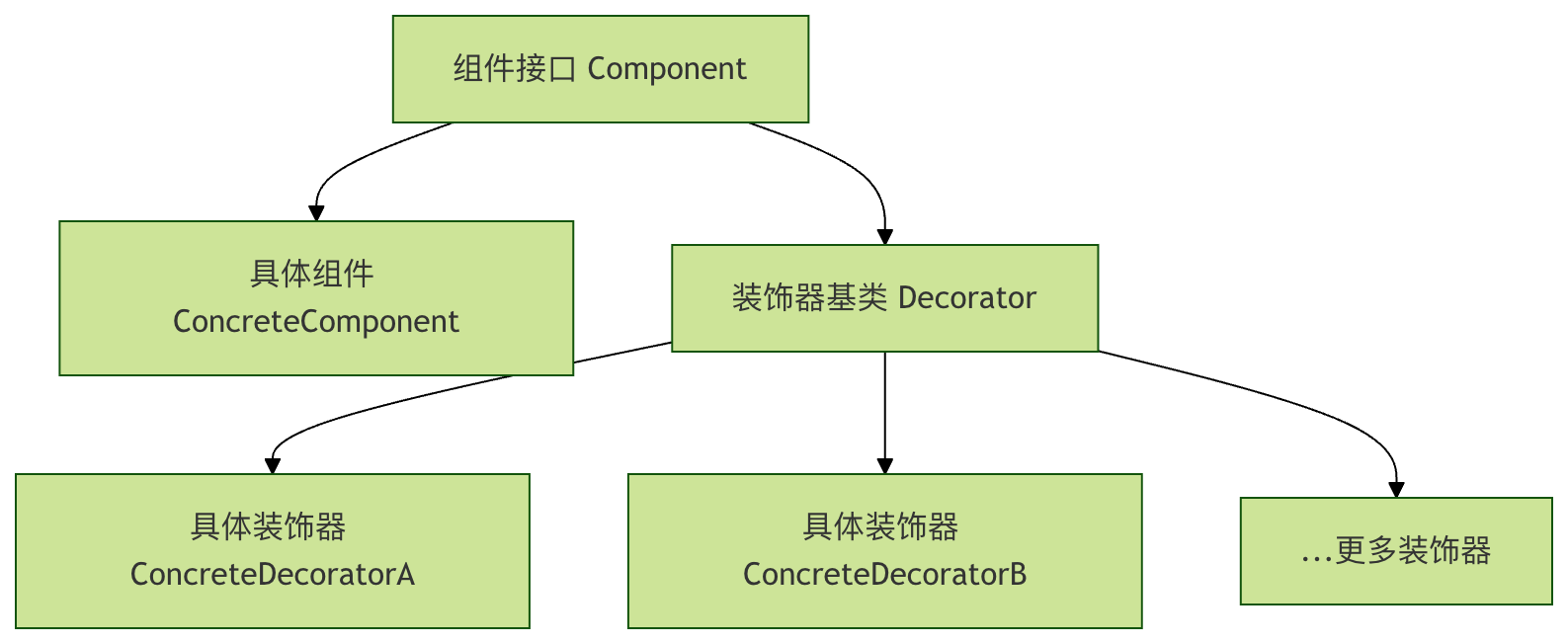
Basic Syntax of Decorators
Function Decorators
Function decorators are the most common form of decorators. They take a function as an argument and return a new function.
Example
def wrapper(*args, **kwargs):
print("Some operations before function execution")
result = func(*args, **kwargs)
print("Some operations after function execution")
return result
return wrapper
@my_decorator
def say_hello(name):
print(f"Hello, {name}!")
# Use decorator
say_hello("Alice")
Output:
函数执行前的一些操作
Hello, Alice!
函数执行后的一些操作
Decorators with Parameters
If you need to pass parameters to the decorator, you need to nest another layer of functions:
Example
def decorator(func):
def wrapper(*args, **kwargs):
for i in range(times):
print(f"Execution {i+1}:")
result = func(*args, **kwargs)
return result
return wrapper
return decorator
@repeat(times=3)
def greet(name):
print(f"Hello, {name}!")
greet("Bob")
Class Decorators
Besides function decorators, Python also supports class decorators. Class decorators work by implementing__call__methods to work.
Basic Class Decorator
Example
def __init__(self, func):
self.func = func
def __call__(self, *args, **kwargs):
import time
start_time = time.time()
result = self.func(*args, **kwargs)
end_time = time.time()
print(f"Function {self.func.__name__} executed in {end_time - start_time:.4f} seconds")
return result
@TimerDecorator
def calculate_sum(n):
return sum(range(n))
result = calculate_sum(1000000)
print(f"Calculation result: {result}")
Class Decorator with Parameters
Example
def __init__(self, level="INFO"):
self.level = level
def __call__(self, func):
def wrapper(*args, **kwargs):
print(f"[{self.level}] Calling function: {func.__name__}")
print(f"[{self.level}] Arguments: args={args}, kwargs={kwargs}")
result = func(*args, **kwargs)
print(f"[{self.level}] Return value: {result}")
return result
return wrapper
@LogDecorator(level="DEBUG")
def multiply(a, b):
return a * b
multiply(5, 3)
Built-in Decorators
Python provides some useful built-in decorators:
@staticmethod and @classmethod
Example
@staticmethod
def add(x, y):
return x + y
@classmethod
def multiply(cls, x, y):
return x * y
# Use static method
result1 = Calculator.add(5, 3)
print(f"Static method result: {result1}")
# Use class method
result2 = Calculator.multiply(5, 3)
print(f"Class method result: {result2}")
@property
Example
def __init__(self, radius):
self._radius = radius
@property
def radius(self):
return self._radius
@radius.setter
def radius(self, value):
if value <= 0:
raise ValueError("Radius must be a positive number")
self._radius = value
@property
def area(self):
return 3.14159 * self._radius ** 2
circle = Circle(5)
print(f"Radius: {circle.radius}")
print(f"Area: {circle.area}")
circle.radius = 10
print(f"New radius: {circle.radius}")
print(f"New area: {circle.area}")
Practical Application Scenarios of Decorators
1. Logging
Example
def wrapper(*args, **kwargs):
print(f"Start executing: {func.__name__}")
try:
result = func(*args, **kwargs)
print(f"Successfully completed: {func.__name__}")
return result
except Exception as e:
print(f"Execution failed: {func.__name__}, error: {e}")
raise
return wrapper
@log_execution
def process_data(data):
# Simulate data processing
if not data:
raise ValueError("Data cannot be empty")
return [x * 2 for x in data]
# Test
data = [1, 2, 3]
result = process_data(data)
print(f"Processing result: {result}")
2. Permission Verification
Example
def wrapper(user, *args, **kwargs):
if not user.get('is_authenticated', False):
raise PermissionError("User not logged in")
return func(user, *args, **kwargs)
return wrapper
@require_login
def view_profile(user):
return f"View profile of user {user['username']}"
# Test
user1 = {'username': 'alice', 'is_authenticated': True}
user2 = {'username': 'bob', 'is_authenticated': False}
print(view_profile(user1)) # Normal execution
# print(view_profile(user2)) # will raise PermissionError
3. Cache Decorator
Example
cache = {}
def wrapper(*args):
if args in cache:
print(f"Get result from cache: {args}")
return cache[args]
result = func(*args)
cache[args] = result
print(f"Calculate and cache result: {args} -> {result}")
return result
return wrapper
@cache_results
def fibonacci(n):
if n <= 1:
return n
return fibonacci(n-1) + fibonacci(n-2)
# Test cache effect
print(fibonacci(5))
print(fibonacci(5)) # This time it will get from cache
Execution Order of Multiple Decorators
When using multiple decorators, their execution order is from bottom to top:
Example
def wrapper():
print("Decorator 1 - before")
func()
print("Decorator 1 - after")
return wrapper
def decorator2(func):
def wrapper():
print("Decorator 2 - before")
func()
print("Decorator 2 - after")
return wrapper
@decorator1
@decorator2
def my_function():
print("Original function")
my_function()
Output:
装饰器1 - 前
装饰器2 - 前
原始函数
装饰器2 - 后
装饰器1 - 后
Preserving Function Metadata
When using decorators, the original function's metadata (such as function name, docstring, etc.) is overwritten by the wrapper function. You can usefunctools.wrapsto preserve this information:
Example
def preserve_metadata(func):
@wraps(func)
def wrapper(*args, **kwargs):
"""Docstring of the wrapper function"""
return func(*args, **kwargs)
return wrapper
@preserve_metadata
def example_function():
"""This is the docstring of the original function"""
pass
print(f"Function name: {example_function.__name__}")
print(f"Docstring: {example_function.__doc__}")
Practical Exercises
Exercise 1: Creating a Performance Monitoring Decorator
Write a decorator to monitor the execution time and memory usage of a function.
Example
import tracemalloc
def performance_monitor(func):
@wraps(func)
def wrapper(*args, **kwargs):
# Start memory tracking
tracemalloc.start()
# Record start time
start_time = time.time()
# Execute function
result = func(*args, **kwargs)
# Record end time
end_time = time.time()
# Get memory usage
current, peak = tracemalloc.get_traced_memory()
tracemalloc.stop()
print(f"Performance report for function {func.__name__}:")
print(f"Execution time: {end_time - start_time:.4f} seconds")
print(f"Memory usage: current {current/1024:.2f} KB, peak {peak/1024:.2f} KB")
return result
return wrapper
@performance_monitor
def process_large_data():
"""Simulate processing large amounts of data"""
data = [i**2 for i in range(100000)]
return sum(data)
process_large_data()
Exercise 2: Implementing a Retry Mechanism Decorator
Create a decorator that automatically retries a specified number of times when a function execution fails.
Example
def decorator(func):
@wraps(func)
def wrapper(*args, **kwargs):
attempts = 0
while attempts < max_attempts:
try:
return func(*args, **kwargs)
except Exception as e:
attempts += 1
if attempts == max_attempts:
print(f"Function {func.__name__} failed, maximum retry count reached")
raise
print(f"Function {func.__name__} failed on attempt {attempts}: {e}")
print(f"Waiting {delay} seconds before retrying...")
time.sleep(delay)
return None
return wrapper
return decorator
@retry(max_attempts=3, delay=2)
def unstable_operation():
"""Simulate an unstable operation"""
import random
if random.random() < 0.7: # 70% probability of failure
raise ValueError("Random failure")
return "Operation succeeded"
# Test retry mechanism
result = unstable_operation()
print(f"Final result: {result}")
Summary
Python decorators are a powerful and flexible tool that provide the following advantages:
- Code reuse: Separates cross-cutting concerns (such as logging, caching, validation) from business logic
- Dynamic extension: Add new functionality without modifying the original code
- Keep it concise: Use
@syntax makes code clearer and more readable - Follows the open-closed principle: Open for extension, closed for modification
Best practices for using decorators:
- Usage
functools.wrapsPreserve function metadata - Keep the decorator's single responsibility
- Handle exceptions in decorators properly
- Pay attention to the execution order of decorators