Python Command Pattern
The Command Pattern is a behavioral design pattern that encapsulates a request as an object, thereby allowing you to parameterize clients with different requests. In simple terms,the Command Pattern wraps operations (such as opening files, saving data) into independent objects,allowing you to handle operations in the same way you handle data.
Analogy in Daily Life
Imagine the ordering process at a restaurant:
- Customer(client) does not need to know how the cook prepares the dish
- Waiter(invoker) receives the order but does not cook personally
- Order(command object) contains the specific dish information
- Cook(receiver) performs the actual cooking operations based on the order
This well-divided pattern is a real-life manifestation of the Command Pattern.
Why Need the Command Pattern?
Limitations of the Traditional Approach
In traditional programming, we usually directly call an object's methods:
Example
def turn_on(self):
print("The light is on")
def turn_off(self):
print("The light is off")
# Direct call
light = Light()
light.turn_on()
light.turn_off()
This approach has several problems:
- Tight coupling: The caller needs to know the specific interface of the receiver
- Difficult to extend: Adding new features requires modifying existing code
- No support for undo/redo: Operations cannot be rolled back after execution
Advantages of the Command Pattern
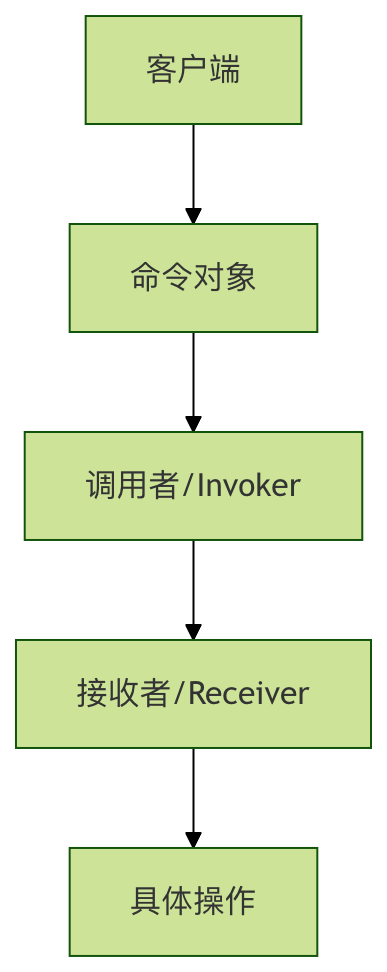
The Command Pattern solves the above problems by introducing an intermediate layer (command object), providing:
- Decoupling: No direct dependency between caller and receiver
- Extensibility: Easy to add new commands
- Support for undo/redo: Can record operation history
- Queue support: Commands can be placed in a queue for delayed execution
Core Components of the Command Pattern
Basic Structure
The Command Pattern includes four core roles:
| Role | Responsibility | Example |
|---|---|---|
| Command(Command Interface) | Declares the interface for executing operations | execute(), undo() |
| ConcreteCommand(Concrete Command) | Implements the command interface and binds the receiver | LightOnCommand, LightOffCommand |
| Receiver(Receiver) | Knows how to perform operations | Light, TV |
| Invoker(Invoker) | Stores and executes commands | RemoteControl |
Complete Code Example
Basic Implementation
Let's understand the Command Pattern through a smart home lighting control example:
Example
from typing import List
# 1. Command Interface
class Command(ABC):
@abstractmethod
def execute(self):
pass
@abstractmethod
def undo(self):
pass
# 2. Receiver - Light Device
class Light:
def turn_on(self):
print("💡 Light is on")
def turn_off(self):
print("💡 Light is off")
# 3. Concrete Command - Turn On Light Command
class LightOnCommand(Command):
def __init__(self, light: Light):
self.light = light
def execute(self):
self.light.turn_on()
def undo(self):
self.light.turn_off()
# 4. Concrete Command - Turn Off Light Command
class LightOffCommand(Command):
def __init__(self, light: Light):
self.light = light
def execute(self):
self.light.turn_off()
def undo(self):
self.light.turn_on()
# 5. Invoker - Remote Control
class RemoteControl:
def __init__(self):
self.command = None
self.history: List[Command] = []
def set_command(self, command: Command):
self.command = command
def press_button(self):
if self.command:
self.command.execute()
self.history.append(self.command)
def press_undo(self):
if self.history:
last_command = self.history.pop()
last_command.undo()
# Client code
if __name__ == "__main__":
# Create device
living_room_light = Light()
# Create commands
light_on = LightOnCommand(living_room_light)
light_off = LightOffCommand(living_room_light)
# Create remote control
remote = RemoteControl()
# Test turning on light
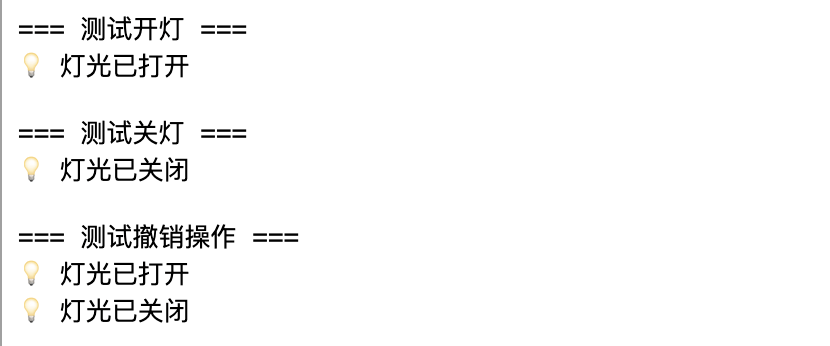
print("=== Test turning on light ===")
remote.set_command(light_on)
remote.press_button()
# Test turning off light
print("\n=== Test turning off light ===")
remote.set_command(light_off)
remote.press_button()
# Test undo
print("\n=== Test undo operation ===")
remote.press_undo() # Undo turning off light, should turn on light
remote.press_undo() # Undo turning on light, should turn off light
Running result:
Advanced Application Example
Universal Remote Control Supporting Multiple Devices
Let's extend the previous example and create a universal remote control that supports multiple devices:
Example
class TV:
def __init__(self, location: str):
self.location = location
self.is_on = False
self.volume = 50
def turn_on(self):
self.is_on = True
print(f"📺 {self.location} TV is on")
def turn_off(self):
self.is_on = False
print(f"📺 {self.location} TV is off")
def set_volume(self, volume: int):
self.volume = volume
print(f"📺 {self.location} TV volume set to {volume}")
# TV-related commands
class TVOnCommand(Command):
def __init__(self, tv: TV):
self.tv = tv
self.previous_volume = 50
def execute(self):
self.previous_volume = self.tv.volume
self.tv.turn_on()
def undo(self):
self.tv.turn_off()
self.tv.volume = self.previous_volume
class TVVolumeUpCommand(Command):
def __init__(self, tv: TV):
self.tv = tv
self.previous_volume = 50
def execute(self):
self.previous_volume = self.tv.volume
self.tv.set_volume(min(100, self.tv.volume + 10))
def undo(self):
self.tv.set_volume(self.previous_volume)
# Macro command - execute multiple commands with one press
class MacroCommand(Command):
def __init__(self, commands: List[Command]):
self.commands = commands
def execute(self):
for command in self.commands:
command.execute()
def undo(self):
# Undo in reverse order
for command in reversed(self.commands):
command.undo()
# Improved remote control
class AdvancedRemoteControl:
def __init__(self, slot_count: int = 4):
self.on_commands: List[Command] = [None] * slot_count
self.off_commands: List[Command] = [None] * slot_count
self.history: List[Command] = []
def set_command(self, slot: int, on_command: Command, off_command: Command):
self.on_commands[slot] = on_command
self.off_commands[slot] = off_command
def press_on_button(self, slot: int):
if self.on_commands[slot]:
self.on_commands[slot].execute()
self.history.append(self.on_commands[slot])
def press_off_button(self, slot: int):
if self.off_commands[slot]:
self.off_commands[slot].execute()
self.history.append(self.off_commands[slot])
def press_undo(self):
if self.history:
last_command = self.history.pop()
last_command.undo()
# Test advanced remote control
def test_advanced_remote():
print("=== Test universal remote control ===")
# Create devices
living_room_light = Light()
bedroom_tv = TV("Bedroom")
# Create commands
light_on = LightOnCommand(living_room_light)
light_off = LightOffCommand(living_room_light)
tv_on = TVOnCommand(bedroom_tv)
tv_volume_up = TVVolumeUpCommand(bedroom_tv)
# Create macro command - cinema mode
cinema_mode = MacroCommand([light_off, tv_on, tv_volume_up])
# Set up remote control
remote = AdvancedRemoteControl()
remote.set_command(0, light_on, light_off) # Slot 0: light control
remote.set_command(1, tv_on, TVOnCommand(bedroom_tv)) # Slot 1: TV control
remote.set_command(2, cinema_mode, light_on) # Slot 2: cinema mode
# Test various functions
print("\n1. Turn on light:")
remote.press_on_button(0)
print("\n2. Enable cinema mode:")
remote.press_on_button(2)
print("\n3. Undo operation:")
remote.press_undo()
if __name__ == "__main__":
test_advanced_remote()
Parameters and Options of the Command Pattern
Extension of the Command Interface
In practical applications, the command interface can be extended with more functionality as needed:
Example
@abstractmethod
def execute(self):
"""Execute command"""
pass
@abstractmethod
def undo(self):
"""Undo command"""
pass
@abstractmethod
def redo(self):
"""Redo command"""
pass
@abstractmethod
def can_execute(self) -> bool:
"""Check whether the command can be executed"""
pass
@abstractmethod
def get_description(self) -> str:
"""Get command description"""
pass
Command Queue and Delayed Execution
The Command Pattern naturally supports command queues, which is very useful in many scenarios:
Example
def __init__(self):
self.queue: List[Command] = []
def add_command(self, command: Command):
self.queue.append(command)
def process_commands(self):
while self.queue:
command = self.queue.pop(0)
if command.can_execute():
command.execute()
def clear(self):
self.queue.clear()
Practical Exercises
Exercise 1: Implement an Air Conditioning Control System
Try to implement the Command Pattern for an air conditioning control system:
Example
class AirConditioner:
def __init__(self):
self.temperature = 26
self.is_on = False
def turn_on(self):
# Implement turning on the air conditioner
pass
def turn_off(self):
# Implement turning off the air conditioner
pass
def set_temperature(self, temp: int):
# Implement setting the temperature
pass
# Implement command classes related to the air conditioner
# AirConditionerOnCommand
# AirConditionerOffCommand
# TemperatureUpCommand
# TemperatureDownCommand
Exercise 2: Implement Undo Functionality for a Text Editor
Create a simple text editor that supports text input and undo operations:
Example
def __init__(self):
self.content = ""
def add_text(self, text: str):
# Implement adding text
pass
def delete_text(self, length: int):
# Implement deleting text
pass
# Implement text editing commands
# AddTextCommand
# DeleteTextCommand
FAQ
Q: What scenarios is the Command Pattern suitable for?
A:The Command Pattern is especially suitable for the following scenarios:
- When operations need to be parameterized (e.g., buttons bound to different functions)
- When undo/redo functionality is needed
- When operations need to be placed in a queue for delayed execution
- When operation logs need to be recorded
- When transaction operations need to be supported
Q: What are the disadvantages of the Command Pattern?
A:The main disadvantages include:
- It may create a large number of command classes
- It increases code complexity
- It may be too cumbersome for simple operations
Q: How to choose whether to use the Command Pattern?
A:Consider the following points:
- If you only need simple method calls, do not use the Command Pattern
- If undo/redo functionality is needed, it is strongly recommended
- If the system requires high decoupling, the Command Pattern is a good choice
- If operations need queuing or logging, the Command Pattern is very suitable
Summary
The Command Pattern decouples the caller from the receiver by encapsulating operations as objects, providing powerful extensibility. Although it adds some code complexity, the Command Pattern is an indispensable design pattern in scenarios such as undo/redo, operation queues, and logging.
Key points:
- The Command Pattern separates "what to do" from "who does it"
- Supports advanced features such as undo, redo, and queues
- Easy to extend with new commands
- Widely used in GUI applications, transaction systems, and game development