Python Memento Pattern (Memento)
The Memento Pattern is a behavioral design pattern that allows capturing and saving an object's internal state without breaking encapsulation, so that it can be restored to a previous state when needed.
Imagine you are playing a game that provides a "save" feature. You can save the current game progress at any time. If you fail later or want to retry a level, you can load a previous save. The Memento Pattern is a programming solution that implements this "save-load" functionality.
Why do we need the Memento Pattern?
Application Scenarios
- Text editor: Implement undo and redo functionality
- Game development: Save game progress and state
- Graphics software: Support operation history
- Transaction processing: Roll back to a previous state when an operation fails
Problems Solved
- Need to save object state without exposing internal details
- Provide a state recovery mechanism, supporting a "regret medicine" function (i.e., undo ability)
- Maintain object encapsulation and avoid mixing state-saving logic with business logic
Core Components of the Memento Pattern
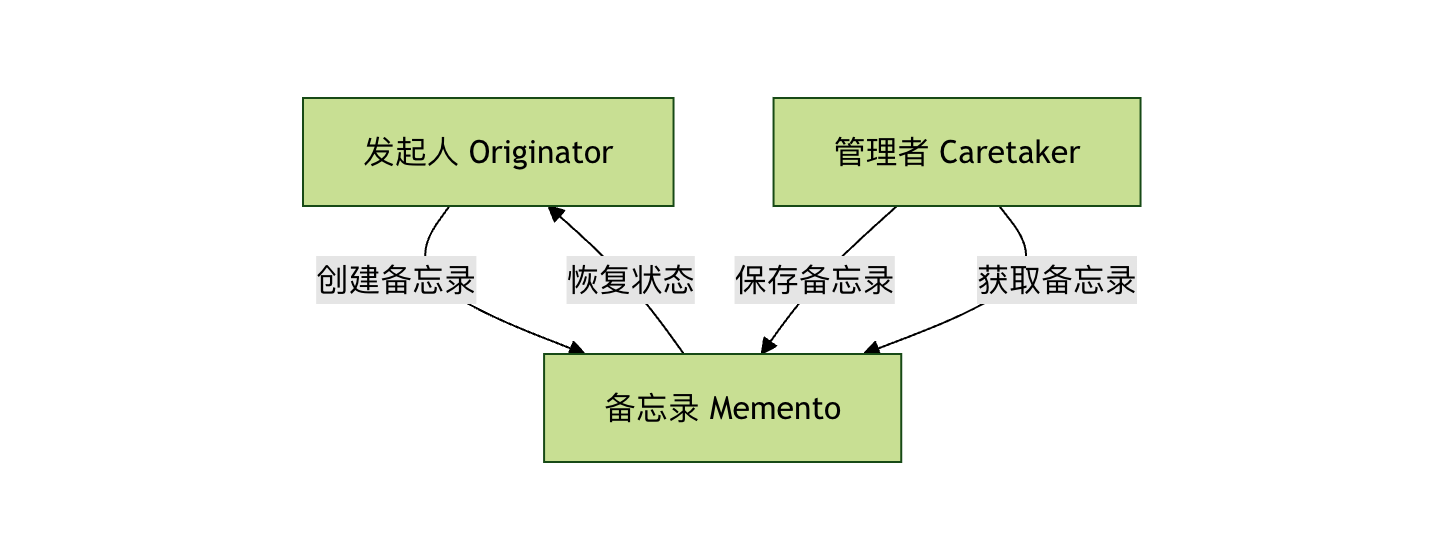
The Memento Pattern consists of three main roles:
1. Originator
- The object that needs to save state
- Creates a memento to record the current state
- Uses the memento to restore a previous state
2. Memento
- Stores the internal state of the originator object
- Prevents objects other than the originator from accessing the memento's contents
3. Caretaker
- Responsible for saving mementos
- Cannot operate on or inspect the contents of mementos
Python Implementation of the Memento Pattern
Let's implement the Memento Pattern concretely through a text editor example.
Basic Implementation
Example
"""Memento class - saves the state of the text editor"""
def __init__(self, content):
self._content = content
def get_content(self):
"""Get the saved content"""
return self._content
class TextEditor:
"""Originator class - Text editor"""
def __init__(self):
self._content = ""
def write(self, text):
"""Write text"""
self._content += text
def get_content(self):
"""Get current content"""
return self._content
def save(self):
"""Create memento - save current state"""
return TextEditorMemento(self._content)
def restore(self, memento):
"""Restore state - read from memento"""
self._content = memento.get_content()
class HistoryManager:
"""Caretaker class - History manager"""
def __init__(self):
self._mementos = []
def push(self, memento):
"""Save memento"""
self._mementos.append(memento)
def pop(self):
"""Get the latest memento"""
if self._mementos:
return self._mementos.pop()
return None
Complete Example Code
Example
def memo_pattern_demo():
# Create text editor and history manager
editor = TextEditor()
history = HistoryManager()
print("=== Text Editor Memento Pattern Demo ==="\n")
# First edit and save
editor.write("Hello, ")
history.push(editor.save())
print(f"Current content: {editor.get_content()}")
print("✅ State saved\n")
# Second edit and save
editor.write("World!")
history.push(editor.save())
print(f"Current content: {editor.get_content()}")
print("✅ State saved\n")
# Third edit but not save
editor.write(" This is new text.")
print(f"Current content: {editor.get_content()}")
print("❌ Current edit not saved\n")
# Undo operation - restore to the last saved state
memento = history.pop()
if memento:
editor.restore(memento)
print(f"Content after undo: {editor.get_content()}")
print("↩️ Undone to the previous save point\n")
# Undo again
memento = history.pop()
if memento:
editor.restore(memento)
print(f"Content after undo again: {editor.get_content()}")
print("↩️ Undone to the initial state")
# Run the demo
if __name__ == "__main__":
memo_pattern_demo()
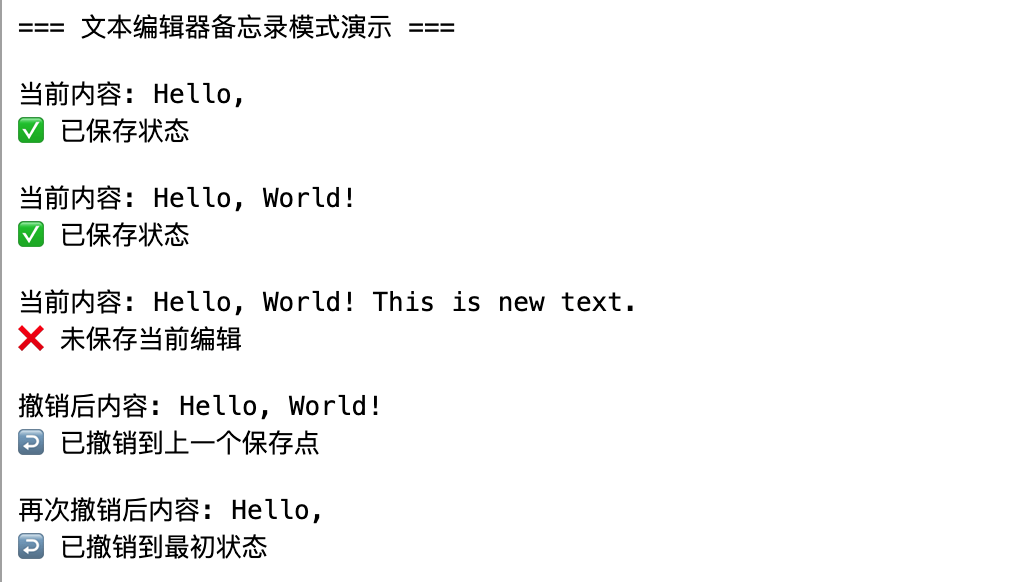
Running result:
Advanced Application: Memento Supporting Multiple States
In real applications, we may need to save multiple attributes of an object. Here is a more complex example:
Example
import json
class GameStateMemento:
"""Game state memento"""
def __init__(self, level, score, player_health, inventory):
self._state = {
'level': level,
'score': score,
'player_health': player_health,
'inventory': inventory.copy(), # Create a copy to avoid reference issues
'timestamp': datetime.datetime.now().isoformat()
}
def get_state(self):
"""Get full state"""
return self._state.copy()
def get_timestamp(self):
"""Get save time"""
return self._state['timestamp']
class Game:
"""Game class - Originator"""
def __init__(self):
self.level = 1
self.score = 0
self.player_health = 100
self.inventory = ['sword', 'potion']
def play(self, level_increase=1, score_increase=100, health_change=0, new_item=None):
"""Simulate game process"""
self.level += level_increase
self.score += score_increase
self.player_health += health_change
if new_item and new_item not in self.inventory:
self.inventory.append(new_item)
# Health cannot be negative
self.player_health = max(0, self.player_health)
def display_status(self):
"""Display current state"""
status = f"""
🎮 Game state:
Level: {self.level}
Score: {self.score}
Health: {self.player_health}
Inventory: {', '.join(self.inventory)}
"""
print(status)
def save_game(self):
"""Save game state"""
return GameStateMemento(
self.level,
self.score,
self.player_health,
self.inventory
)
def load_game(self, memento):
"""Load game state"""
state = memento.get_state()
self.level = state['level']
self.score = state['score']
self.player_health = state['player_health']
self.inventory = state['inventory']
class SaveManager:
"""Save manager"""
def __init__(self):
self.saves = {}
def create_save(self, save_name, memento):
"""Create save"""
self.saves[save_name] = memento
print(f"💾 Save '{save_name}' created successfully!")
def load_save(self, save_name):
"""Load save"""
if save_name in self.saves:
print(f"🔄 Loading save '{save_name}'...")
return self.saves[save_name]
else:
print(f"❌ Save '{save_name}' does not exist!")
return None
def list_saves(self):
"""List all saves"""
if not self.saves:
print("📁 No saves available")
return
print("\n📋 Save list:")
for name, memento in self.saves.items():
timestamp = memento.get_timestamp()
print(f" - {name} (Saved at: {timestamp})")
# Advanced example demo
def advanced_memo_demo():
print("=== Game Save System Demo ==="\n")
game = Game()
save_manager = SaveManager()
# Initial state
print("🎯 Starting a new game:")
game.display_status()
# Game progress
print("🚀 Playing the game...")
game.play(level_increase=2, score_increase=500, new_item='shield')
game.display_status()
# Save the first save
save_manager.create_save("Level 1 completed", game.save_game())
# Continue the game
print("⚔️ Continue adventuring...")
game.play(level_increase=1, score_increase=200, health_change=-30, new_item='magic_wand')
game.display_status()
# Save the second save
save_manager.create_save("Level 2 starts", game.save_game())
# Display save list
save_manager.list_saves()
# Load the first save
print("\n⏪ Return to Level 1 completed state:")
first_save = save_manager.load_save("Level 1 completed")
if first_save:
game.load_game(first_save)
game.display_status()
# Run the advanced example
if __name__ == "__main__":
advanced_memo_demo()
Advantages and Disadvantages of the Memento Pattern
Advantages
- Encapsulation protection: Does not expose an object's internal state, maintaining encapsulation
- Simplify the originator: Separates state-saving logic from business logic
- Easy to implement recovery: Provides a simple state restoration mechanism
- Support multiple undos: Can save states at multiple points in time
Disadvantages
- Memory consumption: If the state is large or saves are frequent, it consumes a lot of memory
- Caretaker overhead: Requires an additional class to manage mementos
- Lifecycle management: Need to properly handle the creation and destruction of mementos
Best Practices and Precautions
1. Memory Optimization Strategy
Example
class LimitedHistoryManager:
def __init__(self, max_size=10):
self._mementos = []
self._max_size = max_size
def push(self, memento):
if len(self._mementos) >= self._max_size:
# Remove the oldest record
self._mementos.pop(0)
self._mementos.append(memento)
2. Handling Complex Object States
For objects with complex references, ensure the memento creates a deep copy:
Example
class ComplexMemento:
def __init__(self, complex_state):
# Use deep copy to avoid reference issues
self._state = copy.deepcopy(complex_state)
3. Selective Saving
Not all states need to be saved; you can choose to save only important properties:
Example
"""Selectively save important state"""
important_state = {
'essential_data': self.essential_data,
'critical_settings': self.critical_settings
# Ignore temporary data and cache
}
return SelectiveMemento(important_state)
Real-World Application Scenarios
1. Graphic Editor
Example
def save_state(self):
return GraphicMemento(
self.selected_shapes.copy(),
self.canvas_state,
self.view_settings
)
2. Configuration Manager
Example
def backup_config(self):
return ConfigMemento(
self.current_settings.copy(),
self.user_preferences
)
3. Transaction Operations
Example
def create_checkpoint(self):
return TransactionMemento(
self.connection_state,
self.pending_operations.copy()
)
Summary
The Memento pattern is a powerful and practical design pattern that provides an elegant mechanism for state saving and restoration. By separating state-saving logic from business logic, it not only keeps the code clean but also enhances system maintainability.
Key Points:
- The core of the Memento pattern is the "save-restore" mechanism.
- The three core roles each perform their own duties with clear responsibilities.
- In practice, pay attention to memory management and state selection.
- Suitable for scenarios requiring undo, redo, or state rollback.