Python Factory Pattern
The Factory Pattern is a creational design pattern that provides the best way to create objects.
Imagine you go to a restaurant to order food: you don't need to know how the kitchen prepares the food, you just tell the waiter what you want, and the kitchen will make it for you.
The Factory Pattern is such a "kitchen": it is responsible for creating objects, and you only need to tell it what type of object you want.
Why do we need the Factory Pattern?
In programming, we often need to create objects. If we directly use thenewkeyword or a class constructor in code, it will lead to:
- High code coupling: The code for creating objects is tightly coupled with the concrete classes
- Difficult to maintain: When you need to modify or add new object types, you have to modify code in multiple places
- Violates the Open/Closed Principle: The principle of being open for extension and closed for modification is broken
The Factory Pattern solves these problems by encapsulating the object creation process.
Three types of Factory Pattern
The Factory Pattern is mainly divided into three types; let's understand them through concrete examples.
1. Simple Factory Pattern
The Simple Factory Pattern is the most basic factory pattern; it uses a factory class to create different types of objects.
Basic structure
Example
# Product interface
class Animal(ABC):
@abstractmethod
def speak(self):
pass
# Concrete product
class Dog(Animal):
def speak(self):
return "Woof!"
class Cat(Animal):
def speak(self):
return "Meow!"
class Duck(Animal):
def speak(self):
return "Quack!"
# Simple factory
class AnimalFactory:
@staticmethod
def create_animal(animal_type):
if animal_type == "dog":
return Dog()
elif animal_type == "cat":
return Cat()
elif animal_type == "duck":
return Duck()
else:
raise ValueError(f"Unknown animal type: {animal_type}")
# Usage example
def test_simple_factory():
factory = AnimalFactory()
dog = factory.create_animal("dog")
cat = factory.create_animal("cat")
duck = factory.create_animal("duck")
print(dog.speak()) # Output: Woof!
print(cat.speak()) # Output: Meow!
print(duck.speak()) # Output: Quack!
if __name__ == "__main__":
test_simple_factory()
Advantages and disadvantages
Advantages:
- Decouples the client from concrete product classes
- Separation of responsibilities, easy to maintain
Disadvantages:
- Adding new products requires modifying the factory class, violating the Open/Closed Principle
- The factory class has too many responsibilities, not adhering to the Single Responsibility Principle
2. Factory Method Pattern
The Factory Method Pattern solves the problems of the Simple Factory Pattern by letting subclasses decide what objects to create.
Basic structure
Example
# Product interface
class Button(ABC):
@abstractmethod
def render(self):
pass
@abstractmethod
def onClick(self):
pass
# Concrete product
class WindowsButton(Button):
def render(self):
return "Render Windows-style button"
def onClick(self):
return "Windows button clicked"
class MacButton(Button):
def render(self):
return "Render Mac-style button"
def onClick(self):
return "Mac button clicked"
# Abstract creator class
class Dialog(ABC):
@abstractmethod
def createButton(self) -> Button:
pass
def render(self):
# Call the factory method to create a product
button = self.createButton()
result = button.render()
return result
# Concrete creator
class WindowsDialog(Dialog):
def createButton(self) -> Button:
return WindowsButton()
class MacDialog(Dialog):
def createButton(self) -> Button:
return MacButton()
# Usage example
def test_factory_method():
# Choose the concrete factory based on configuration
config = "windows" # Can be read from a configuration file
if config == "windows":
dialog = WindowsDialog()
else:
dialog = MacDialog()
result = dialog.render()
print(result)
if __name__ == "__main__":
test_factory_method()
Factory Method Pattern workflow
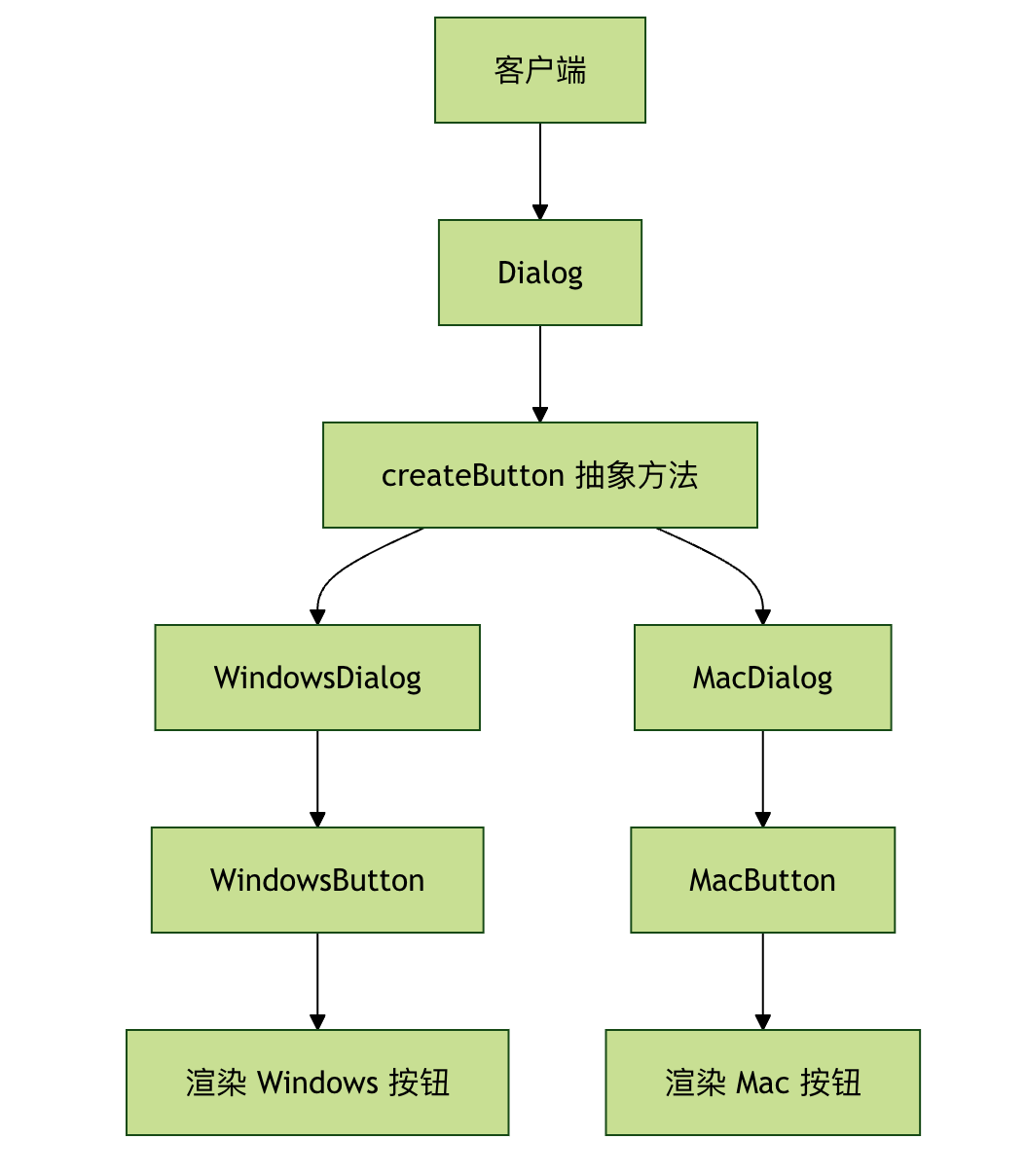
3. Abstract Factory Pattern
The Abstract Factory Pattern provides an interface for creating families of related or dependent objects without specifying their concrete classes.
Basic structure
Example
# Abstract product A
class Button(ABC):
@abstractmethod
def paint(self):
pass
# Abstract product B
class Checkbox(ABC):
@abstractmethod
def paint(self):
pass
# Concrete product A1
class WindowsButton(Button):
def paint(self):
return "Render Windows button"
# Concrete product A2
class MacButton(Button):
def paint(self):
return "Render Mac button"
# Concrete product B1
class WindowsCheckbox(Checkbox):
def paint(self):
return "Render Windows checkbox"
# Concrete product B2
class MacCheckbox(Checkbox):
def paint(self):
return "Render Mac checkbox"
# Abstract factory
class GUIFactory(ABC):
@abstractmethod
def createButton(self) -> Button:
pass
@abstractmethod
def createCheckbox(self) -> Checkbox:
pass
# Concrete factory 1
class WindowsFactory(GUIFactory):
def createButton(self) -> Button:
return WindowsButton()
def createCheckbox(self) -> Checkbox:
return WindowsCheckbox()
# Concrete factory 2
class MacFactory(GUIFactory):
def createButton(self) -> Button:
return MacButton()
def createCheckbox(self) -> Checkbox:
return MacCheckbox()
# Client code
class Application:
def __init__(self, factory: GUIFactory):
self.factory = factory
self.button = None
self.checkbox = None
def createUI(self):
self.button = self.factory.createButton()
self.checkbox = self.factory.createCheckbox()
def paint(self):
result = []
if self.button:
result.append(self.button.paint())
if self.checkbox:
result.append(self.checkbox.paint())
return "\n".join(result)
# Usage example
def test_abstract_factory():
# Select the factory based on the system type
system_type = "windows" # Can be automatically detected or read from configuration
if system_type == "windows":
factory = WindowsFactory()
else:
factory = MacFactory()
app = Application(factory)
app.createUI()
print(app.paint())
if __name__ == "__main__":
test_abstract_factory()
Comparison of the three Factory Patterns
| Feature | Simple Factory Pattern | Factory Method Pattern | Abstract Factory Pattern |
|---|---|---|---|
| Complexity | Low | Medium | High |
| Extensibility | Poor | OK | Very good |
| Applicable scenarios | Few object types | Single product family | Multiple related product families |
| Open/Closed Principle | Violates | Complies | Complies |
| Dependency | Depends on concrete classes | Depends on abstract classes | Depends on abstract interfaces |
Practical application scenarios
Scenario 1: Database Connection Factory
Example
import sqlite3
import mysql.connector
# Database connection interface
class DatabaseConnection(ABC):
@abstractmethod
def connect(self):
pass
@abstractmethod
def execute(self, query):
pass
# Concrete database connection
class SQLiteConnection(DatabaseConnection):
def __init__(self, db_path):
self.db_path = db_path
self.connection = None
def connect(self):
self.connection = sqlite3.connect(self.db_path)
return self.connection
def execute(self, query):
if self.connection:
cursor = self.connection.cursor()
cursor.execute(query)
return cursor.fetchall()
class MySQLConnection(DatabaseConnection):
def __init__(self, host, user, password, database):
self.host = host
self.user = user
self.password = password
self.database = database
self.connection = None
def connect(self):
self.connection = mysql.connector.connect(
host=self.host,
user=self.user,
password=self.password,
database=self.database
)
return self.connection
def execute(self, query):
if self.connection:
cursor = self.connection.cursor()
cursor.execute(query)
return cursor.fetchall()
# Database factory
class DatabaseFactory:
@staticmethod
def create_connection(db_type, **kwargs):
if db_type == "sqlite":
return SQLiteConnection(**kwargs)
elif db_type == "mysql":
return MySQLConnection(**kwargs)
else:
raise ValueError(f"Unsupported database type: {db_type}")
# Usage example
def test_database_factory():
# Create SQLite connection
sqlite_conn = DatabaseFactory.create_connection(
"sqlite",
db_path="example.db"
)
sqlite_conn.connect()
# Create MySQL connection
mysql_conn = DatabaseFactory.create_connection(
"mysql",
host="localhost",
user="root",
password="password",
database="test"
)
mysql_conn.connect()
print("Database connection created successfully!")
if __name__ == "__main__":
test_database_factory()
Scenario 2: Logger Factory
Example
from abc import ABC, abstractmethod
import sys
# Logger interface
class Logger(ABC):
@abstractmethod
def info(self, message):
pass
@abstractmethod
def error(self, message):
pass
@abstractmethod
def debug(self, message):
pass
# Console logger
class ConsoleLogger(Logger):
def info(self, message):
print(f"INFO: {message}")
def error(self, message):
print(f"ERROR: {message}", file=sys.stderr)
def debug(self, message):
print(f"DEBUG: {message}")
# File logger
class FileLogger(Logger):
def __init__(self, filename):
self.filename = filename
def info(self, message):
with open(self.filename, 'a') as f:
f.write(f"INFO: {message}\n")
def error(self, message):
with open(self.filename, 'a') as f:
f.write(f"ERROR: {message}\n")
def debug(self, message):
with open(self.filename, 'a') as f:
f.write(f"DEBUG: {message}\n")
# Logger factory
class LoggerFactory:
@staticmethod
def get_logger(logger_type, **kwargs):
if logger_type == "console":
return ConsoleLogger()
elif logger_type == "file":
return FileLogger(**kwargs)
else:
raise ValueError(f"Unsupported logger type: {logger_type}")
# Usage example
def test_logger_factory():
# Create console logger
console_logger = LoggerFactory.get_logger("console")
console_logger.info("This is an information message")
console_logger.error("This is an error message")
# Create file logger
file_logger = LoggerFactory.get_logger("file", filename="app.log")
file_logger.info("Information logged to file")
file_logger.debug("Debug information")
if __name__ == "__main__":
test_logger_factory()
Best practices and considerations
1. When to use the Factory Pattern?
Situations suitable for using the Factory Pattern:
- The object creation process is relatively complex
- Need to create different objects based on different conditions
- Want to separate object creation from usage
- The system needs to support multiple types of products
Situations where it is not suitable:
- The object creation process is simple, just use the constructor directly
- There are few product types and extension is unlikely
2. Common mistakes and how to avoid them
Mistake 1: Over-engineering
Example
class SimpleObject:
def __init__(self, name):
self.name = name
# Over-engineered factory
class SimpleObjectFactory:
@staticmethod
def create_simple_object(name):
return SimpleObject(name)
# Recommended: create directly
obj = SimpleObject("test")
Mistake 2: The factory class has too many responsibilities
Example
class GodFactory:
def create_user(self): ...
def create_order(self): ...
def create_product(self): ...
def send_email(self): ... # This is not creating objects!
# Recommended: separate by responsibility
class UserFactory: ...
class OrderFactory: ...
class ProductFactory: ...
3. Integration with Dependency Injection
The Factory Pattern is often used together with Dependency Injection (DI):
Example
# Service interface
class NotificationService(ABC):
@abstractmethod
def send(self, message):
pass
# Concrete service
class EmailService(NotificationService):
def send(self, message):
return f"Send email: {message}"
class SMSService(NotificationService):
def send(self, message):
return f"Send SMS: {message}"
# Factory
class NotificationFactory:
@staticmethod
def create_service(service_type):
if service_type == "email":
return EmailService()
elif service_type == "sms":
return SMSService()
else:
raise ValueError(f"Unknown service type: {service_type}")
# Class using dependency injection
class OrderProcessor:
def __init__(self, notification_service: NotificationService):
self.notification_service = notification_service
def process_order(self, order):
# Handle order logic
result = self.notification_service.send("Order processing completed")
return result
# Usage
def main():
# Create service via factory
notification_service = NotificationFactory.create_service("email")
# Inject dependency
processor = OrderProcessor(notification_service)
result = processor.process_order({"id": 1})
print(result)
if __name__ == "__main__":
main()
Practice problems
Exercise 1: Implement a Shape Factory
Create a shape factory that supports creating Circle, Rectangle, and Triangle. Each shape should have methods to calculate area and perimeter.
Requirements:
- Use the Factory Method pattern
- Each shape class implements
calculate_area()andcalculate_perimeter()methods - Provide usage examples
Exercise 2: Extend the Database Factory
Based on the previous database factory example, add support for the PostgreSQL database.
Requirements:
- Create
PostgreSQLConnectionClass - Modify the factory to support the new database type
- Ensure not to break existing code
Exercise 3: Configuration-driven Factory
Create a system that can dynamically select a factory based on configuration files.
Requirements:
- Read configuration from JSON or YAML files
- Create corresponding objects based on the configuration
- Support hot reloading of configuration
Summary
The Factory pattern is a very important creational pattern in Python design. By encapsulating the object creation process, it provides the following benefits:
- Reduce coupling: The client does not need to know the creation details of specific products.
- Improve maintainability: Creation logic is centrally managed, making it easy to modify and extend.
- Enhance flexibility: New product types can be easily added.
- Promote code reuse: Creation logic can be reused in multiple places.
Remember to choose the appropriate type of factory pattern:
- Simple Factory: Suitable for scenarios with few product types and little change.
- Factory Method: Suitable for scenarios where product families need to be extended.
- Abstract Factory: Suitable for complex scenarios that require creating related product families.
By using the factory pattern properly, you can write more flexible, maintainable, and extensible Python code!
Other extensions