Python Facade Pattern
The Facade Pattern is a structural design pattern that provides a simplified interface to a complex subsystem. Imagine going to a restaurant: you don't need to know all the details of how the chefs chop, stir-fry, and plate the food, you just tell the waiter what you want, and the waiter coordinates the kitchen to complete all the work. This waiter plays the role of the "facade."
In software development, the Facade Pattern hides the complexity of a subsystem by creating a unified interface, making client code easier to use.
Core Idea of the Facade Pattern
Simplify Complex Systems
When a system becomes increasingly complex, the dependencies between classes also become intricate. The Facade Pattern reduces the coupling between the system and the client by providing a high-level interface.
Provide a Unified Interface
The facade class acts as the single entry point to the subsystem. The client only needs to interact with the facade class, without needing to understand the complex internal structure of the subsystem.
Lower the Barrier to Use
For developers unfamiliar with the internal structure of a system, the Facade Pattern allows them to quickly get up to speed and use the system's features.
Structure of the Facade Pattern
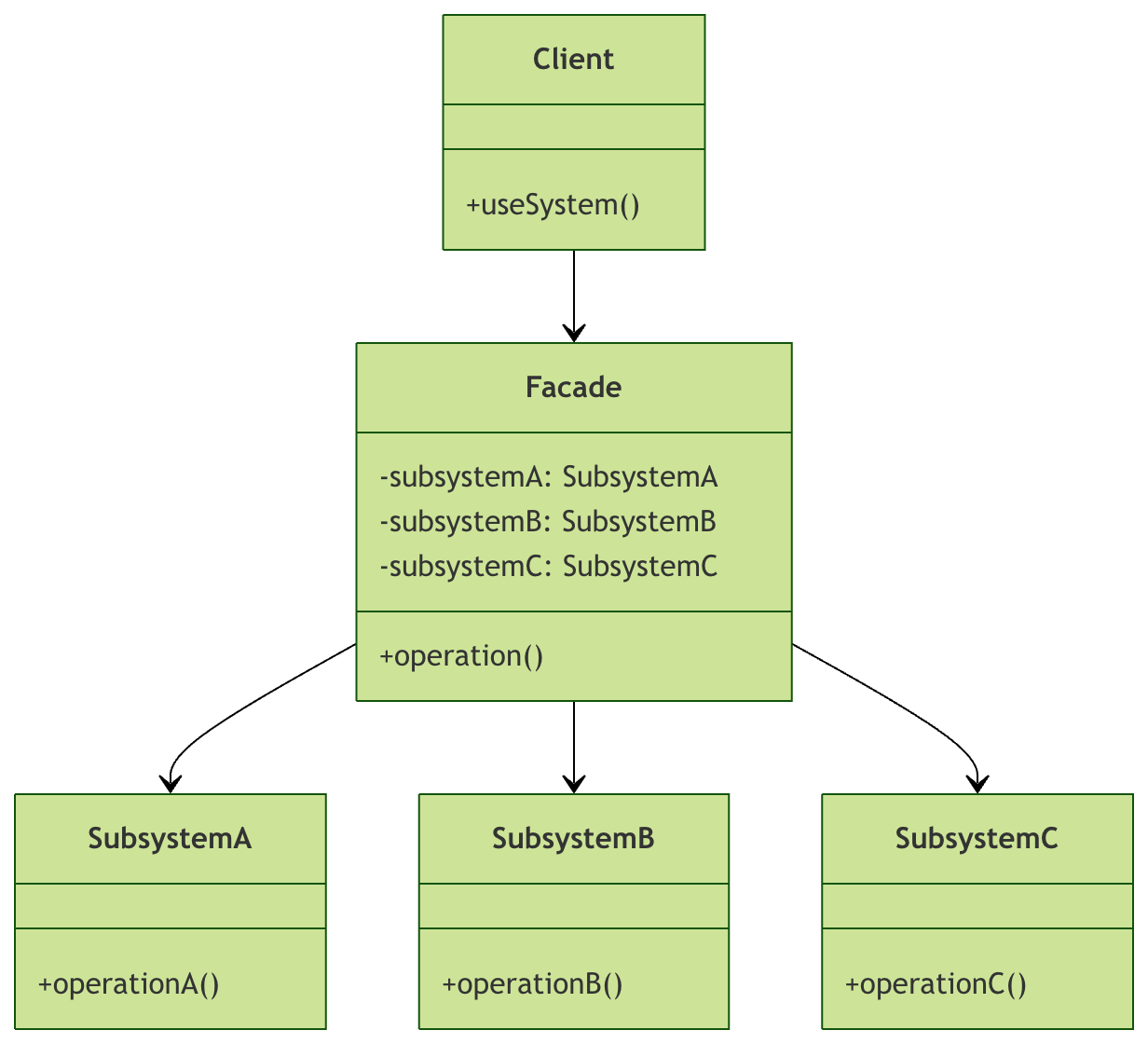
As can be seen from the diagram:
- Client: Code that uses the facade class
- Facade: Provides a simplified interface and coordinates the subsystems
- Subsystem: Classes that implement specific functionality
Practical Example: Home Theater System
Let's understand the practical application of the Facade Pattern through a home theater example.
Subsystem Classes
First, we create the device classes in the home theater:
Example
"""Amplifier class"""
def on(self):
print("Amplifier is on")
def set_volume(self, level):
print(f"Volume set to {level}")
def off(self):
print("Amplifier is off")
class DVDPlayer:
"""DVD player class"""
def on(self):
print("DVD player is on")
def play(self, movie):
print(f"Playing movie: {movie}")
def stop(self):
print("DVD player stopped")
def off(self):
print("DVD player is off")
class Projector:
"""Projector class"""
def on(self):
print("Projector is on")
def set_input(self, source):
print(f"Projector input source set to: {source}")
def off(self):
print("Projector is off")
class Lights:
"""Lighting class"""
def dim(self, level):
print(f"Lights dimmed to {level}%")
def on(self):
print("Lights fully on")
class Screen:
"""Screen class"""
def down(self):
print("Screen lowered")
def up(self):
print("Screen raised")
Facade Class
Now create the facade class, which encapsulates the complex operations of all devices:
Example
"""Home theater facade class"""
def __init__(self):
self.amplifier = Amplifier()
self.dvd_player = DVDPlayer()
self.projector = Projector()
self.lights = Lights()
self.screen = Screen()
def watch_movie(self, movie):
"""Watch a movie - complete all preparations with one click"""
print("\n"=== Starting home theater mode ===")
# Start devices in the correct order
self.lights.dim(10) # Dim the lights
self.screen.down() # Lower the screen
self.projector.on() # Turn on the projector
self.projector.set_input("DVD")
self.amplifier.on() # Turn on the amplifier
self.amplifier.set_volume(5) # Set the volume
self.dvd_player.on() # Turn on the DVD player
self.dvd_player.play(movie) # Play the movie
print("=== Home theater ready ==="\n")
def end_movie(self):
"""End movie watching - turn off all devices with one click"""
print("\n"=== Ending home theater mode ===")
# Turn off devices in the correct order
self.dvd_player.stop() # Stop the DVD
self.dvd_player.off() # Turn off the DVD
self.amplifier.off() # Turn off the amplifier
self.projector.off() # Turn off the projector
self.screen.up() # Raise the screen
self.lights.on() # Turn on the lights
print("=== All devices are off ==="\n")
Client Code
Now let's see how the client uses this simplified interface:
Example
# Create a home theater facade instance
home_theater = HomeTheaterFacade()
# Watch a movie - only one method call needed!
home_theater.watch_movie("Avatar")
# Simulate the movie-watching process...
print("Enjoying movie time..."\n")
# End movie watching - again, only one method call needed!
home_theater.end_movie()
if __name__ == "__main__":
main()
Run result:
=== 开始家庭影院模式 ===
灯光调暗到 10%
屏幕已降下
投影仪已开启
投影仪输入源设置为: DVD
功放已开启
音量设置为 5
DVD播放器已开启
开始播放电影: 阿凡达
=== 家庭影院准备就绪 ===

正在享受电影时光...

=== 结束家庭影院模式 ===
DVD播放器已停止
DVD播放器已关闭
功放已关闭
投影仪已关闭
屏幕已升起
灯光全开
=== 所有设备已关闭 ===
Advantages of the Facade Pattern
1. Simplify Client Code
The client no longer needs to understand the details and startup order of all subsystems:
Example
def watch_movie_manual():
lights = Lights()
screen = Screen()
projector = Projector()
amplifier = Amplifier()
dvd_player = DVDPlayer()
lights.dim(10)
screen.down()
projector.on()
projector.set_input("DVD")
amplifier.on()
amplifier.set_volume(5)
dvd_player.on()
dvd_player.play("Avatar")
# With the facade pattern - simplified client code
def watch_movie_simple():
home_theater = HomeTheaterFacade()
home_theater.watch_movie("Avatar")
2. Reduce Coupling
When a subsystem changes, only the facade class needs to be modified; the client code does not need changes.
3. Improve Code Maintainability
Encapsulating complex subsystem operations in one place makes maintenance and debugging easier.
More Practical Application Scenarios
Scenario 1: Database Operation Facade
Example
"""Database operation facade class"""
def __init__(self, connection_string):
self.connection_string = connection_string
def execute_query(self, query, params=None):
"""Simplified interface for executing queries"""
# Connect to database
connection = self._connect()
cursor = connection.cursor()
try:
# Execute query
if params:
cursor.execute(query, params)
else:
cursor.execute(query)
# Get results
result = cursor.fetchall()
return result
except Exception as e:
print(f"Query execution failed: {e}")
return None
finally:
# Close connection
cursor.close()
connection.close()
def _connect(self):
"""Internal connection method - hidden from client"""
# Actual database connection logic
print("Connecting to database...")
return "Simulating database connection"
Scenario 2: File Processing Facade
Example
"""File processing facade class"""
def process_file(self, file_path):
"""Simplified interface for processing files"""
try:
# Validate file
if not self._validate_file(file_path):
return False
# Read file
content = self._read_file(file_path)
# Process content
processed_content = self._process_content(content)
# Save result
self._save_result(processed_content)
return True
except Exception as e:
print(f"File processing failed: {e}")
return False
def _validate_file(self, file_path):
"""Validate file"""
print(f"Validating file: {file_path}")
return True
def _read_file(self, file_path):
"""Read file"""
print(f"Reading file: {file_path}")
return "File content"
def _process_content(self, content):
"""Process content"""
print("Processing file content...")
return "Processed content"
def _save_result(self, content):
"""Save result"""
print("Saving processing result...")
Best Practices for the Facade Pattern
1. Design Interfaces Properly
The facade class should provide genuinely useful simplified interfaces, not simply wrap all subsystem methods.
2. Maintain Single Responsibility
Each facade class should focus on a specific functional area.
3. Don't Overuse
If the system itself is not complex, using the Facade Pattern may add an unnecessary abstraction layer.
4. Consider Extensibility
Consider new features that may be added in the future when designing.
Practical Exercises
Now it's your turn! Try completing the following exercises to consolidate what you've learned:
Exercise 1: Improve the Home Theater System
isHomeTheaterFacadeAdd the following new features to the class:
listen_to_music(song)Method: turn on only the speaker system to listen to musicplay_game(game)Method: turn on game mode (may require different device configurations)
Exercise 2: Create an E-commerce Order Processing Facade
Design an order processing facade for an e-commerce system, including the following subsystems:
- Inventory Check
- Payment Processing
- Logistics Arrangement
- Email Notification
Exercise 3: Debugging Tips
Add logging functionality to the facade class to record the call time and parameters of each method, making it easier to debug.
Summary
The Facade pattern is a powerful tool that hides the complexity of a system by providing a simplified interface. Just like a restaurant waiter, the facade class acts as an intermediary between the client and subsystems, making complex systems simple and intuitive to use.
Key Points:
- The Facade pattern reduces the complexity of using the system.
- Improves code maintainability and readability.
- Reduces coupling between clients and subsystems.
- Particularly suitable for complex systems or libraries that need to provide a simplified API.