PyCharm Unit Testing
Unit testing is a fundamental means of ensuring code quality; it verifies whether the behavior of the smallest testable unit in a program meets expectations.
Writing and running unit tests in PyCharm is very convenient; the IDE provides a complete workflow from test creation to execution and result analysis.
PyCharm has built-in support for three mainstream Python testing frameworks:unittest、pytestandnose。
Writing Test Examples
The following complete example demonstrates how to write unit tests in PyCharm.
First, we create a simpleCarclass, and then write test cases for it.
Code under test: car.py
Example
class Car:
"""Simulates a car class, providing acceleration and braking functions."""
def __init__(self, make="example", model="EXAMPLE-X1"):
# Initialize the car brand and model
self.make = make
self.model = model
# Initial speed is 0
self.speed = 0
def accelerate(self, increment):
"""Acceleration method.
Parameters:
increment: speed increment, must be a positive integer
Returns:
The current speed after acceleration
Raises:
ValueError: raised when increment is negative or zero
"""
if increment <= 0:
raise ValueError("Acceleration increment must be positive")
self.speed += increment
return self.speed
def brake(self, decrement):
"""Braking method.
Parameters:
decrement: deceleration amount, must be a positive integer
Returns:
The current speed after braking, minimum 0
Raises:
ValueError: raised when decrement is negative or zero
"""
if decrement <= 0:
raise ValueError("Deceleration amount must be positive")
self.speed = max(0, self.speed - decrement)
return self.speed
Test code: test_car.py
Example
# Write test cases using the unittest framework
import unittest
from car import Car
class TestCar(unittest.TestCase):
"""Test suite for the Car class."""
def setUp(self):
"""setUp is called before each test method to create a brand-new Car instance."""
self.car = Car()
def test_initial_speed(self):
"""Test whether the initial speed is 0."""
self.assertEqual(self.car.speed, 0,
"The new car's initial speed should be 0")
def test_accelerate_normal(self):
"""Test normal acceleration scenario."""
# Accelerate by 50
result = self.car.accelerate(50)
# Verify the return value
self.assertEqual(result, 50,
"The speed after acceleration should be 50")
# Verify the object state
self.assertEqual(self.car.speed, 50,
"The car.speed attribute should be updated to 50")
def test_accelerate_multiple_times(self):
"""Test the cumulative effect of multiple accelerations."""
# First acceleration by 30
self.car.accelerate(30)
# Second acceleration by 20
result = self.car.accelerate(20)
# Total speed should be 50
self.assertEqual(result, 50,
"The speed after two accelerations should be 50")
def test_accelerate_with_zero(self):
"""Test that an exception is raised when the acceleration increment is 0."""
with self.assertRaises(ValueError,
msg="An acceleration increment of 0 should raise ValueError"):
self.car.accelerate(0)
def test_accelerate_negative(self):
"""Test that an exception is raised when the acceleration increment is negative."""
with self.assertRaises(ValueError,
msg="A negative acceleration increment should raise ValueError"):
self.car.accelerate(-10)
def test_brake_normal(self):
"""Test normal braking scenario."""
# First accelerate to 80
self.car.accelerate(80)
# Brake by 30
result = self.car.brake(30)
# Verify the speed
self.assertEqual(result, 50,
"The speed after braking should be 50")
def test_brake_below_zero(self):
"""Test that braking does not make the speed go below 0."""
# First accelerate to 20
self.car.accelerate(20)
# Brake by 50, the speed should be limited to 0
result = self.car.brake(50)
self.assertEqual(result, 0,
"The speed should not be below 0")
def test_brake_with_zero(self):
"""Test that an exception is raised when the deceleration amount is 0."""
with self.assertRaises(ValueError,
msg="A deceleration amount of 0 should raise ValueError"):
self.car.brake(0)
# Execute tests when the script is run directly
if __name__ == "__main__":
unittest.main()
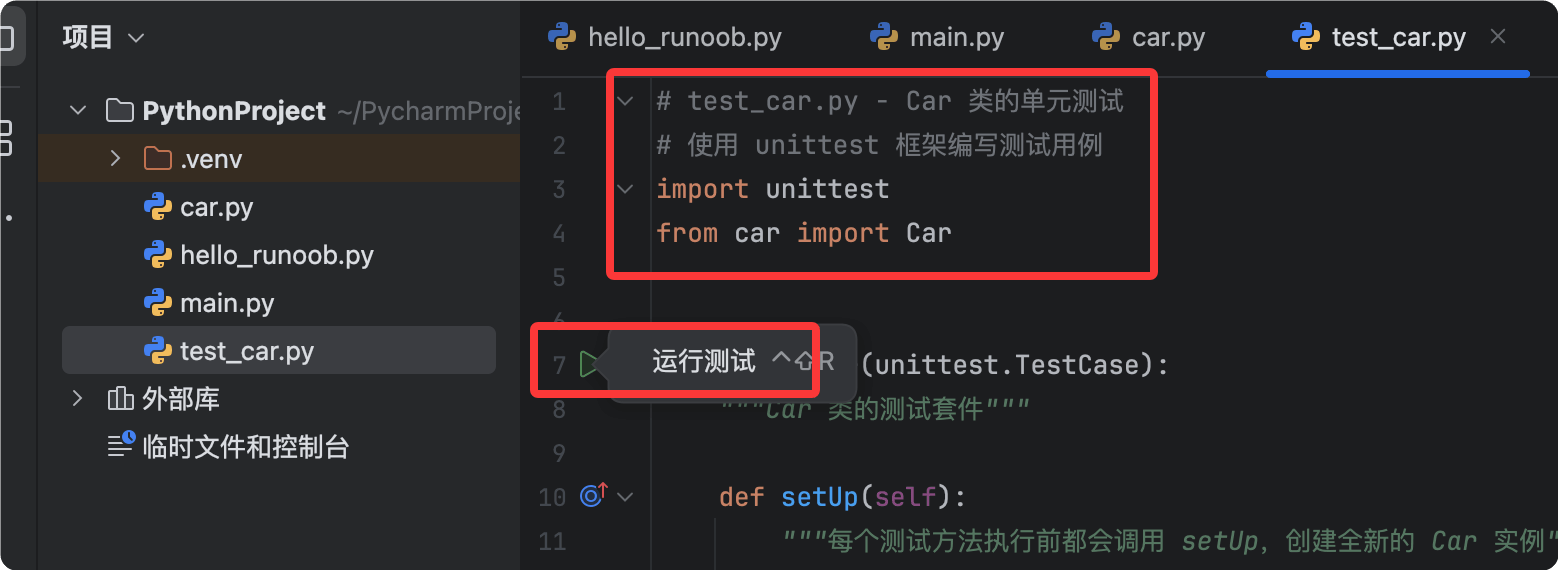
PyCharm can automatically recognize test classes and test methods. Test class names start withTestand test method names start withtest_This is the Python test naming convention.
Running Tests
After writing the test code, there are multiple ways to run the tests.
Method 1: Click the green run icon
PyCharm will display in the left Gutter area next to the test class and each test methoda green run icon.。
Clicking the green icon next to the class name runs all tests in that class, while clicking the icon next to a method runs only that single test.
You can also right-click the test file and choose from the menuRun 'test_car'。
Method 2: Use keyboard shortcuts
Place the cursor inside the test class or test method and pressCtrl + Shift + F10to run the current test.
Viewing Test Results
After the test run completes, PyCharm will, in the bottomRuntool window,display the test results in atree view.
Passed tests are marked with a green checkmark, failed tests with a red cross, along with detailed error messages and stack traces.
Clicking a failed test item makes PyCharm jump directly to the code line where the error occurred, making it easy to quickly locate the problem.
Switching Test Frameworks
PyCharm uses by defaultunittestas the test runner, but you can easily switch to other frameworks.
Configuration Steps
- OpenSettings(Shortcut: Ctrl + Alt + S, or Command + , on macOS).
- Navigate to Python。
- Inthe Integrated Toolssection and find theTestingdropdown menu.
- fromUnittests、pytest、NosetestsSelect the framework you need.
- ClickOKto save the settings.
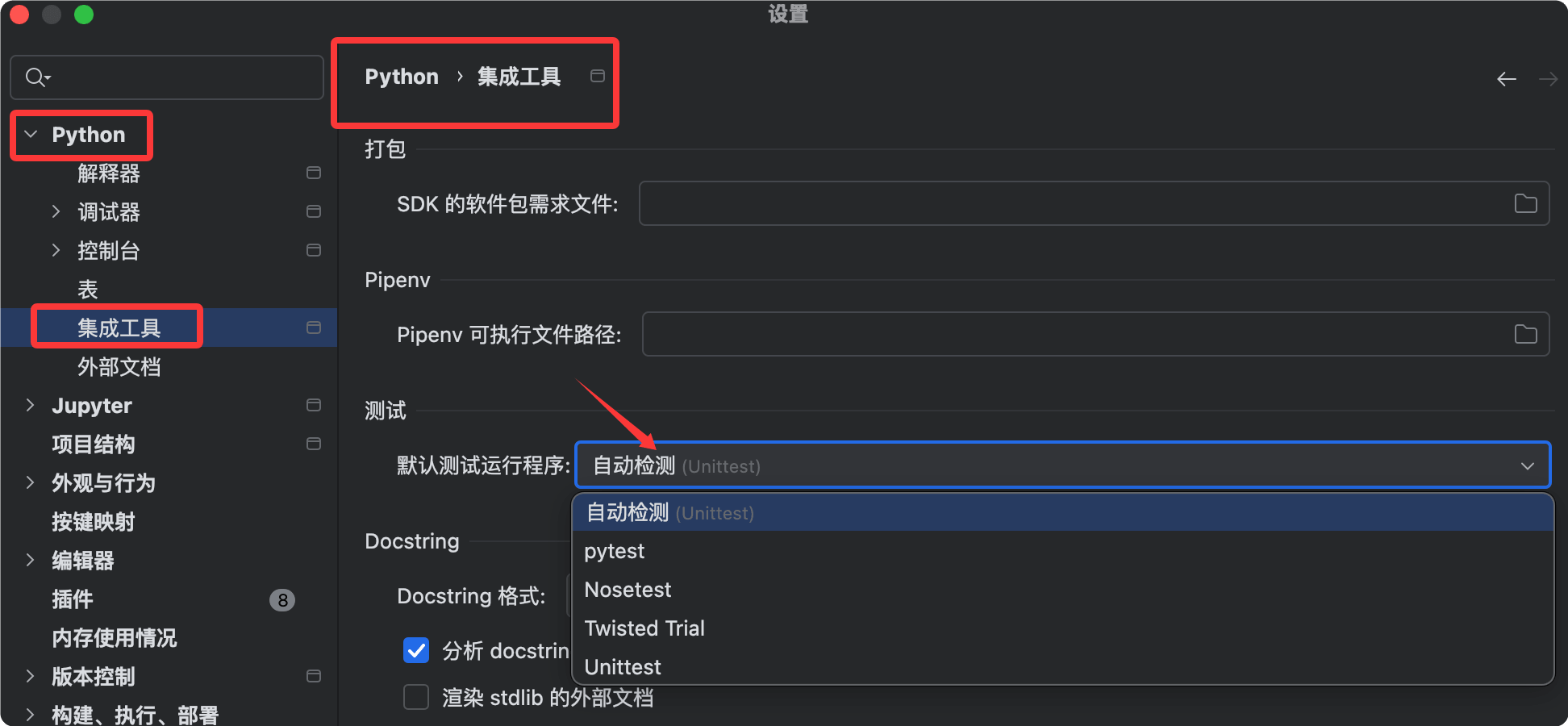
If you choose pytest as the test runner, make sure you havepip install pytestinstalled the pytest package.
Test-Driven Development Tips
Unit testing is not only used to verify existing code; it is also theTest-Driven Development (TDD)core practice.
The recommended development process is to write test cases first, then write the implementation code, and finally verify by passing tests.
Develop the habit of writing tests, and your code quality will be significantly improved.
Other Extensions