MySQL WHERE Clause
We know that from a MySQL table, usingSELECTthe statement to read data.
If you need to conditionally select data from a table, you can add a WHERE clause to the SELECT statement.
The WHERE clause is used to filter query results in MySQL, returning only rows that meet specific conditions.
Syntax
The following is the general syntax for using the WHERE clause in a SQL SELECT statement to read data from a data table:
SELECT column1, column2, ...
FROM table_name
WHERE condition;
Parameter description:
column1,column2, ... are the names of the columns you want to select. If you use*means selecting all columns.table_nameis the name of the table from which you want to query data.WHERE conditionis the clause used to specify the filter condition.
Additional notes:
- In a query statement, you can use one or more tables, and commas are used between tables,to separate them, and use the WHERE statement to set query conditions.
- You can specify any condition in the WHERE clause.
- You can use AND or OR to specify one or more conditions.
- The WHERE clause can also be applied to SQL DELETE or UPDATE commands.
- The WHERE clause is similar to an if condition in programming languages; it reads the specified data based on the field values in a MySQL table.
The following is a list of operators that can be used in the WHERE clause.
In the examples in the table below, assume A is 10 and B is 20.
| Operator | Description | Example |
|---|---|---|
| = | Equal sign, checks whether two values are equal; returns true if they are equal. | (A = B) returns false. |
| <>, != | Not equal, checks whether two values are equal; returns true if they are not equal. | (A != B) returns true. |
| > | Greater than sign, checks whether the value on the left is greater than the value on the right; returns true if the left value is greater than the right value. | (A > B) returns false. |
| < | Less than sign, checks whether the value on the left is less than the value on the right; returns true if the left value is less than the right value. | (A < B) returns true. |
| >= | Greater than or equal sign, checks whether the value on the left is greater than or equal to the value on the right; returns true if the left value is greater than or equal to the right value. | (A >= B) returns false. |
| <= | Less than or equal sign, checks whether the value on the left is less than or equal to the value on the right; returns true if the left value is less than or equal to the right value. | (A <= B) returns true. |
Simple Examples
1. Equal condition:
SELECT * FROM users WHERE username = 'test';
2. Not equal condition:
SELECT * FROM users WHERE username != 'example';
3. Greater than condition:
SELECT * FROM products WHERE price > 50.00;
4. Less than condition:
SELECT * FROM orders WHERE order_date < '2023-01-01';
5. Greater than or equal condition:
SELECT * FROM employees WHERE salary >= 50000;
6. Less than or equal condition:
SELECT * FROM students WHERE age <= 21;
7. Combined conditions (AND, OR):
SELECT * FROM products WHERE category = 'Electronics' AND price > 100.00;

SELECT * FROM orders WHERE order_date >= '2023-01-01' OR total_amount > 1000.00;
8. Fuzzy matching condition (LIKE):
SELECT * FROM customers WHERE first_name LIKE 'J%';
9. IN condition:
SELECT * FROM countries WHERE country_code IN ('US', 'CA', 'MX');
10. NOT condition:
SELECT * FROM products WHERE NOT category = 'Clothing';
11. BETWEEN condition:
SELECT * FROM orders WHERE order_date BETWEEN '2023-01-01' AND '2023-12-31';
12. IS NULL condition
SELECT * FROM employees WHERE department IS NULL;
13. IS NOT NULL condition:
SELECT * FROM customers WHERE email IS NOT NULL;
If we want to read specific data from a MySQL data table, the WHERE clause is very useful.
Using a primary key as the condition in a WHERE clause query is very fast.
If the given condition has no matching records in the table, the query will not return any data.
Reading Data from the Command Prompt
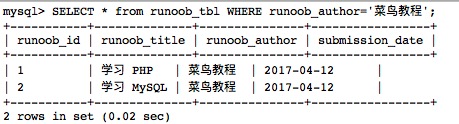
We willSELECTuse the WHERE clause in the statement to read data from the MySQL data table example_tbl.
The following example will read all records in the example_tbl table where the example_author field value is Sanjay:
SQL SELECT WHERE Clause
Output result:
MySQL WHERE clause string comparisons are not case-sensitive. You can use the BINARY keyword to make WHERE clause string comparisons case-sensitive.
As in the following example:
BINARY Keyword
In the example, theBINARYkeyword is used, which is case-sensitive, soexample_author='example.com'the query condition returns no data.
Reading Data Using PHP Script
You can use the PHP function mysqli_query() and the same SQL SELECT command with a WHERE clause to fetch data.
This function is used to execute the SQL command, and then output all the queried data through the PHP function mysqli_fetch_array().
Example
The following example will return from the example_tbl table the records where the example_author field value isexample.com:
MySQL WHERE Clause Test:
The output result is as follows: