MySQL Operators
In this chapter, we mainly introduce MySQL operators and their precedence. MySQL mainly has the following types of operators:- Arithmetic Operators
- Comparison Operators
- Logical Operators
- Bitwise Operators
Arithmetic Operators
The arithmetic operators supported by MySQL include:
| Operator | Description |
|---|---|
| + | Addition |
| - | Subtraction |
| * | Multiplication |
| / or DIV | Division |
| % or MOD | Modulo |
In division and modulo operations, if the divisor is 0, it is an illegal divisor and the returned result is NULL.
1. Addition
mysql> select 1+2;
+-----+
| 1+2 |
+-----+
|   3 |
+-----+
2. Subtraction
mysql> select 1-2;
+-----+
| 1-2 |
+-----+
|  -1 |
+-----+
3. Multiplication
mysql> select 2*3;
+-----+
| 2*3 |
+-----+
|   6 |
+-----+
4. Division
mysql> select 2/3;
+--------+
| 2/3    |
+--------+
| 0.6667 |
+--------+
5. Quotient
mysql> select 10 DIV 4;
+----------+
| 10 DIV 4 |
+----------+
|        2 |
+----------+
6. Remainder
mysql> select 10 MOD 4;
+----------+
| 10 MOD 4 |
+----------+
|        2 |
+----------+
Comparison Operators
Conditional statements in SELECT statements often use comparison operators. Through these comparison operators, you can determine which records in the table meet the conditions. If the comparison result is true, 1 is returned; if false, 0 is returned; if the comparison result is uncertain, NULL is returned.
| Symbol | Description | Remarks |
|---|---|---|
| = | Equal to | |
| <>, != | Not equal to | |
| > | Greater than | |
| < | Less than | |
| <= | Less than or equal to | |
| >= | Greater than or equal to | |
| BETWEEN | Between two values | >=min&&<=max |
| NOT BETWEEN | Not between two values | |
| IN | In a set | |
| NOT IN | Not in a set | |
| <=> | Strictly compare whether two NULL values are equal | When both operands are NULL, the result is 1; when one operand is NULL, the result is 0. |
| LIKE | Fuzzy matching | |
| REGEXP or RLIKE | Regular expression matching | |
| IS NULL | Is NULL | |
| IS NOT NULL | Is not NULL |
1. Equal to
mysql> select 2=3;
+-----+
| 2=3 |
+-----+
|   0 |
+-----+


mysql> select NULL = NULL;
+-------------+
| NULL = NULL |
+-------------+
|        NULL |
+-------------+
2. Not equal to
mysql> select 2<>3;
+------+
| 2<>3 |
+------+
|    1 |
+------+
3. Safe equal to
and=The difference is that when both operands are NULL, the result is 1 instead of NULL, and when one operand is NULL, the result is 0 instead of NULL.
mysql> select 2<=>3;
+-------+
| 2<=>3 |
+-------+
|     0 |
+-------+


mysql> select null=null;
+-----------+
| null=null |
+-----------+
|      NULL |
+-----------+


mysql> select null<=>null;
+-------------+
| null<=>null |
+-------------+
|           1 |
+-------------+
4. Less than
mysql> select 2<3;
+-----+
| 2<3 |
+-----+
|   1 |
+-----+
5. Less than or equal to
mysql> select 2<=3;
+------+
| 2<=3 |
+------+
|    1 |
+------+
6. Greater than
mysql> select 2>3;
+-----+
| 2>3 |
+-----+
|   0 |
+-----+
7. Greater than or equal to
mysql> select 2>=3;
+------+
| 2>=3 |
+------+
|    0 |
+------+
8、BETWEEN
mysql> select 5 between 1 and 10;
+--------------------+
| 5 between 1 and 10 |
+--------------------+
|                  1 |
+--------------------+
9、IN
mysql> select 5 in (1,2,3,4,5);
+------------------+
| 5 in (1,2,3,4,5) |
+------------------+
|                1 |
+------------------+
10、NOT IN
mysql> select 5 not in (1,2,3,4,5);
+----------------------+
| 5 not in (1,2,3,4,5) |
+----------------------+
|                    0 |
+----------------------+
11、IS NULL
mysql> select null is NULL;
+--------------+
| null is NULL |
+--------------+
|            1 |
+--------------+

mysql> select 'a' is NULL;
+-------------+
| 'a' is NULL |
+-------------+
|           0 |
+-------------+
12、IS NOT NULL
mysql> select null IS NOT NULL;
+------------------+
| null IS NOT NULL |
+------------------+
|                0 |
+------------------+


mysql> select 'a' IS NOT NULL;
+-----------------+
| 'a' IS NOT NULL |
+-----------------+
|               1 |
+-----------------+
13、LIKE
mysql> select '12345' like '12%';
+--------------------+
| '12345' like '12%' |
+--------------------+
|                  1 |
+--------------------+

mysql> select '12345' like '12_';
+--------------------+
| '12345' like '12_' |
+--------------------+
|                  0 |
+--------------------+
14、REGEXP
mysql> select 'beijing' REGEXP 'jing';
+-------------------------+
| 'beijing' REGEXP 'jing' |
+-------------------------+
|                       1 |
+-------------------------+

mysql> select 'beijing' REGEXP 'xi';
+-----------------------+
| 'beijing' REGEXP 'xi' |
+-----------------------+
|                     0 |
+-----------------------+
Logical Operators
Logical operators are used to determine whether an expression is true or false. If the expression is true, the result returns 1. If the expression is false, the result returns 0.
| Operator symbol | Description |
|---|---|
| NOT or ! | Logical NOT |
| AND | Logical AND |
| OR | Logical OR |
| XOR | Logical XOR |
1. AND
mysql> select 2 and 0;
+---------+
| 2 and 0 |
+---------+
|       0 |
+---------+


mysql> select 2 and 1;
+---------+
| 2 and 1 |
+---------+
|       1 |
+---------+
2. OR
mysql> select 2 or 0;
+--------+
| 2 or 0 |
+--------+
|      1 |
+--------+

mysql> select 2 or 1;
+--------+
| 2 or 1 |
+--------+
|      1 |
+--------+

mysql> select 0 or 0;
+--------+
| 0 or 0 |
+--------+
|      0 |
+--------+

mysql> select 1 || 0;
+--------+
| 1 || 0 |
+--------+
|      1 |
+--------+
3. NOT
mysql> select not 1;
+-------+
| not 1 |
+-------+
|     0 |
+-------+

mysql> select !0;
+----+
| !0 |
+----+
|  1 |
+----+
4. XOR
mysql> select 1 xor 1;
+---------+
| 1 xor 1 |
+---------+
|       0 |
+---------+

mysql> select 0 xor 0;
+---------+
| 0 xor 0 |
+---------+
|       0 |
+---------+

mysql> select 1 xor 0;
+---------+
| 1 xor 0 |
+---------+
|       1 |
+---------+

mysql> select null or 1;
+-----------+
| null or 1 |
+-----------+
|         1 |
+-----------+

mysql> select 1 ^ 0;
+-------+
| 1 ^ 0 |
+-------+
|     1 |
+-------+
Bitwise Operators
Bitwise operators are operators that perform calculations on binary numbers. Bitwise operations first convert the operands into binary numbers, perform the bitwise operation, and then convert the calculation result from binary numbers back to decimal numbers.
| Operator symbol | Description |
|---|---|
| & | Bitwise AND |
| | | Bitwise OR |
| ^ | Bitwise XOR |
| ! | Bitwise NOT |
| << | Left shift |
| >> | Right shift |
1. Bitwise AND
mysql> select 3&5;
+-----+
| 3&5 |
+-----+
|   1 |
+-----+
2. Bitwise OR
mysql> select 3|5;
+-----+
| 3|5 |
+-----+
|   7 |
+-----+
3. Bitwise XOR
mysql> select 3^5;
+-----+
| 3^5 |
+-----+
|   6 |
+-----+
4. Bitwise NOT
mysql> select ~18446744073709551612;
+-----------------------+
| ~18446744073709551612 |
+-----------------------+
|                     3 |
+-----------------------+
5. Bitwise right shift
mysql> select 3>>1;
+------+
| 3>>1 |
+------+
|    1 |
+------+
6. Bitwise left shift
mysql> select 3<<1;
+------+
| 3<<1 |
+------+
|    6 |
+------+
Operator Precedence
The lowest precedence is::=。
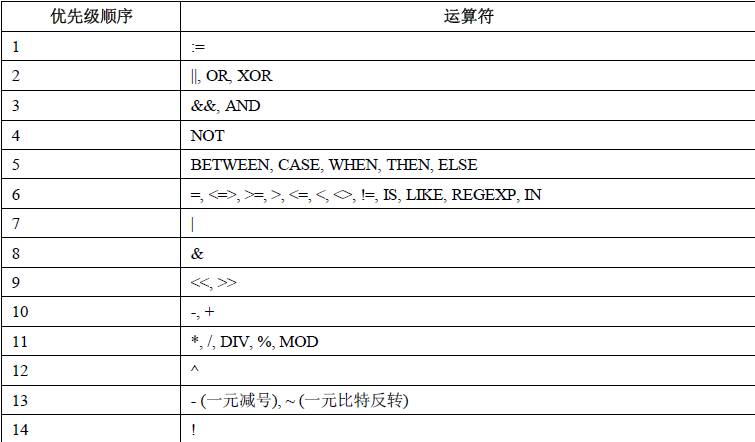
The highest precedence is:!、BINARY、 COLLATE。
Other Extensions