MySQL Insert Data
In MySQL tables, useINSERT INTOstatement to insert data.
You can viamysql>the command prompt window to insert data into the data table, or via PHP script to insert data.
Syntax
The following is the common SQL syntax for inserting data into MySQL data tables: INSERT INTO SQL syntax:
INSERT INTO table_name (column1, column2, column3, ...)
VALUES (value1, value2, value3, ...);
Parameter description:
table_nameis the name of the table into which you want to insert data.column1,column2,column3, ... are the column names in the table.value1,value2,value3, ... are the specific values to be inserted.
If the data is character type, you must use single quotes'or double quotes", such as: 'value1', "value1".
A simple example that inserts a row of data into a table named users:
INSERT INTO users (username, email, birthdate, is_active)
VALUES ('test', '[email protected]', '1990-01-01', true);
username: username, string type.email: email address, string type.birthdate: user birthday, date type.is_active: whether activated, boolean type.
If you want to insert data for all columns, you can omit the column names:
INSERT INTO users
VALUES (NULL,'test', '[email protected]', '1990-01-01', true);
Here,NULLis the placeholder for the auto-increment column, indicating that the system willidgenerate a unique value for the column.
If you want to insert multiple rows of data, you can specify multiple sets of values in the VALUES clause:
INSERT INTO users (username, email, birthdate, is_active)
VALUES
    ('test1', '[email protected]', '1985-07-10', true),
    ('test2', '[email protected]', '1988-11-25', false),
    ('test3', '[email protected]', '1993-05-03', true);
The above code will insert three rows of data into the users table.
Insert data via the command prompt window
In the following, we will useINSERT INTOstatement to insert data into the MySQL data table example_tbl
Example
In the following example, we will insert three rows of data into the example_tbl table:
Example
Enter password:*******
mysql> USE EXAMPLE;
DATABASE changed
mysql> INSERT INTO example_tbl
-> (example_title, example_author, submission_date)
-> VALUES
-> ("Learn PHP", "Example Tutorial", NOW());
Query OK, 1 ROWS affected, 1 warnings (0.01 sec)
mysql> INSERT INTO example_tbl
-> (example_title, example_author, submission_date)
-> VALUES
-> ("Learn MySQL", "Example Tutorial", NOW());
Query OK, 1 ROWS affected, 1 warnings (0.01 sec)
mysql> INSERT INTO example_tbl
-> (example_title, example_author, submission_date)
-> VALUES
-> ("JAVA Tutorial", "example.com", '2016-05-06');
Query OK, 1 ROWS affected (0.00 sec)
mysql>
Note:Use the arrow marker->is not part of the SQL statement; it merely indicates a new line. If a SQL statement is too long, we can press the Enter key to create a new line to write the SQL statement. The command terminator for a SQL statement is a semicolon.;。
In the above example, we did not provideexample_iddata for this field, because we already set this field toAUTO_INCREMENT(auto-increment) attribute.NOW()is a MySQL function that returns the date and time.
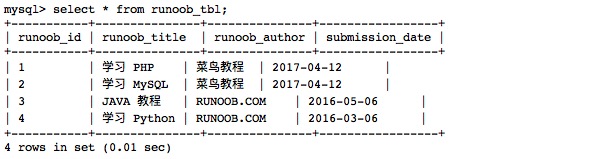
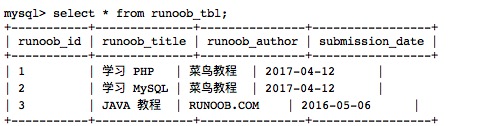
Next, we can view the data table data with the following statement:
Read the data table:
Output result:
Insert data using PHP script
You can use PHP's mysqli_query() function to executeINSERT INTOcommand to insert data.
This function has two parameters, returns TRUE on success, otherwise returns FALSE.
Syntax
mysqli_query(connection,query,resultmode);
| Parameter | Description |
|---|---|
| connection | Required. Specifies the MySQL connection to use. |
| query | Required. Specifies the query string. |
| resultmode |
Optional. A constant. Can be any of the following values:
|
Example
In the following example, the program receives data entered by the user for three fields and inserts it into the data table:
Add data
For inserting data containing Chinese, you need to addmysqli_query($conn , "set names utf8");statement.
Next, we can view the data table data with the following statement:
Read the data table:
Output result: