MySQL JOIN Usage
In the previous chapters, we have learned how to read data from a single table, which is relatively simple, but in real applications we often need to read data from multiple data tables.
In this chapter, we will introduce how to use MySQL's JOIN to query data in two or more tables.
You can use MySQL's JOIN in SELECT, UPDATE, and DELETE statements to perform multi-table queries.
JOIN can be roughly divided into the following three categories according to functionality:
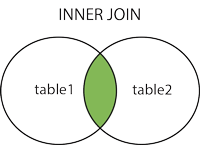
- INNER JOIN (inner join, or equijoin):Retrieves records with matching field relationships in the two tables.
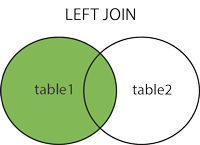
- LEFT JOIN (left join):Retrieves all records from the left table, even if the right table has no corresponding matching records.
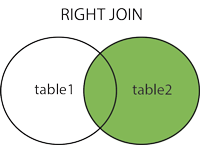
- RIGHT JOIN (right join):Opposite of LEFT JOIN, used to retrieve all records from the right table, even if the left table has no corresponding matching records.
Database structure and data download used in this chapter:example-mysql-join-test.sql。
INNER JOIN
INNER JOIN returns matching rows that satisfy the join condition in both tables. The following is the basic syntax of the INNER JOIN statement:
SELECT column1, column2, ...
FROM table1
INNER JOIN table2 ON table1.column_name = table2.column_name;
Parameter description:
column1,column2, ... are the names of the columns you want to select. If you use*means selecting all columns.table1,table2are the names of the two tables to be joined.table1.column_name = table2.column_nameis the join condition, specifying the columns used for matching in the two tables.
Simple INNER JOIN:
SELECT orders.order_id, customers.customer_name
FROM orders
INNER JOIN customers ON orders.customer_id = customers.customer_id;
The above SQL statement will select the order ID and customer name from the orders table and customers table that satisfy the join condition.
2. Using table aliases:
SELECT o.order_id, c.customer_name
FROM orders AS o
INNER JOIN customers AS c ON o.customer_id = c.customer_id;
The above SQL statement uses table aliases o and c as aliases for the orders and customers tables.
3. Multi-table INNER JOIN:
SELECT orders.order_id, customers.customer_name, products.product_name
FROM orders
INNER JOIN customers ON orders.customer_id = customers.customer_id
INNER JOIN order_items ON orders.order_id = order_items.order_id
INNER JOIN products ON order_items.product_id = products.product_id;
The above SQL statement involves the joining of four tables: orders, customers, order_items, and products. It selects the order ID, customer name, and product name, and joins the associated columns of these tables.
4. Filtering with the WHERE clause:
SELECT orders.order_id, customers.customer_name
FROM orders
INNER JOIN customers ON orders.customer_id = customers.customer_id
WHERE orders.order_date >= '2023-01-01';
The above SQL statement uses the WHERE clause after INNER JOIN to filter orders with an order date on or after '2023-01-01'.
LEFT JOIN
LEFT JOIN returns all rows from the left table, and includes matching rows from the right table. If there is no matching row in the right table, NULL values will be returned. The following is the basic syntax of the LEFT JOIN statement:
SELECT column1, column2, ...
FROM table1
LEFT JOIN table2 ON table1.column_name = table2.column_name;
1. Simple LEFT JOIN:
SELECT customers.customer_id, customers.customer_name, orders.order_id
FROM customers
LEFT JOIN orders ON customers.customer_id = orders.customer_id;
The above SQL statement will select the customer ID and customer name from the customer table, and include all rows from the left table customers, as well as the matching order ID (if any).
2. Using table aliases:
SELECT c.customer_id, c.customer_name, o.order_id
FROM customers AS c
LEFT JOIN orders AS o ON c.customer_id = o.customer_id;
The above SQL statement uses table aliases c and o to replace the names of the customers and orders tables, respectively.
3. Multi-table LEFT JOIN:
SELECT customers.customer_id, customers.customer_name, orders.order_id, products.product_name
FROM customers
LEFT JOIN orders ON customers.customer_id = orders.customer_id
LEFT JOIN order_items ON orders.order_id = order_items.order_id
LEFT JOIN products ON order_items.product_id = products.product_id;
The above SQL statement joins four tables: customers, orders, order_items, and products, and selects customer ID, customer name, order ID, and product name. The left join ensures that even if there are no matching rows in order_items or products, customer and order information is still returned.
4. Filtering with the WHERE clause:
SELECT customers.customer_id, customers.customer_name, orders.order_id
FROM customers
LEFT JOIN orders ON customers.customer_id = orders.customer_id
WHERE orders.order_date >= '2023-01-01' OR orders.order_id IS NULL;
The above SQL statement uses the WHERE clause after LEFT JOIN to filter orders with order dates on or after '2023-01-01', as well as customers without matching orders.
LEFT JOIN is a commonly used join type, especially when you need to return all rows from the left table. When there is no matching row in the right table, the related columns will display as NULL. When using LEFT JOIN, make sure you understand the join condition and filter results as needed.
RIGHT JOIN
RIGHT JOIN returns all rows from the right table, and includes matching rows from the left table. If there is no matching row in the left table, NULL values will be returned. The following is the basic syntax of the RIGHT JOIN statement:
SELECT column1, column2, ...
FROM table1
RIGHT JOIN table2 ON table1.column_name = table2.column_name;
The following is a simple RIGHT JOIN example:
SELECT customers.customer_id, orders.order_id
FROM customers
RIGHT JOIN orders ON customers.customer_id = orders.customer_id;
The above SQL statement will select all order IDs from the right table orders, and include matching customer IDs from the left table customers. If there is no matching customer ID in the customers table, the related columns will display as NULL.
During development, RIGHT JOIN is not frequently used, because it can achieve the same effect by using LEFT JOIN and swapping the order of the tables. For example, the above query can be rewritten using LEFT JOIN as:
SELECT customers.customer_id, orders.order_id
FROM orders
LEFT JOIN customers ON orders.customer_id = customers.customer_id;
The above SQL statement returns the same result, because LEFT JOIN and RIGHT JOIN are symmetric. In practice, you can choose which form to use based on personal preference or organizational standards.
Using INNER JOIN in the Command Prompt
INNER JOIN can join multiple tables together based on the specified join condition, so you can retrieve related data in a query.
When using INNER JOIN, make sure the join condition is accurate and understand the relationships between the joined tables.
Example
We have two tables, tcount_tbl and example_tbl, in the EXAMPLE database.
Try the following example:
Test Data for the Example
Next, we use MySQL'sINNER JOIN (you can also omit INNER and use JOIN, with the same effect)to join the above two tables to read the example_count field values in the tcount_tbl table corresponding to all example_author fields in the example_tbl table:
INNER JOIN
The above SQL statement is equivalent to:
WHERE Clause
MySQL LEFT JOIN
LEFT JOIN is a commonly used join type, especially when you need to return all rows from the left table.
When there is no matching row in the right table, the related columns will display as NULL.
When using LEFT JOIN, make sure you understand the join condition and filter results as needed.
MySQL LEFT JOIN differs from JOIN; LEFT JOIN reads all data from the left data table, even if the right table has no corresponding data.
Example
Try the following example, usingexample_tblas the left table,tcount_tblas the right table, to understand the application of MySQL LEFT JOIN:
LEFT JOIN
The above example uses LEFT JOIN, which reads all selected field data from the left data table example_tbl, even if there is no corresponding example_author field value in the right table tcount_tbl.
MySQL RIGHT JOIN
MySQL RIGHT JOIN reads all data from the right data table, even if the left table has no corresponding data.
In actual development, RIGHT JOIN is not frequently used, because it can achieve the same effect by using LEFT JOIN and swapping the order of tables.
Example
Try the following example, usingexample_tblas the left table,tcount_tblas the right table, to understand the application of MySQL RIGHT JOIN:
RIGHT JOIN
The above example uses RIGHT JOIN, which reads all selected field data from the right data table tcount_tbl, even if there is no corresponding example_author field value in the left table example_tbl.
Using JOIN in PHP Scripts
In PHP, use the mysqli_query() function to execute SQL statements. You can use the same SQL statements above as parameters of the mysqli_query() function.
Try the following example:
MySQL ORDER BY Test:
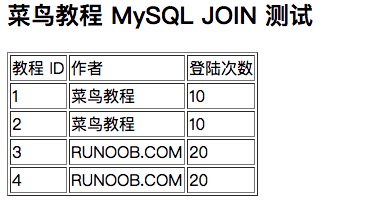
The output result is shown in the figure below: