MySQL Administration
Start and stop MySQL server
On Windows system
Start MySQL server:
1、Through the "Services" management tool:Open the Run dialog (Win + R), enterservices.msc, find the "MySQL" service, right-click and select "Start".
2. Via Command Prompt:Open Command Prompt (as administrator), enter the following command:
net start mysql
Stop MySQL server:
1、Through the "Services" management tool:Similarly open the Run dialog, enter services.msc, find the "MySQL" service, right-click and select "Stop".
2、Via Command Prompt:Open Command Prompt (as administrator), enter the following command:
net stop mysql
On Linux system
1. Start MySQL service:
Usesystemdcommand (applicable to most modern Linux distributions, such as Ubuntu, CentOS, etc.):
sudo systemctl start mysql
Useservicecommand (in some older distributions):
sudo service mysql start
2. Stop MySQL service:
Using systemd:
sudo systemctl stop mysql
Using the service command:
sudo service mysql stop
3. Restart MySQL service:
Using systemd:sudo systemctl restart mysql
Using the service command:
sudo service mysql restart
4. Check MySQL service status:
Using systemd command:
sudo systemctl status mysql
Using the service command:
sudo service mysql status
Mac OS system
Start MySQL service:
Using the command line:
sudo /usr/local/mysql/support-files/mysql.server start
Stop MySQL service:
Using the command line:
sudo /usr/local/mysql/support-files/mysql.server stop
Restart MySQL service:
Using the command line:
sudo /usr/local/mysql/support-files/mysql.server restart
Check MySQL service status:
Using the command line:
sudo /usr/local/mysql/support-files/mysql.server status
In the above commands, mysql may vary due to different installation paths or versions.
On Mac OS, the installation path of MySQL is usually /usr/local/mysql/, so you need to use the mysql.server script in this path to start and stop the MySQL service.
MySQL user settings
In MySQL, user settings include operations such as creating users, setting privileges, and managing users. The following are some common MySQL user settings operations, including creating users, setting privileges, viewing and deleting users, etc.
Create user
To create a new user, you can use the following SQL command:
CREATE USER 'username'@'host' IDENTIFIED BY 'password';
username: username.host: specifies which hosts the user can connect from. For example,localhostallows local connections only,%allows connections from any host.password: the user's password.
Example
Grant privileges
After creating a user, you need to grant them access privileges. UseGRANTcommand to grant privileges:
GRANT privileges ON database_name.* TO 'username'@'host';
privileges: required privileges, such asALL PRIVILEGES、SELECT、INSERT、UPDATE、DELETEetc.database_name.*: indicates granting privileges on a database or table.database_name.*means granting privileges on all tables in the entire database,database_name.table_namemeans granting privileges on the specified table.TO 'username'@'host': specifies the user and host to whom privileges are granted.
Example
Flush privileges
After granting or revoking privileges, you need to flush privileges to make the changes take effect:
FLUSH PRIVILEGES;
View user privileges
To view the privileges of a specific user, you can use the following command:
SHOW GRANTS FOR 'username'@'host';
Example
Revoke privileges
To revoke a user's privileges, use the REVOKE command:
REVOKE privileges ON database_name.* FROM 'username'@'host';
Example
Delete user
To delete a user, you can use the following command:
DROP USER 'username'@'host';
Example
Change user password
To change a user's password, you can use the ALTER USER command:
ALTER USER 'username'@'host' IDENTIFIED BY 'new_password';
Example
Change user host
To change the user's host (i.e., which hosts are allowed to connect), you can first delete the user and then recreate a new user.
Example
DROP USER 'john'@'localhost';
-- Recreate user and specify new host
CREATE USER 'john'@'%' IDENTIFIED BY 'password123';
Specify privileges when creating user
When creating a user, you can also grant privileges at the same time (MySQL 8.0.16 and higher):
Example
GRANT ALL PRIVILEGES ON test_db.* TO 'john'@'localhost';
/etc/my.cnf file configuration
The /etc/my.cnf file is the MySQL configuration file used to configure various parameters and options of the MySQL server.
In general, you do not need to modify this configuration file. The default configuration of this file is as follows:
[mysqld]
datadir=/var/lib/mysql
socket=/var/lib/mysql/mysql.sock

[mysql.server]
user=mysql
basedir=/var/lib

[safe_mysqld]
err-log=/var/log/mysqld.log
pid-file=/var/run/mysqld/mysqld.pid
In the configuration file, you can specify the directory for storing different error log files. Generally, you do not need to change these configurations.
The /etc/my.cnf file may vary across different systems and MySQL versions, but generally includes the following sections:
1. Basic settings
basedir: The basic installation directory of the MySQL server.datadir: The location where MySQL data files are stored.socket: The Unix socket file path of the MySQL server.pid-file: The file path that stores the process ID of the currently running MySQL server.port: The port number that the MySQL server listens on, default is 3306.
2. Server options
bind-address: Specifies the IP address that the MySQL server listens on; can be an IP address or hostname.server-id: In replication configuration, set a unique identifier for each MySQL server.default-storage-engine: The default storage engine, e.g., InnoDB or MyISAM.max_connections: The maximum number of connections the server can maintain simultaneously.thread_cache_size: The size of the thread cache, used to improve the startup speed of new connections.query_cache_size: The size of the query cache, used to improve the efficiency of identical queries.default-character-set: The default character set.collation-server: The server's default collation.
3. Performance tuning
innodb_buffer_pool_size: The buffer pool size of the InnoDB storage engine; this is one of the most important parameters in InnoDB performance tuning.key_buffer_size: The key buffer size of the MyISAM storage engine.table_open_cache: The number of table caches that can be opened simultaneously.thread_concurrency: The number of threads allowed to run simultaneously.
4. Security settings
skip-networking: Disables the MySQL server from listening on network connections, allowing only local connections.skip-grant-tables: Starts the MySQL server without requiring a password, usually used to recover a forgotten root password, but this is a security risk.auth_native_password=1: Enables native password authentication for MySQL 5.7 and above.
5. Log settings
log_error: The path to the error log file.general_log: Logs all client connections and queries.slow_query_log: Logs slow queries whose execution time exceeds a specific threshold.log_queries_not_using_indexes: Logs queries that do not use indexes.
6. Replication settings
master_hostandmaster_user: The address of the master server and the replication user.master_password: The password of the replication user.master_log_fileandmaster_log_pos: The log file and position used for replication.
Commands for managing MySQL
Below are commonly used commands when operating a MySQL database.
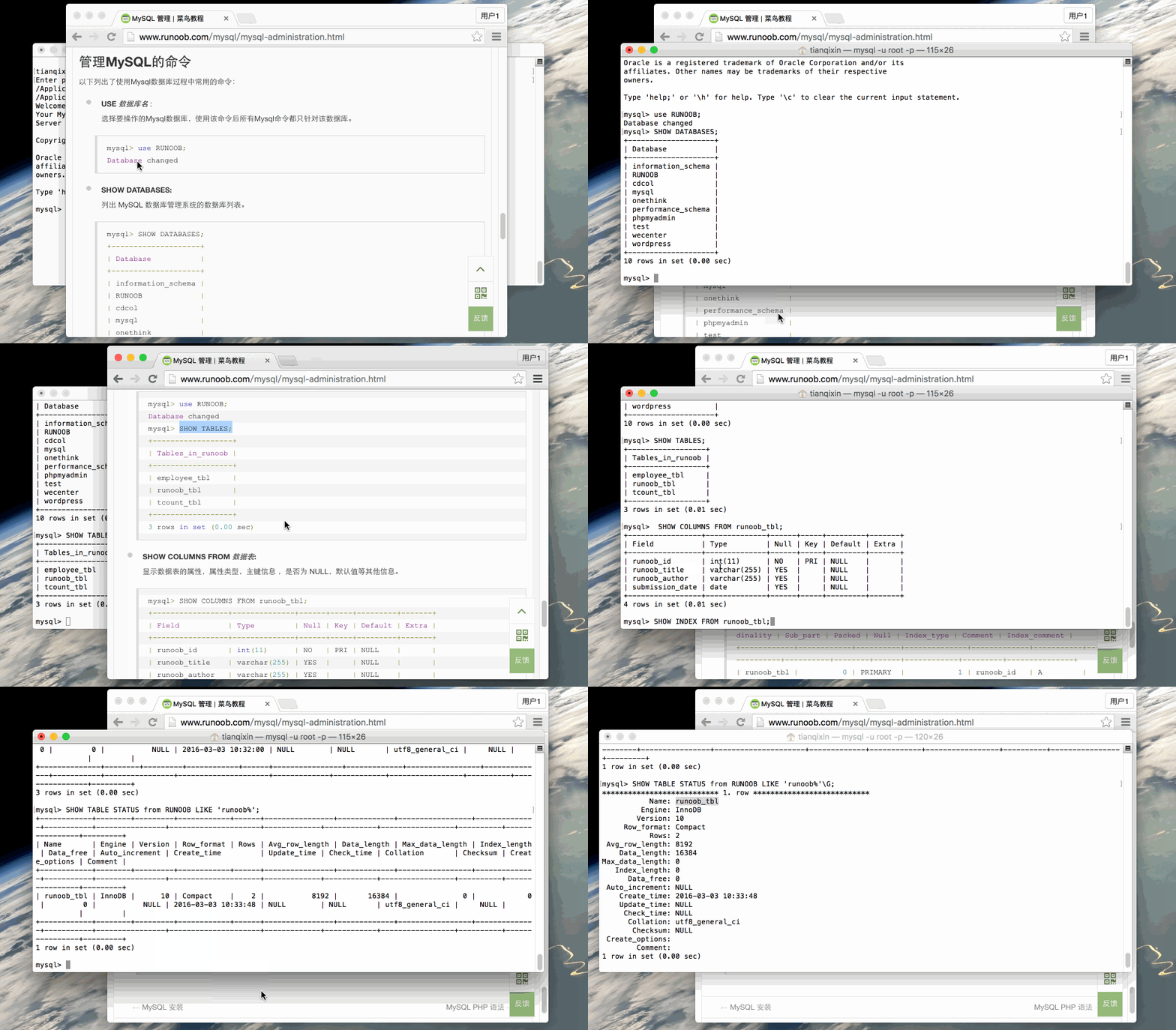
USE Database name :
Select the MySQL database to operate on. After using this command, all MySQL commands will only target that database.mysql> use EXAMPLE; Database changed
SHOW DATABASES:
List the databases in the MySQL database management system.mysql> SHOW DATABASES; +--------------------+ | Database | +--------------------+ | information_schema | | EXAMPLE | | cdcol | | mysql | | onethink | | performance_schema | | phpmyadmin | | test | | wecenter | | wordpress | +--------------------+ 10 rows in set (0.02 sec)
SHOW TABLES:
Display all tables in the specified database. Before using this command, you need to use the use command to select the database to operate on.mysql> use EXAMPLE; Database changed mysql> SHOW TABLES; +------------------+ | Tables_in_example | +------------------+ | employee_tbl | | example_tbl | | tcount_tbl | +------------------+ 3 rows in set (0.00 sec)
SHOW COLUMNS FROM Data table:
Display the attributes, attribute types, primary key information, whether it is NULL, default values, and other information of the data table.mysql> SHOW COLUMNS FROM example_tbl; +-----------------+--------------+------+-----+---------+-------+ | Field | Type | Null | Key | Default | Extra | +-----------------+--------------+------+-----+---------+-------+ | example_id | int(11) | NO | PRI | NULL | | | example_title | varchar(255) | YES | | NULL | | | example_author | varchar(255) | YES | | NULL | | | submission_date | date | YES | | NULL | | +-----------------+--------------+------+-----+---------+-------+ 4 rows in set (0.01 sec)
SHOW INDEX FROM Data table:
Display detailed index information of the data table, including PRIMARY KEY.mysql> SHOW INDEX FROM example_tbl; +------------+------------+----------+--------------+-------------+-----------+-------------+----------+--------+------+------------+---------+---------------+ | Table | Non_unique | Key_name | Seq_in_index | Column_name | Collation | Cardinality | Sub_part | Packed | Null | Index_type | Comment | Index_comment | +------------+------------+----------+--------------+-------------+-----------+-------------+----------+--------+------+------------+---------+---------------+ | example_tbl | 0 | PRIMARY | 1 | example_id | A | 2 | NULL | NULL | | BTREE | | | +------------+------------+----------+--------------+-------------+-----------+-------------+----------+--------+------+------------+---------+---------------+ 1 row in set (0.00 sec)
SHOW TABLE STATUS [FROM db_name] [LIKE 'pattern'] \G:
This command will output performance and statistics information of the MySQL database management system.mysql> SHOW TABLE STATUS FROM EXAMPLE; # 显示数据库 EXAMPLE 中所有表的信息 mysql> SHOW TABLE STATUS from EXAMPLE LIKE 'example%'; # 表名以example开头的表的信息 mysql> SHOW TABLE STATUS from EXAMPLE LIKE 'example%'\G; # 加上 \G,查询结果按列打印
Gif demonstration: