MySQL LIKE Clause
We know that in MySQL, we useSELECTthe command to read data, and we can also useSELECTin the statementWHEREclause to retrieve specified records.
You can use the equal sign in the WHERE clause=to set the condition for retrieving data, such as "example_author = 'example.com'".
But sometimes we need to retrieve all records where the example_author field contains the characters "COM". In such cases, we need to use in the WHERE clauseLIKEthe LIKE clause.
LIKEThe LIKE clause is a keyword in MySQL used for fuzzy matching in the WHERE clause. It is usually used with wildcards to search for strings that match a certain pattern.LIKEIn the clause, use the percent sign%character to represent any character, similar to the asterisk in UNIX or regular expressions.*。
If the percent sign is not used%, the LIKE clause and the equal sign=have the same effect.
Syntax
The following is the general syntax for a SQL SELECT statement using the LIKE clause to read data from a table:
SELECT column1, column2, ...
FROM table_name
WHERE column_name LIKE pattern;
Parameter description:
column1,column2, ... are the names of the columns you want to select. If you use*it means selecting all columns.table_nameis the name of the table from which you want to query data.column_nameis the one you want to applyLIKEthe name of the column for the clause.patternis the pattern used for matching, which can contain wildcards.
More information:
- You can specify any condition in the WHERE clause.
- You can use the LIKE clause in the WHERE clause.
- You can use the LIKE clause instead of the equal sign=。
- LIKE is usually used with%together, similar to a metacharacter search.
- You can use AND or OR to specify one or more conditions.
- You can use the WHERE...LIKE clause in DELETE or UPDATE commands to specify conditions.
Examples
The following are someLIKEexamples of using the LIKE clause.
1. Percent sign wildcard %:
%The wildcard represents zero or more characters. For example,'a%'matches strings starting with the letter'a'any string that begins with.
SELECT * FROM customers WHERE last_name LIKE 'S%';
The above SQL statement will select all customers whose last name starts with 'S'.
2. Underscore wildcard _:
_The wildcard represents a single character. For example,'_r%'matches any string where the second letter is'r'any string.
SELECT * FROM products WHERE product_name LIKE '_a%';
The above SQL statement will select all products whose product name's second character is 'a'.
3. Combining % and _:
SELECT * FROM users WHERE username LIKE 'a%o_';
The above SQL statement will match strings that start with the letter 'a', followed by zero or more characters, then an 'o', and finally a single arbitrary character, such as 'aaron', 'apol'.
4. Case-insensitive matching:
SELECT * FROM employees WHERE last_name LIKE 'smi%' COLLATE utf8mb4_general_ci;
The above SQL statement will select the last names starting with'smi'of all employees, regardless of case.
LIKEThe LIKE clause provides powerful fuzzy search capabilities and can be customized according to different patterns and requirements. When using it, make sure you understand the meaning of the wildcards and match according to the actual situation.
Using the LIKE Clause in the Command Prompt
In the following, we willSELECTuse the commandWHERE...LIKEthe LIKE clause to read data from the MySQL table example_tbl.
Examples
The following is how we will get from the example_tbl table the records where the example_author fieldCOMends with:
SQL LIKE statement:
Using the LIKE Clause in a PHP Script
You can use the PHP function mysqli_query() and the same SELECT command with a WHERE...LIKE clause to retrieve data.
This function is used to execute the SQL command, and then use the PHP function mysqli_fetch_array() to output all the queried data.
However, if it is a SQL statement that uses a WHERE...LIKE clause in DELETE or UPDATE, there is no need to use the mysqli_fetch_array() function.
Examples
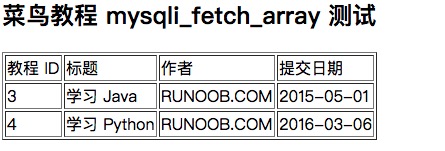
The following is how we use a PHP script to read from the example_tbl table all records where the example_author field ends with COM:
MySQL LIKE Clause Test:
The output result is shown in the figure below: