MySQL Transactions
MySQL transactions are mainly used to handle data with large volumes of operations and high complexity. For example, in a personnel management system, when you delete a person, you need to delete not only the person's basic information but also the information related to that person, such as mailboxes, articles, and so on. In this way, these database operation statements form a transaction!
In MySQL, a transaction is the execution of a set of SQL statements that are treated as a single unit of work.
- In MySQL, only databases or tables using the InnoDB database engine support transactions.
- Transaction processing can be used to maintain database integrity, ensuring that a batch of SQL statements either all execute or none execute.
- Transactions are used to manageinsert、update、deletestatements
Generally, a transaction must satisfy 4 conditions (ACID): Atomicity (Aatomicity, or indivisibility), Consistency (Cconsistency), Isolation (Iisolation, also known as independence), Durability (Durability)。
Atomicity:All operations in a transaction (transaction) must either be all completed or not completed at all, and the transaction must not end at some intermediate stage. If an error occurs during transaction execution, it will be rolled back to the state before the transaction started, just as if the transaction had never been executed.
Consistency:The integrity of the database is not compromised before the transaction begins and after the transaction ends. This means that the written data must fully comply with all preset rules, including the accuracy and concatenation of the data, as well as the ability of the database to spontaneously complete the scheduled work afterwards.
Isolation:The ability of a database to allow multiple concurrent transactions to read, write, and modify its data at the same time. Isolation can prevent data inconsistency caused by cross-execution when multiple transactions run concurrently. Transaction isolation is divided into different levels, including Read uncommitted, Read committed, Repeatable read, and Serializable.
Durability:After the transaction processing is completed, the modifications to the data are permanent, and will not be lost even if the system fails.
Under the default settings of the MySQL command line, transactions are automatically committed, that is, after executing an SQL statement, a COMMIT operation is immediately performed. Therefore, to explicitly start a transaction, you must use the command BEGIN or START TRANSACTION, or execute the command SET AUTOCOMMIT=0 to disable auto-commit for the current session.
Transaction Control Statements:
BEGIN or START TRANSACTION explicitly starts a transaction;
COMMIT, or COMMIT WORK, although the two are equivalent. COMMIT commits the transaction and makes all modifications made to the database permanent;
ROLLBACK, or ROLLBACK WORK, although the two are equivalent. Rollback ends the user's transaction and undoes all uncommitted modifications in progress;
SAVEPOINT identifier. SAVEPOINT allows creating a savepoint in a transaction, and a transaction can have multiple SAVEPOINTs;
RELEASE SAVEPOINT identifier deletes a savepoint of a transaction. When the specified savepoint does not exist, executing this statement will throw an exception;
ROLLBACK TO identifier rolls back the transaction to the marked point;
SET TRANSACTION is used to set the isolation level of a transaction. The InnoDB storage engine provides transaction isolation levels including READ UNCOMMITTED, READ COMMITTED, REPEATABLE READ, and SERIALIZABLE.
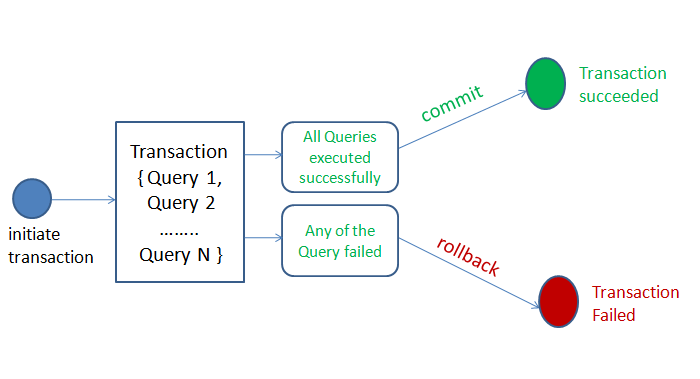
There are mainly two methods for MySQL transaction processing:
1. Implement with BEGIN, ROLLBACK, COMMIT
- BEGIN or START TRANSACTION: used to start a transaction.
- ROLLBACKTransaction rollback, canceling the previous changes.
- COMMIT: Transaction confirmation, committing the transaction, making the changes permanent.
2. Directly use SET to change MySQL's auto-commit mode:
- SET AUTOCOMMIT=0Disable auto-commit
- SET AUTOCOMMIT=1Enable auto-commit
BEGIN or START TRANSACTION-- Used to start a transaction:
BEGIN; -- 或者使用 START TRANSACTION;
COMMIT-- Used to commit the transaction, permanently saving all changes to the database:
COMMIT;
ROLLBACK-- Used to roll back the transaction, undoing all changes made since the last commit:
ROLLBACK;
SAVEPOINT-- Used to set a savepoint within the transaction, so that you can roll back to that point later:
SAVEPOINT savepoint_name;
ROLLBACK TO SAVEPOINT-- Used to roll back to a previously set savepoint:
ROLLBACK TO SAVEPOINT savepoint_name;
Below is a simple example of a MySQL transaction:
Example
START TRANSACTION;
-- Execute some SQL statements
UPDATE accounts SET balance = balance - 100 WHERE user_id = 1;
UPDATE accounts SET balance = balance + 100 WHERE user_id = 2;
-- Determine whether to commit or roll back
IF (Condition) THEN
COMMIT; -- Commit transaction
ELSE
ROLLBACK; -- Rollback transaction
END IF;
Example
A simple transaction example: