Java Streams, Files, and IO
Streams, Files, and IO (input/output) in Java are the infrastructure for handling data reading and writing. They allow programs to interact with external data (such as files, networks, system input, etc.).
The java.io package is a core package in the Java standard library, providing classes for system input and output. It contains tools for handling data streams (byte streams and character streams), file reading and writing, serialization, and data formatting.
java.io is the foundational package for handling file operations, stream operations, and low-level IO operations.
The streams in the java.io package support many formats, such as primitive types, objects, localized character sets, and so on.
A stream can be understood as a sequence of data. An input stream represents reading data from a source, and an output stream represents writing data to a destination.
Reading Console Input
Java console input is handled by System.in.
To obtain a character stream bound to the console, you can wrap System.in in a BufferedReader object to create a character stream.
The following is the basic syntax for creating a BufferedReader:
After the BufferedReader object is created, we can use the read() method to read a character from the console, or the readLine() method to read a string.
Reading Multiple Characters from Console Input
To read a character from a BufferedReader object, use the read() method. Its syntax is as follows:
Each time the read() method is called, it reads a character from the input stream and returns the character as an integer value. It returns -1 when the stream ends. This method throws an IOException.
The following program demonstrates using the read() method to continuously read characters from the console until the user entersq。
BRRead.java file code:
The compilation and running result of the above example is as follows:
输入字符, 按下 'q' 键退出。
example
r
u
n
o
o
b


q
q
Reading Strings from Console Input
To read a string from standard input, you need to use the readLine() method of BufferedReader.
Its general format is:
The following program reads and displays character lines until you enter the word "end".
BRReadLines.java file code:
The compilation and running result of the above example is as follows:
Enter lines of text.
Enter 'end' to quit.
This is line one
This is line one
This is line two
This is line two
end
end
In versions after JDK 5, we can also use theJava Scannerclass to obtain console input.
Console Output
As introduced earlier, console output is accomplished by print() and println(). These methods are all defined by the PrintStream class, and System.out is a reference to an object of that class.
PrintStream inherits the OutputStream class and implements the write() method. Thus, write() can also be used to write to the console.
The simplest form of write() defined by PrintStream is as follows:
This method writes the low-order eight bits of byteval to the stream.
Example
The following example uses write() to output the character "A" followed by a newline to the screen:
WriteDemo.java file code:
Running the above example outputs the character "A" in the output window.
A
Note:The write() method is not frequently used because print() and println() methods are more convenient to use.
Reading and Writing Files
As mentioned earlier, a stream is defined as a data sequence. Input streams are used to read data from a source, and output streams are used to write data to a destination.
The following diagram is a class hierarchy diagram describing input streams and output streams.
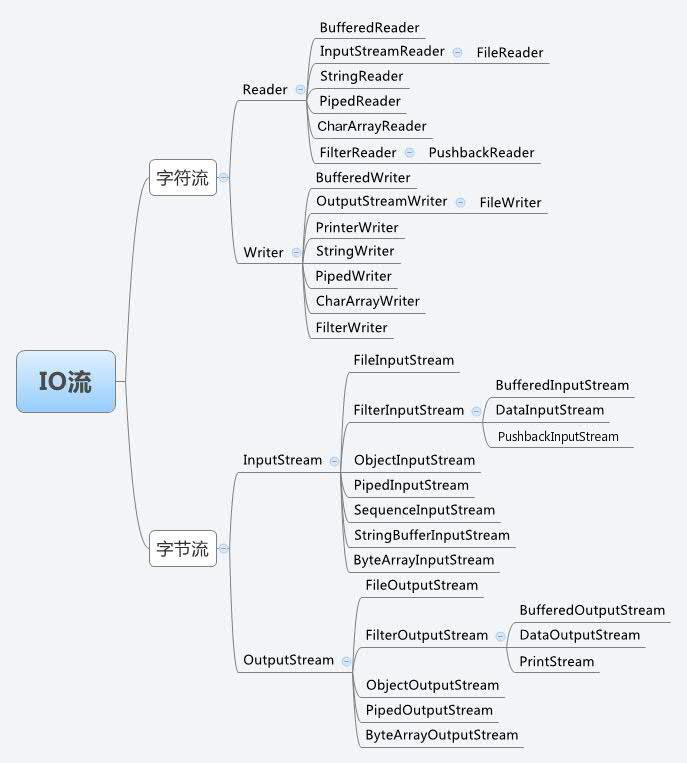
Byte Streams (handling binary data)
Byte streams are used to handle binary data, such as files, images, videos, etc.
| Class Name | Type | Description |
|---|---|---|
InputStream | Abstract class (input stream) | The superclass of all byte input streams, handling byte input operations. |
OutputStream | Abstract class (output stream) | The superclass of all byte output streams, handling byte output operations. |
FileInputStream | Input stream | Reads byte data from a file. |
FileOutputStream | Output stream | Writes byte data to a file. |
BufferedInputStream | Input stream | Provides buffering for byte input streams to improve reading efficiency. |
BufferedOutputStream | Output stream | Provides buffering for byte output streams to improve writing efficiency. |
ByteArrayInputStream | Input stream | Uses a byte array in memory as the input source. |
ByteArrayOutputStream | Output stream | Writes data to a byte array in memory. |
DataInputStream | Input stream | Allows reading Java primitive data types from an input stream (such asint、float、boolean)。 |
DataOutputStream | Output stream | Allows writing Java primitive data types to an output stream. |
ObjectInputStream | Input stream | Reads serialized objects from an input stream. |
ObjectOutputStream | Output stream | Serializes objects and writes them to an output stream. |
PipedInputStream | Input stream | Used to read byte data in a pipe, usually withPipedOutputStreamUsed together. |
PipedOutputStream | Output stream | Used to write byte data in a pipe, usually withPipedInputStreamUsed together. |
FilterInputStream | Input stream | A wrapper class for byte input streams, used to perform filtering on other input streams. |
FilterOutputStream | Output stream | A wrapper class for byte output streams, used to perform filtering on other output streams. |
SequenceInputStream | Input stream | Combines multiple input streams into one input stream for processing. |
Character Streams (handling text data)
Character streams are used to handle text data, such as reading and writing strings or files.
| Class Name | Type | Description |
|---|---|---|
Reader | Abstract class (input stream) | The superclass of all character input streams, handling character input operations. |
Writer | Abstract class (output stream) | The superclass of all character output streams, handling character output operations. |
FileReader | Input stream | Reads character data from a file. |
FileWriter | Output stream | Writes character data to a file. |
BufferedReader | Input stream | Provides buffering for character input streams, supports reading line by line, and improves reading efficiency. |
BufferedWriter | Output stream | Provides buffering for character output streams, supports writing line by line, and improves writing efficiency. |
CharArrayReader | Input stream | Uses a character array as the input source. |
CharArrayWriter | Output stream | Writes data to a character array. |
StringReader | Input stream | Uses a string as the input source. |
StringWriter | Output stream | Writes data to a string buffer. |
PrintWriter | Output stream | Convenient character output stream, supports auto-flush and formatted output. |
PipedReader | Input stream | Used to read character data in a pipe, usually withPipedWriterused together. |
PipedWriter | Output stream | Used to write character data in a pipe, usually withPipedReaderused together. |
LineNumberReader | Input stream | Buffered character input stream with line numbers, allowing tracking of the line number being read. |
PushbackReader | Input stream | Allows characters to be pushed back into the stream after reading, so they can be read again. |
Helper Classes (other important classes)
Helper classes provide support for files, directories, and random file access.
| Class name | Type | Description |
|---|---|---|
File | File and directory operations | Used to represent a file or directory, and provides file operations such as creation, deletion, renaming, etc. |
RandomAccessFile | Random access file | Supports random access to files, allowing data to be read from and written to any position in the file. |
Console | Console input/output | Provides input and output support for the system console. |
The two important streams to be discussed next areFileInputStreamandFileOutputStream。
FileInputStream
This stream is used to read data from a file. Its object can be created using the keyword new.
There are several constructors that can be used to create objects.
You can use a file name of string type to create an input stream object to read a file:
You can also use a file object to create an input stream object to read a file. We first need to use the File() method to create a file object:
Once the InputStream object is created, you can use the following methods to read the stream or perform other stream operations.
| Method | Description | Example code |
|---|---|---|
int read() | Reads one byte of data, with the return value being an integer between 0 and 255. Returns -1 if the end of the stream is reached. | int data = inputStream.read(); |
int read(byte[] b) | Reads bytes from the input stream and stores them in the byte arrayband returns the actual number of bytes read. Returns -1 if the end of the stream is reached. | byte[] buffer = new byte[1024]; int bytesRead = inputStream.read(buffer); |
int read(byte[] b, int off, int len) | Reads up tolenbytes from the input stream and stores them in the byte arraybofoffstarting at the offset position, returning the actual number of bytes read. Returns -1 if the end of the stream is reached. | byte[] buffer = new byte[1024]; int bytesRead = inputStream.read(buffer, 0, buffer.length); |
long skip(long n) | Skips and discardsnbytes in the input stream, returning the actual number of bytes skipped. | long skippedBytes = inputStream.skip(100); |
int available() | Returns the number of bytes that can be read (without blocking). | int availableBytes = inputStream.available(); |
void close() | Closes the input stream and releases all resources associated with this stream. | inputStream.close(); |
void mark(int readlimit) | Sets a mark at the current position in the stream,readlimitis the upper limit on the number of bytes that can be read. | inputStream.mark(1024); |
void reset() | Repositions the stream to the position of the last mark. If there is no mark or the mark is invalid, throwsIOException。 | inputStream.reset(); |
boolean markSupported() | Checks whether the current input stream supportsmark()andreset()operation. | boolean isMarkSupported = inputStream.markSupported(); |
In addition to InputStream, there are some other input streams. For more details, refer to the link below:
FileOutputStream
This class is used to create a file and write data to the file.
If the target file does not exist before the stream opens the file for output, the stream will create the file.
There are two constructors that can be used to create a FileOutputStream object.
Use a file name of string type to create an output stream object:
You can also use a file object to create an output stream to write to a file. We first need to use the File() method to create a file object:
After creating the OutputStream object, you can use the following methods to write to the stream or perform other stream operations.
| Method | Description | Example code |
|---|---|---|
void write(int b) | Writes the specified byte to the output stream; the low-order 8 bits ofbwill be written to the stream. | outputStream.write(255); |
void write(byte[] b) | Writes all bytes in the byte arraybto the output stream. | byte[] data = "Hello".getBytes(); outputStream.write(data); |
void write(byte[] b, int off, int len) | Writes bytes from the byte arraybstarting at offsetoffbeginning atlenbytes to the output stream. | byte[] data = "Hello".getBytes(); outputStream.write(data, 0, data.length); |
void flush() | Flushes the output stream and forces all buffered data to be written out, ensuring that the data is immediately written to the target output. | outputStream.flush(); |
void close() | Closes the output stream and releases all resources associated with this stream. After closing, no more writes can be performed. | outputStream.close(); |
In addition to OutputStream, there are some other output streams. For more details, refer to the link below:
Example
The following is an example demonstrating the usage of InputStream and OutputStream:
fileStreamTest.java file code:
The above program first creates the file test.txt, writes the given numbers into the file in binary form, and at the same time outputs them to the console.
Because the above code uses binary writing, garbled characters may appear. You can use the following code example to solve the garbled character problem:
fileStreamTest2.java file code:
Files and I/O
There are also some classes related to files and I/O that we need to know:
Directories in Java
Creating Directories:
There are two methods in the File class that can be used to create folders:
- mkdir( )The method creates a folder. It returns true on success and false on failure. Failure indicates that the path specified by the File object already exists, or that the folder cannot be created because the entire path does not yet exist.
- mkdirs()The method creates a folder and all of its parent folders.
The following example creates the "/tmp/user/java/bin" folder:
CreateDir.java file code:
Compile and execute the above code to create the directory "/tmp/user/java/bin".
Note:Java automatically distinguishes file path separators by convention on UNIX and Windows. If you use the separator (/) in a Windows version of Java, the path can still be resolved correctly.
Reading Directories
A directory is actually a File object that contains other files and folders.
If you create a File object and it is a directory, then calling the isDirectory() method will return true.
You can extract the list of files and folders it contains by calling the list() method on that object.
The example below demonstrates how to use the list() method to check the contents of a folder:
DirList.java file code:
The result of compiling and running the above example is as follows:
目录 /tmp
bin 是一个目录
lib 是一个目录
demo 是一个目录
test.txt 是一个文件
README 是一个文件
index.html 是一个文件
include 是一个目录
Deleting Directories or Files
To delete a file, you can use thejava.io.File.delete()method.
The following code will delete the directory/tmp/java/. Note that when deleting a directory, you must ensure that there are no other files in that directory to delete it correctly; otherwise, the deletion will fail.
Test directory structure:
/tmp/java/
|-- 1.log
|-- test