Java File Class
 Java Stream
In Java, the File class is part of the java.io package and is used to handle file and directory pathnames.
The Java File class represents file names and directory pathnames in an abstract way. The File class is mainly used for creating files and directories, finding files, and deleting files, etc.
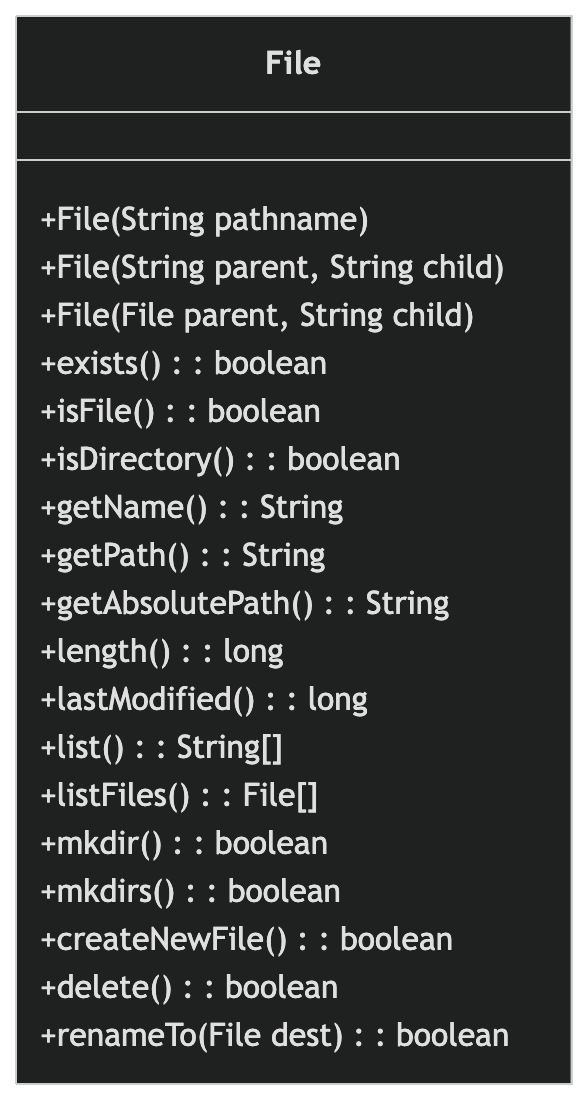
File objects represent files and directories that actually exist on the disk. Create a File object through the following constructors.
Create a new File instance with the given parent abstract pathname and child pathname string:
File file = new File(File parent, String child);
Create a new File instance by converting the given pathname string into an abstract pathname:
File file = new File(String pathname);
Create a new File instance based on the parent pathname string and the child pathname string.
File file = new File(String parent, String child);
Create a new File instance by converting the given file: URI into an abstract pathname.
File file = new File(URI uri)
Example
File file1 = new File("C:/test/test.txt");
// Create via parent path and child path
File file2 = new File("C:/test", "test.txt");
// Create via parent File object and child path
File parent = new File("C:/test");
File file3 = new File(parent, "test.txt");
After the File object is successfully created, you can use the methods in the following list to operate on files.
| No. | Method Description |
|---|---|
| 1 |
public String getName() Returns the name of the file or directory represented by this abstract pathname. |
| 2 |
public String getParent() Returns the pathname string of the parent pathname of this abstract pathname, or returns null if this pathname does not specify a parent directory. null。 |
| 3 |
public File getParentFile() Returns the abstract pathname of the parent pathname of this abstract pathname, or returns null if this pathname does not specify a parent directory. null。 |
| 4 |
public String getPath() Converts this abstract pathname to a pathname string. |
| 5 |
public boolean isAbsolute() Tests whether this abstract pathname is an absolute pathname. |
| 6 |
public String getAbsolutePath() Returns the absolute pathname string of this abstract pathname. |
| 7 |
public boolean canRead() Tests whether the application can read the file represented by this abstract pathname. |
| 8 |
public boolean canWrite() Tests whether the application can modify the file represented by this abstract pathname. |
| 9 |
public boolean exists() Tests whether the file or directory represented by this abstract pathname exists. |
| 10 |
public boolean isDirectory() Tests whether the file represented by this abstract pathname is a directory. |
| 11 |
public boolean isFile() Tests whether the file represented by this abstract pathname is a normal file. |
| 12 |
public long lastModified() Returns the time when the file represented by this abstract pathname was last modified. |
| 13 |
public long length() Returns the length of the file represented by this abstract pathname. |
| 14 |
public boolean createNewFile() throws IOException Atomically creates a new, empty file specified by this abstract pathname if and only if a file with the name specified by this abstract pathname does not exist. |
| 15 |
public boolean delete() Deletes the file or directory represented by this abstract pathname. |
| 16 |
public void deleteOnExit() Requests that the file or directory represented by this abstract pathname be deleted when the virtual machine terminates. |
| 17 |
public String[] list() Returns an array of strings naming the files and directories in the directory represented by this abstract pathname. |
| 18 |
public String[] list(FilenameFilter filter) Returns a string array composed of the names of files and directories contained in the directory represented by an abstract pathname that satisfies the specified filter. |
| 19 |
public File[] listFiles() Returns an array of abstract pathnames denoting the files in the directory represented by this abstract pathname. |
| 20 |
public File[] listFiles(FileFilter filter) Returns an array of abstract pathnames denoting the files and directories in the directory represented by this abstract pathname that satisfy a specific filter. |
| 21 |
public boolean mkdir() Creates the directory specified by this abstract pathname. |
| 22 |
public boolean mkdirs() Creates the directory specified by this abstract pathname, including creating any necessary but nonexistent parent directories. |
| 23 |
public boolean renameTo(File dest) Renames the file represented by this abstract pathname. |
| 24 |
public boolean setLastModified(long time) Sets the last-modified time of the file or directory specified by this abstract pathname. |
| 25 |
public boolean setReadOnly() Marks the file or directory specified by this abstract pathname so that it can only be read. |
| 26 |
public static File createTempFile(String prefix, String suffix, File directory) throws IOException Creates a new empty file in the specified directory, using the given prefix and suffix strings to generate its name. |
| 27 |
public static File createTempFile(String prefix, String suffix) throws IOException Creates an empty file in the default temporary file directory, using the given prefix and suffix to generate its name. |
| 28 |
public int compareTo(File pathname) Compares two abstract pathnames alphabetically. |
| 29 |
public int compareTo(Object o) Compares the abstract pathname with the given object alphabetically. |
| 30 |
public boolean equals(Object obj) Tests whether this abstract pathname is equal to the given object. |
| 31 |
public String toString() Returns the pathname string of this abstract pathname. |
Example
The following example demonstrates the use of File objects:
Example
The result of compiling and running the above example is as follows:
Directory of /java
bin is a directory
lib is a directory
demo is a directory
test.txt is a file
README is a file
index.html is a file
include is a directory
Other Extensions