Java Arrays
Arrays are one of the important data structures for every programming language. Of course, different languages have different implementations and handling of arrays.
Arrays provided in the Java language are used to store fixed-size elements of the same type.
You can declare an array variable, such as numbers
This tutorial will introduce the declaration, creation, and initialization of Java arrays, and provide the corresponding code.
Declaring Array Variables
First, you must declare an array variable before you can use an array in a program. The following is the syntax for declaring an array variable:
Note:It is recommended to usedataType[] arrayRefVarthe declaration style to declare array variables. The dataType arrayRefVar[] style comes from the C/C++ language. It is adopted in Java so that C/C++ programmers can quickly understand the Java language.
Example
Below are code examples of these two syntaxes:
Creating an Array
The Java language uses the new operator to create arrays. The syntax is as follows:
arrayRefVar = new dataType[arraySize];
The above syntax statement does two things:
- First, it creates an array using dataType[arraySize].
- Second, it assigns the reference of the newly created array to the variable arrayRefVar.
Declaring an array variable and creating an array can be completed in one statement, as shown below:
dataType[] arrayRefVar = new dataType[arraySize];
In addition, you can also create an array in the following way.
dataType[] arrayRefVar = {value0, value1, ..., valuek};
Array elements are accessed by index. Array indices start at 0, so the index values range from 0 to arrayRefVar.length-1.
Example
The following statement first declares an array variable myList, then creates an array containing 10 double-type elements, and assigns its reference to the myList variable.
TestArray.java file code:
The output of the above example is:
总和为: 11367.373
The following picture depicts the array myList. Here the myList array has 10 double elements, and its indices range from 0 to 9.
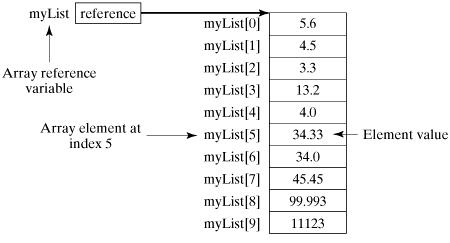
Processing Arrays
The element type and size of an array are fixed, so when processing array elements, we usually use a basic loop or a For-Each loop.
Example
This example fully demonstrates how to create, initialize, and manipulate arrays:
TestArray.java file code:
The compilation and running result of the above example is as follows:
1.9
2.9
3.4
3.5
Total is 11.7
Max is 3.5
For-Each Loop
JDK 1.5 introduced a new type of loop, called the For-Each loop or enhanced loop, which can traverse arrays without using indices.
The syntax format is as follows:
for(type element: array)
{
    System.out.println(element);
}
Example
This example is used to display all elements in the array myList:
TestArray.java file code:
The compilation and running result of the above example is as follows:
1.9
2.9
3.4
3.5
Arrays as Function Parameters
Arrays can be passed as parameters to methods.
For example, the following example is a method that prints the elements of an int array:
The following example calls the printArray method to print 3, 1, 2, 6, 4, and 2:
Arrays as Return Values of Functions
In the above example, the result array is used as the return value of the function.
Multidimensional Arrays
Multidimensional arrays can be seen as arrays of arrays. For example, a two-dimensional array is a special one-dimensional array where each element is a one-dimensional array, for instance:
Dynamic Initialization of Multidimensional Arrays (Using a Two-Dimensional Array as an Example)
1. Directly allocate space for each dimension, the format is as follows:
type can be a basic data type or a composite data type. typeLength1 and typeLength2 must be positive integers. typeLength1 is the number of rows, and typeLength2 is the number of columns.
For example:
Analysis:
The two-dimensional array a can be viewed as an array with two rows and three columns.
2. Starting from the highest dimension, allocate space for each dimension separately, for example:
Analysis:
s[0]=new String[2]ands[1]=new String[3]It allocates reference space for the highest dimension, that is, it limits the maximum length of data that the highest dimension can store, and then allocates space separately for each of its array elements.s0=new String("Good")and other operations.
Referencing Multidimensional Arrays (Using a Two-Dimensional Array as an Example)
For each element in a two-dimensional array, the referencing method isarrayName[index1][index2], for example:
Arrays Class
The java.util.Arrays class can conveniently operate on arrays. All the methods it provides are static.
It has the following functions:
- Assign values to the array: through the fill method.
- Sort the array: through the sort method, in ascending order.
- Compare arrays: use the equals method to compare whether the element values in the arrays are equal.
- Search for array elements: the binarySearch method can perform a binary search operation on a sorted array.
For detailed instructions, please see the following table:
| No. | Method and Description |
|---|---|
| 1 |
public static int binarySearch(Object[] a, Object key) Searches for an object with a given value in a given array using the binary search algorithm (Byte, Int, double, etc.). The array must be sorted before calling. If the search value is contained in the array, the index of the search key is returned; otherwise, it returns (-(insertion point) - 1)。 |
| 2 |
public static boolean equals(long[] a, long[] a2) If two specified long-type arrays areequal, it returns true. If the two arrays contain the same number of elements, and all corresponding pairs of elements in the two arrays are equal, then the two arrays are considered equal. In other words, if the two arrays contain the same elements in the same order, then the two arrays are equal. The same method applies to all other basic data types (Byte, short, Int, etc.). |
| 3 |
public static void fill(int[] a, int val) Assigns the specified int value to each element in the specified range of the specified int array. The same method applies to all other basic data types (Byte, short, Int, etc.). |
| 4 |
public static void sort(Object[] a) Sorts the specified object array in ascending order according to the natural ordering of its elements. The same method applies to all other basic data types (Byte, short, Int, etc.). |
Other ExtensionsExercises
Java Arrays Quiz