Java switch case Statement
The switch case statement determines whether a variable is equal to a value in a series of values. Each value is called a branch.
Syntax
The syntax format of the switch case statement is as follows:
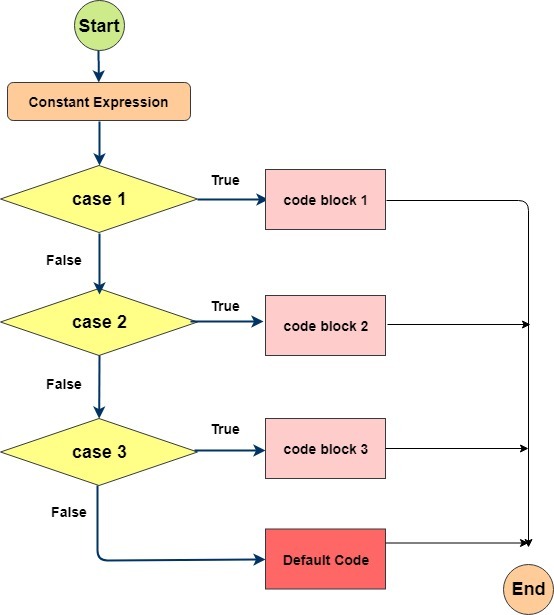
The switch case statement has the following rules:
The variable type in a switch statement can be: byte, short, int, or char. Starting from Java SE 7, switch supports the String type, and the case label must be a string constant or literal.
A switch statement can have multiple case statements. Each case is followed by a value to compare and a colon.
The data type of the value in a case statement must be the same as the data type of the variable, and it can only be a constant or a literal constant.
When the variable's value equals the value of a case statement, the statements after the case statement begin to execute until a break statement appears, at which point it exits the switch statement.
When a break statement is encountered, the switch statement terminates. The program jumps to the statement after the switch statement to execute. The case statement does not necessarily need to contain a break statement. If no break statement appears, the program will continue to execute the next case statement until a break statement appears.
A switch statement can contain a default branch, which is generally the last branch of the switch statement (it can be placed anywhere, but it is recommended to be last). The default branch executes when no case statement's value equals the variable's value. The default branch does not need a break statement.
When switch case executes, it always matches first. If the match succeeds, it returns the value of the current case, and then determines whether to continue output or exit the judgment based on whether there is a break.
Example
Test.java file code:
The result of compiling and running the above code is as follows:
良好
你的等级是 C
If there is no break statement in the case block, the JVM will not sequentially output the return value corresponding to each case; instead, it continues to match, and if the match is unsuccessful, it returns the default case.
Test.java file code:
The result of compiling and running the above code is as follows:
default
If there is no break statement in the case block, after a successful match, starting from the current case, the values of all subsequent cases will be output.
Test.java file code:
The result of compiling and running the above code is as follows:
1
2
default
If the currently matched case block has no break statement, then starting from the current case, the values of all subsequent cases will be output. If a subsequent case block has a break statement, it will exit the judgment.
Test.java file code:
The result of compiling and running the above code is as follows:
1
2
3
Other Extensions