Java ArrayList
 Java Collections Framework
The ArrayList class is an array that can be dynamically modified. The difference from ordinary arrays is that it has no fixed size limit, and we can add or delete elements.
ArrayList inherits from AbstractList and implements the List interface.
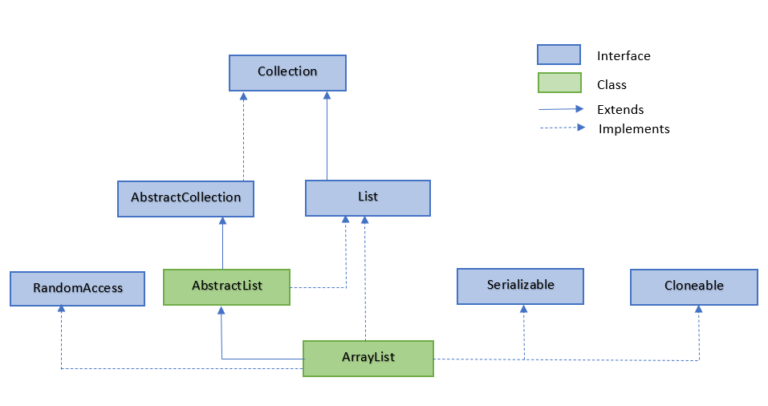
The ArrayList class is located in the java.util package. You need to import it before use. The syntax format is as follows:
import java.util.ArrayList; // 引入 ArrayList 类

ArrayList<E> objectName =new ArrayList<>();  // 初始化
- E: generic data type, used to set the data type of objectName,can only be reference data types。
- objectName: object name.
ArrayList is an array queue that provides related functions such as add, delete, modify, and traverse.
Add Element
The ArrayList class provides many useful methods. You can use the add() method to add elements to an ArrayList:
Example
public class ExampleTest {
public static void main(String[] args) {
ArrayList<String> sites = new ArrayList<String>();
sites.add("Google");
sites.add("Example");
sites.add("Taobao");
sites.add("Weibo");
System.out.println(sites);
}
}
The above example executes and the output result is:
[Google, Example, Taobao, Weibo]
Access Element
To access an element in an ArrayList, you can use the get() method:
Example
public class ExampleTest {
public static void main(String[] args) {
ArrayList<String> sites = new ArrayList<String>();
sites.add("Google");
sites.add("Example");
sites.add("Taobao");
sites.add("Weibo");
System.out.println(sites.get(1)); // Access the second element
}
}
Note: The index value of an array starts from 0.
The above example executes and the output result is:
Example
Modify Element
To modify an element in an ArrayList, you can use the set() method. The first parameter of the set(int index, E element) method is the index, indicating the position of the element to be replaced; the second parameter is the new element, indicating the new value to be set:
Example
public class ExampleTest {
public static void main(String[] args) {
ArrayList<String> sites = new ArrayList<String>();
sites.add("Google");
sites.add("Example");
sites.add("Taobao");
sites.add("Weibo");
sites.set(2, "Wiki"); // The first parameter is the index position, the second is the value to modify
System.out.println(sites);
}
}
The above example executes and the output result is:
[Google, Example, Wiki, Weibo]
Delete Element
To delete an element in an ArrayList, you can use the remove() method:
Example
public class ExampleTest {
public static void main(String[] args) {
ArrayList<String> sites = new ArrayList<String>();
sites.add("Google");
sites.add("Example");
sites.add("Taobao");
sites.add("Weibo");
sites.remove(3); // Delete the fourth element
System.out.println(sites);
}
}
The above example executes and the output result is:
[Google, Example, Taobao]
Calculate Size
To calculate the number of elements in an ArrayList, you can use the size() method:
Example
public class ExampleTest {
public static void main(String[] args) {
ArrayList<String> sites = new ArrayList<String>();
sites.add("Google");
sites.add("Example");
sites.add("Taobao");
sites.add("Weibo");
System.out.println(sites.size());
}
}
The above example executes and the output result is:
4
Iterate ArrayList
We can use for to iterate over the elements in the array list:
Example
public class ExampleTest {
public static void main(String[] args) {
ArrayList<String> sites = new ArrayList<String>();
sites.add("Google");
sites.add("Example");
sites.add("Taobao");
sites.add("Weibo");
for (int i = 0; i < sites.size(); i++) {
System.out.println(sites.get(i));
}
}
}
The above example executes and the output result is:
Google
Example
Taobao
Weibo
You can also use for-each to iterate over elements:
Example
public class ExampleTest {
public static void main(String[] args) {
ArrayList<String> sites = new ArrayList<String>();
sites.add("Google");
sites.add("Example");
sites.add("Taobao");
sites.add("Weibo");
for (String i : sites) {
System.out.println(i);
}
}
}
The above example executes and the output result is:
Google
Example
Taobao
Weibo
Other Reference Types
The elements in an ArrayList are actually objects. In the above examples, the array list elements are all String types.
If we want to store other types, and <E> can only be reference data types, then we need to use the wrapper classes of basic types.
The wrapper class table corresponding to basic types is as follows:
| Basic Type | Reference Type |
|---|---|
| boolean | Boolean |
| byte | Byte |
| short | Short |
| int | Integer |
| long | Long |
| float | Float |
| double | Double |
| char | Character |
In addition, BigInteger and BigDecimal are used for high-precision operations. BigInteger supports arbitrary precision integers. They are also reference types, but they do not have corresponding basic types.
ArrayList<Integer> li=new ArrayList<>();     // 存放整数元素
ArrayList<Character> li=new ArrayList<>();   // 存放字符元素
The following example uses ArrayList to store numbers (using Integer type):
Example
public class ExampleTest {
public static void main(String[] args) {
ArrayList<Integer> myNumbers = new ArrayList<Integer>();
myNumbers.add(10);
myNumbers.add(15);
myNumbers.add(20);
myNumbers.add(25);
for (int i : myNumbers) {
System.out.println(i);
}
}
}
The above example executes and the output result is:
10
15
20
25
ArrayList Sorting
The Collections class is also a very useful class, located in the java.util package. Its sort() method can sort character or number lists.
The following example sorts letters:
Example
import java.util.Collections; // Import the Collections class
public class ExampleTest {
public static void main(String[] args) {
ArrayList<String> sites = new ArrayList<String>();
sites.add("Taobao");
sites.add("Wiki");
sites.add("Example");
sites.add("Weibo");
sites.add("Google");
Collections.sort(sites); // Sort letters
for (String i : sites) {
System.out.println(i);
}
}
}
The above example executes and the output result is:
Google
Example
Taobao
Weibo
Wiki
The following example sorts numbers:
Example
import java.util.Collections; // Import the Collections class
public class ExampleTest {
public static void main(String[] args) {
ArrayList<Integer> myNumbers = new ArrayList<Integer>();
myNumbers.add(33);
myNumbers.add(15);
myNumbers.add(20);
myNumbers.add(34);
myNumbers.add(8);
myNumbers.add(12);
Collections.sort(myNumbers); // Sort numbers
for (int i : myNumbers) {
System.out.println(i);
}
}
}
The above example executes and the output result is:
8
12
15
20
33
34
Java ArrayList Methods
The list of commonly used Java ArrayList methods is as follows:
| Method | Description |
|---|---|
| add() | Insert an element into the arraylist at the specified position |
| addAll() | Add all elements in a collection to the arraylist |
| clear() | Remove all elements from the arraylist |
| clone() | Copy a arraylist |
| contains() | Determine whether an element is in the arraylist |
| get() | Get the element in the arraylist by index value |
| indexOf() | Return the index value of an element in the arraylist |
| removeAll() | Remove all elements in the arraylist that exist in the specified collection |
| remove() | Remove a single element from the arraylist |
| size() | Return the number of elements in the arraylist |
| isEmpty() | Determine whether the arraylist is empty |
| subList() | Extract a portion of the arraylist elements |
| set() | Replace the element at the specified index in the arraylist |
| sort() | Sort the arraylist elements |
| toArray() | Convert the arraylist to an array |
| toString() | Convert the arraylist to a string |
| ensureCapacity() | Set the arraylist with the specified capacity |
| lastIndexOf() | Return the last occurrence position of the specified element in the arraylist |
| retainAll() | Retain those elements in the arraylist that also exist in the specified collection |
| containsAll() | Check whether the arraylist contains all elements in the specified collection |
| trimToSize() | Adjust the capacity of the arraylist to the number of elements in the array |
| removeRange() | Delete elements between the specified indexes in the arraylist |
| replaceAll() | Replace each element in the array with the given operation content |
| removeIf() | Remove all arraylist elements that satisfy specific conditions |
| forEach() | Traverse each element in the arraylist and perform a specific operation |
For more API methods, you can check:https://www.example.com/manual/jdk11api/java.base/java/util/ArrayList.html
Other Extensions