Java StringBuffer and StringBuilder Classes
When modifying strings, you need to use the StringBuffer and StringBuilder classes.
Unlike the String class, objects of the StringBuffer and StringBuilder classes can be modified multiple times without creating new unused objects.
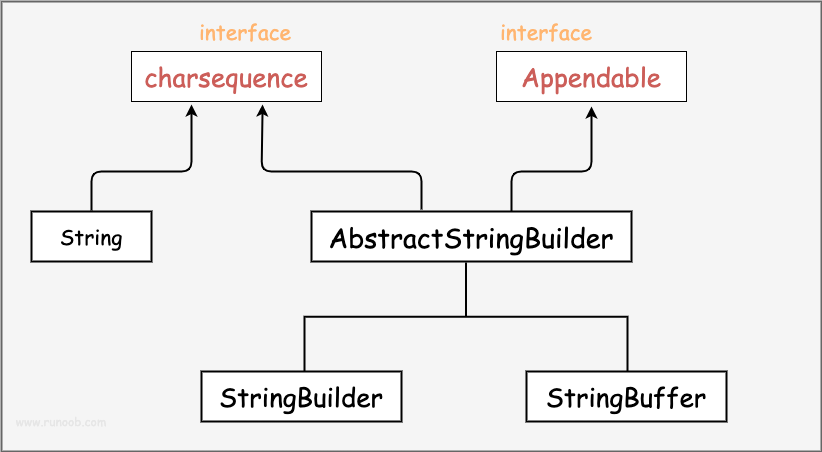
When using the StringBuffer class, every operation is performed on the StringBuffer object itself rather than generating a new object, so if you need to modify strings, StringBuffer is recommended.
The StringBuilder class was introduced in Java 5. The biggest difference between it and StringBuffer is that StringBuilder's methods are not thread-safe (cannot be accessed synchronously).
Since StringBuilder has a speed advantage over StringBuffer, it is recommended to use the StringBuilder class in most cases.
Example

The compilation and execution result of the above example is as follows:
Example..
Example..!
Example..Java!
RunooJava!
However, when the application requires thread safety, the StringBuffer class must be used.
Test.java file code:
The compilation and execution result of the above example is as follows:
Example官网:www.example.com
StringBuffer Methods
The following are the main methods supported by the StringBuffer class:
| No. | Method Description |
|---|---|
| 1 |
public StringBuffer append(String s) Appends the specified string to this character sequence. |
| 2 |
public StringBuffer reverse() Replaces this character sequence with its reversed form. |
| 3 |
public delete(int start, int end) Removes the characters in a substring of this sequence. |
| 4 |
public insert(int offset, int i) will intInserts the string representation of the argument into this sequence. |
| 5 |
insert(int offset, String str)
will strInserts the string of the argument into this sequence. |
| 6 |
replace(int start, int end, String str) Using the given Stringreplace the characters in a substring of this sequence with the characters in the given String. |
The following list lists other common methods of the StringBuffer class:
| No. | Method Description |
|---|---|
| 1 |
int capacity() Returns the current capacity. |
| 2 |
char charAt(int index) Returns the char value at the specified index in this sequence. charvalue. |
| 3 |
void ensureCapacity(int minimumCapacity) Ensures that the capacity is at least equal to the specified minimum. |
| 4 |
void getChars(int srcBegin, int srcEnd, char[] dst, int dstBegin) Copies characters from this sequence into the target character array. dst。 |
| 5 |
int indexOf(String str) Returns the index of the first occurrence of the specified substring in this string. |
| 6 |
int indexOf(String str, int fromIndex) Returns the index of the first occurrence of the specified substring in this string, starting at the specified index. |
| 7 |
int lastIndexOf(String str) Returns the index of the rightmost occurrence of the specified substring in this string. |
| 8 |
int lastIndexOf(String str, int fromIndex) Returns the index of the last occurrence of the substring in the String object. |
| 9 |
int length() Returns the length (number of characters). |
| 10 |
void setCharAt(int index, char ch) Sets the character at the given index to ch。 |
| 11 |
void setLength(int newLength) Sets the length of the character sequence. |
| 12 |
CharSequence subSequence(int start, int end) Returns a new character sequence that is a subsequence of this sequence. |
| 13 |
String substring(int start) Returns a new String, which contains the character subsequence currently contained in this character sequence. |
| 14 |
String substring(int start, int end) Returns a new String, which contains the character subsequence currently contained in this sequence. |
| 15 |
String toString() Returns the string representation of the data in this sequence. |
More content:
- StringBuffer Class:https://www.example.com/manual/jdk11api/java.base/java/lang/StringBuffer.html
- StringBuilder Class:https://www.example.com/manual/jdk11api/java.base/java/lang/StringBuilder.html