Java Inheritance
Concept of Inheritance
Inheritance is a cornerstone of Java object-oriented programming technology because it allows creating hierarchical classes.
Inheritance means that a subclass inherits the characteristics and behaviors of a parent class, so that subclass objects (instances) have the parent class's instance fields and methods, or the subclass inherits methods from the parent class, giving the subclass the same behaviors as the parent class.
Inheritance in Daily Life:
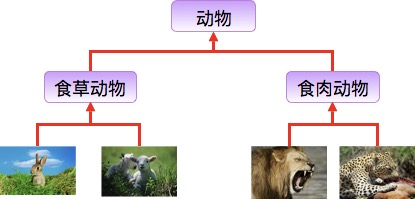
Rabbits and sheep belong to the herbivore class, while lions and leopards belong to the carnivore class.
Herbivores and carnivores also belong to the animal class.
Therefore, the relationship that inheritance needs to satisfy is: is-a. The parent class is more general, and the subclass is more specific.
Although herbivores and carnivores both belong to animals, there are differences in their attributes and behaviors. Therefore, a subclass will have the general characteristics of the parent class as well as its own characteristics.
Class Inheritance Format
In Java, you can use the extends keyword to declare that a class inherits from another class. The general form is as follows:
Class Inheritance Format
Why Do We Need Inheritance?
Next, let's illustrate this need with an example.
Develop an animal class, where the animals are a penguin and a mouse, with the following requirements:
- Penguin: attributes (name, id), methods (eat, sleep, self-introduction)
- Mouse: attributes (name, id), methods (eat, sleep, self-introduction)
Penguin class:
Mouse class:
From these two pieces of code, we can see that the code is duplicated, making the code large and bloated, and maintainability is low (mainly because when changes are needed later, many parts of the code must be modified, which is error-prone). To fundamentally solve the problem of these two pieces of code, inheritance is needed. Extract the common parts of the two pieces of code to form a parent class:
Common parent class:
This Animal class can serve as a parent class. After the Penguin and Mouse classes inherit this class, they will have the attributes and methods of the parent class. The subclasses will no longer have duplicate code, maintainability is improved, the code is more concise, and code reusability is improved (reusability mainly means it can be used multiple times without writing the same code again). Code after inheritance:
Penguin class:
Mouse class:
Types of Inheritance
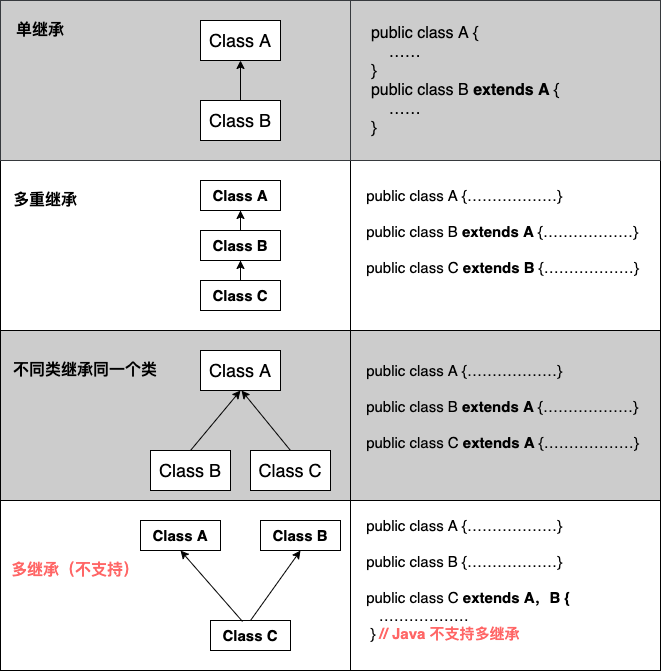
Note that Java does not support multiple inheritance, but it supports multilevel inheritance.
Characteristics of Inheritance
A subclass has all non-private attributes and methods of the parent class.
A subclass can have its own attributes and methods, meaning a subclass can extend the parent class.
A subclass can implement the parent class's methods in its own way.
Java inheritance is single inheritance, but multilevel inheritance is possible. Single inheritance means a subclass can only inherit from one parent class. Multilevel inheritance means, for example, class B inherits class A, and class C inherits class B. So in terms of relationships, class B is the parent of class C, and class A is the parent of class B. This is a feature that distinguishes Java inheritance from C++ inheritance.
It increases coupling between classes (a shortcoming of inheritance; high coupling makes the connections between code tighter and code independence weaker).
Inheritance Keywords
Inheritance can be implemented using the two keywords extends and implements. In addition, all classes inherit from java.lang.Object. When a class does not use these two inheritance keywords, it inherits Object by default (this class is in thejava.langpackage, so there is no need toimport) ancestor class.
extends keyword
In Java, class inheritance is single inheritance; that is, a subclass can have only one parent class, so extends can only inherit one class.
extends keyword
implements keyword
Using the implements keyword can indirectly give Java the characteristics of multiple inheritance. It is used when a class inherits interfaces, and it can inherit multiple interfaces at the same time (interfaces are separated by commas).
implements keyword
super and this keywords
super keyword:We can use the super keyword to access members of the parent class; it is used to reference the parent class of the current object.
this keyword:A reference to itself, referring to the current object, i.e., the object instance to which the current method or constructor belongs.
Example
The output result is:
animal : eat
dog : eat
animal : eat
final keyword
final can be used to modify variables (including class attributes, object attributes, local variables, and formal parameters), methods (including class methods and object methods), and classes.
final means "final".
Using the final keyword to declare a class defines the class as a final class that cannot be inherited; or it is used to modify methods, and such methods cannot be overridden by subclasses:
Declare a class:
final class 类名 {//类体}-
Declare a method:
修饰符(public/private/default/protected) final 返回值类型 方法名(){//方法体}
Note:In a class defined with final, its attributes and methods are not final.
Constructor
A subclass does not inherit the parent class's constructor (construction method or constructor function); it merely calls it (implicitly or explicitly). If the parent class's constructor has parameters, then in the subclass constructor you must explicitly use thesuperkeyword to call the parent class constructor with an appropriate parameter list.
If the parent class constructor has no parameters, then in the subclass constructor there is no need to use thesuperkeyword to call the parent class constructor; the system will automatically call the parent class's no-argument constructor.
Example
The output result is:
------SubClass 类继承------
SuperClass()
SubClass()
SuperClass(int n)
SubClass(int n): 100
------SubClass2 类继承------
SuperClass(int n)
SubClass2()
SuperClass()
SubClass2(int n): 200
Other Extensions