Java Sending Email
Sending E-mail using a Java application is very simple, but first you should install the JavaMail API and Java Activation Framework (JAF) on your machine.
- You can download the latest version from the Java website:JavaMail, open the webpage and on the right side there is aDownloadslink, click it to download.
- You can download the latest version from the Java website:JAF (version 1.1.1)。
You can also use the download link provided by this site:
-
JavaMail mail.jar 1.4.5
-
-
JAF (version 1.1.1) activation.jar
-
Download and unzip these files. In the newly created top-level directory, you will find some jar files for these two applications. You need to put themail.jarandactivation.jarfiles into your CLASSPATH.
If you use a third-party mail server such as QQ's SMTP server, you can refer to the complete user authentication example at the bottom of the article.
Send a Simple E-mail
Below is an example of sending a simple E-mail. Assume your local host is already connected to the network.
SendEmail.java file code:
import java.util.*;
import javax.mail.*;
import javax.mail.internet.*;
import javax.activation.*;
public class SendEmail
{
public static void main(String [] args)
{
String to = "[email protected]";
String from = "[email protected]";
String host = "localhost";
Properties properties = System.getProperties();
properties.setProperty("mail.smtp.host", host);
Session session = Session.getDefaultInstance(properties);
try{
MimeMessage message = new MimeMessage(session);
message.setFrom(new InternetAddress(from));
message.addRecipient(Message.RecipientType.TO,
new InternetAddress(to));
message.setSubject("This is the Subject Line!");
message.setText("This is actual message");
Transport.send(message);
System.out.println("Sent message successfully....");
}catch (MessagingException mex) {
mex.printStackTrace();
}
}
}
Compile and run this program to send a simple E-mail:
$ java SendEmail
Sent message successfully....
If you want to send an e-mail to multiple recipients, use the following methods to specify multiple recipient IDs:
void addRecipients(Message.RecipientType type,
Address[] addresses)
throws MessagingException
The following is a description of the parameters:
type:To be set to TO, CC, or BCC, where CC means carbon copy and BCC means blind carbon copy. Example:Message.RecipientType.TO
addresses:This is an array of email IDs. When specifying email IDs, you will need to use the InternetAddress() method.
Send an HTML E-mail
Below is an example of sending an HTML E-mail. Assume your local host is already connected to the network.
It is very similar to the previous example, except that we use the setContent() method with the second parameter as "text/html" to set the content to specify that HTML content is to be sent.
SendHTMLEmail.java file code:
import java.util.*;
import javax.mail.*;
import javax.mail.internet.*;
import javax.activation.*;
public class SendHTMLEmail
{
public static void main(String [] args)
{
String to = "[email protected]";
String from = "[email protected]";
String host = "localhost";
Properties properties = System.getProperties();
properties.setProperty("mail.smtp.host", host);
Session session = Session.getDefaultInstance(properties);
try{
MimeMessage message = new MimeMessage(session);
message.setFrom(new InternetAddress(from));
message.addRecipient(Message.RecipientType.TO,
new InternetAddress(to));
message.setSubject("This is the Subject Line!");
message.setContent("<h1>This is actual message</h1>",
"text/html" );
Transport.send(message);
System.out.println("Sent message successfully....");
}catch (MessagingException mex) {
mex.printStackTrace();
}
}
}
Compile and run this program to send an HTML e-mail:
$ java SendHTMLEmail
Sent message successfully....
Send an E-mail with Attachments
Below is an example of sending an E-mail with attachments. Assume your local host is already connected to the network.
SendFileEmail.java file code:
import java.util.*;
import javax.mail.*;
import javax.mail.internet.*;
import javax.activation.*;
public class SendFileEmail
{
public static void main(String [] args)
{
String to = "[email protected]";
String from = "[email protected]";
String host = "localhost";
Properties properties = System.getProperties();
properties.setProperty("mail.smtp.host", host);
Session session = Session.getDefaultInstance(properties);
try{
MimeMessage message = new MimeMessage(session);
message.setFrom(new InternetAddress(from));
message.addRecipient(Message.RecipientType.TO,
new InternetAddress(to));
message.setSubject("This is the Subject Line!");
BodyPart messageBodyPart = new MimeBodyPart();
messageBodyPart.setText("This is message body");
Multipart multipart = new MimeMultipart();
multipart.addBodyPart(messageBodyPart);
messageBodyPart = new MimeBodyPart();
String filename = "file.txt";
DataSource source = new FileDataSource(filename);
messageBodyPart.setDataHandler(new DataHandler(source));
messageBodyPart.setFileName(filename);
multipart.addBodyPart(messageBodyPart);
message.setContent(multipart );
Transport.send(message);
System.out.println("Sent message successfully....");
}catch (MessagingException mex) {
mex.printStackTrace();
}
}
}
Compile and run your program to send an email with attachments.
$ java SendFileEmail
Sent message successfully....
User Authentication Section
If you need to provide a username and password to the e-mail server for user authentication, you can do it with the following settings:
props.put("mail.smtp.auth", "true");
props.setProperty("mail.user", "myuser");
props.setProperty("mail.password", "mypwd");
The rest of the e-mail sending mechanism remains the same as above.
Example of email sending with username/password authentication:
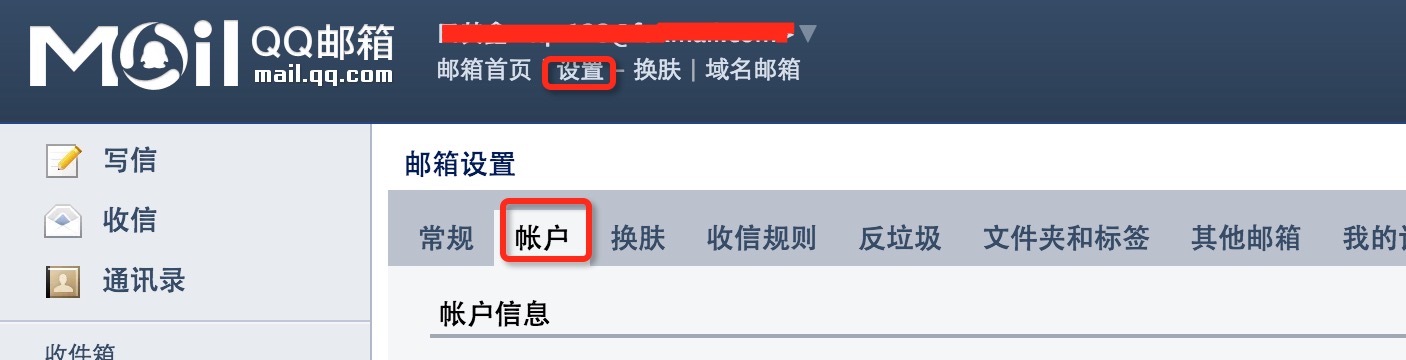
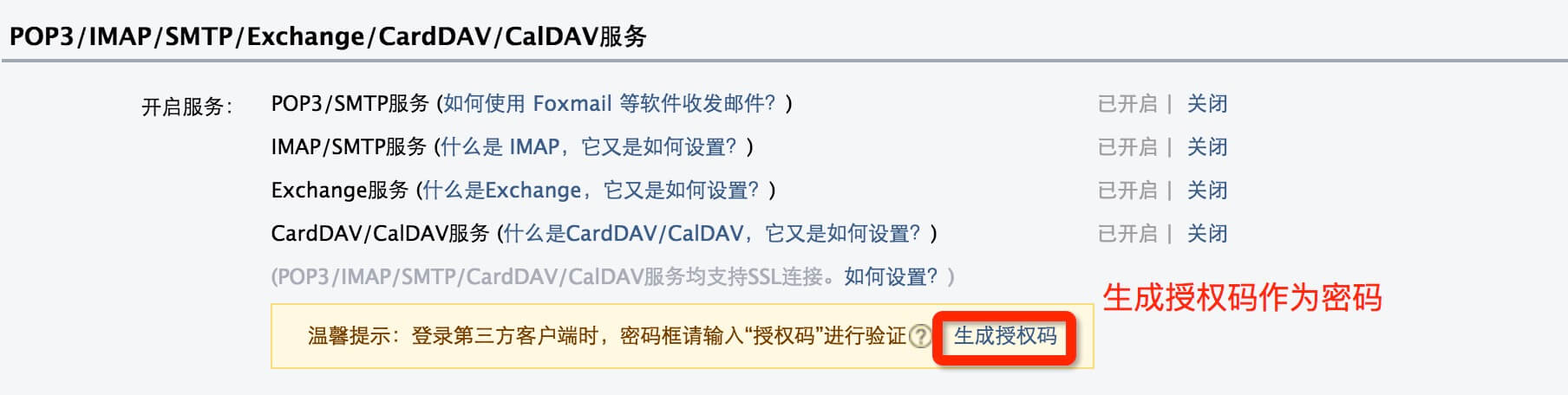
This example uses the QQ mail server as an example. You need to log in to your QQ mailbox backend and enable the POP3/SMTP service under "Settings" => "Accounts", as shown in the figure below:
QQ mailbox sets the password by generating an authorization code:
The Java code is as follows:
SendEmail2.java file code:
import java.util.Properties;
import javax.mail.Authenticator;
import javax.mail.Message;
import javax.mail.MessagingException;
import javax.mail.PasswordAuthentication;
import javax.mail.Session;
import javax.mail.Transport;
import javax.mail.internet.InternetAddress;
import javax.mail.internet.MimeMessage;
public class SendEmail2
{
public static void main(String [] args)
{
String to = "[email protected]";
String from = "[email protected]";
String host = "smtp.qq.com";
Properties properties = System.getProperties();
properties.setProperty("mail.smtp.host", host);
properties.put("mail.smtp.auth", "true");
Session session = Session.getDefaultInstance(properties,new Authenticator(){
public PasswordAuthentication getPasswordAuthentication()
{
return new PasswordAuthentication("[email protected]", "QQ mailbox authorization code");
}
});
try{
MimeMessage message = new MimeMessage(session);
message.setFrom(new InternetAddress(from));
message.addRecipient(Message.RecipientType.TO,
new InternetAddress(to));
message.setSubject("This is the Subject Line!");
message.setText("This is actual message");
Transport.send(message);
System.out.println("Sent message successfully....from example.com");
}catch (MessagingException mex) {
mex.printStackTrace();
}
}
}
Other Extensions