Java ArrayList subList() Method
 Java ArrayList
The subList() method is used to extract and return a portion of the dynamic array.
The syntax of the subList() method is:
arraylist.subList(int fromIndex, int toIndex)
Note:arraylist is an object of the ArrayList class.
Parameter Details:
- fromIndex - The starting position of the elements to be extracted, including the element at this index.
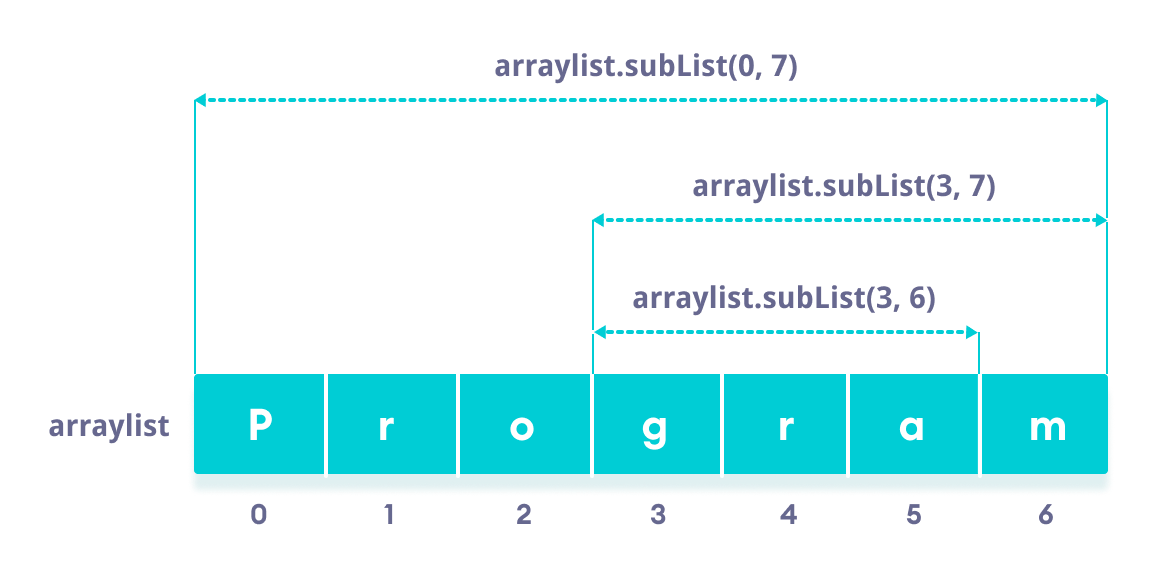
- toIndex - The ending position of the elements to be extracted, excluding the element at this index.
Return Value
Returns the extracted portion of the given dynamic array.
If fromIndex is less than 0 or greater than the length of the array, an IndexOutOfBoundsException is thrown.
If fromIndex is greater than the value of toIndex, an IllegalArgumentException is thrown.
Note: The elements contained in this dynamic array start at position fromIndex and go up to element index position toIndex-1, while the element at index position toIndex is not included.
Example
Extract a sublist from a dynamic array:
Example
class Main {
public static void main(String[] args){
// Create a dynamic array
ArrayList<String> sites = new ArrayList<>();
sites.add("Google");
sites.add("Example");
sites.add("Taobao");
sites.add("Wiki");
System.out.println("Website list: " + sites);
// Element positions 1 to 3
System.out.println("SubList: " + sites.subList(1, 3));
}
}
The output of the above program is:
网站列表: [Google, Example, Taobao, Wiki]
SubList: [Example, Taobao]
In the above example, we use the subList() method to get elements from index 1 to 3 (excluding 3).
Split a dynamic array into two dynamic arrays:
Example
class Main {
public static void main(String[] args) {
// Create an array
ArrayList<Integer> ages = new ArrayList<>();
// Add some elements to the array
ages.add(10);
ages.add(12);
ages.add(15);
ages.add(19);
ages.add(23);
ages.add(34);
System.out.println("Age list: " + ages);
// Under 18
System.out.println("Under 18: " + ages.subList(0, 3));
// 18 and above
System.out.println("18 and above: " + ages.subList(3, ages.size()));
}
}
The output of the above program is:
年龄列表: [10, 12, 15, 19, 23, 34]
18 岁以下: [10, 12, 15]
18 岁以上: [19, 23, 34]
In the above example, we created an array named ages, and the subList() method splits the array into two arrays: those under 18 and those 18 and above.
Please note that we used the ages.size() method to get the length of the array. To learn more about the size() method, please visit Java ArrayList size().
Other Extensions