Using Text Fields
A text field is a user interface element used by applications to obtain user input.
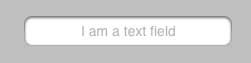
A UITextField looks like this:
Important Text Field Properties
- Placeholder displayed when there is no user input
- Normal text
- Auto-correction type
- Keyboard type
- Return key type
- Clear button mode
- Alignment
- Delegate
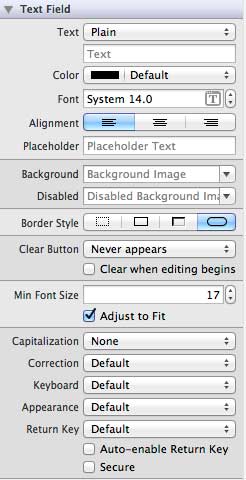
Updating Properties in xib
You can change the text field properties of the xib in the Attribute Inspector within the Utility area (on the right side of the window).
Text Field Delegate
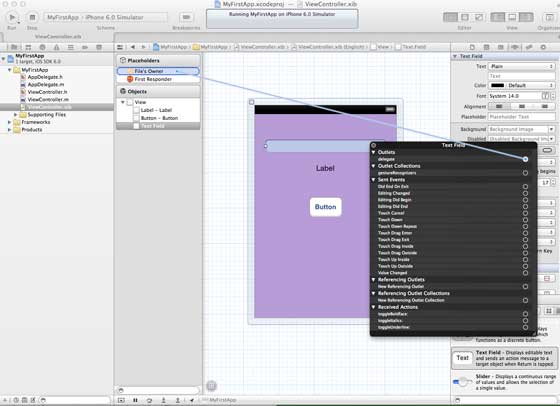
We can set the delegate in Interface Builder by right-clicking the UI element and connecting it to the File's Owner, as shown below:
Steps to use the delegate:
- 1. Set the delegate as shown in the figure above
- 2. Add the delegate to your responder class
- 3. Implement the text field delegate. The important text field delegate methods are as follows:
- (void)textFieldDidBeginEditing:(UITextField *)textField
- (void)textFieldDidEndEditing:(UITextField *)textField
Example
Below, we use a simple example to create a UI element.
The ViewController class will adopt UITextFieldDelegate. Modify the ViewController.h file as shown below:
Add the addTextField method to our ViewController.m file
Then call this method in the viewDidLoad method
Update viewDidLoad in ViewController.m as shown below
#import "ViewController.h"
@interface ViewController ()

@end

@implementation ViewController

- (void)viewDidLoad
{
    [super viewDidLoad];
    //The custom method to create our textfield is called
    [self addTextField];
    // Do any additional setup after loading the view, typically from a nib.
}

- (void)didReceiveMemoryWarning
{
    [super didReceiveMemoryWarning];
    // Dispose of any resources that can be recreated.
}

-(void)addTextField{
   // This allocates a label
   UILabel *prefixLabel = [[UILabel alloc]initWithFrame:CGRectZero];
   //This sets the label text
   prefixLabel.text =@"## ";
   // This sets the font for the label
   [prefixLabel setFont:[UIFont boldSystemFontOfSize:14]];
   // This fits the frame to size of the text
   [prefixLabel sizeToFit];

   // This allocates the textfield and sets its frame
   UITextField *textField = [[UITextField  alloc] initWithFrame:
   CGRectMake(20, 50, 280, 30)];

   // This sets the border style of the text field
   textField.borderStyle = UITextBorderStyleRoundedRect;
   textField.contentVerticalAlignment =
   UIControlContentVerticalAlignmentCenter;
   [textField setFont:[UIFont boldSystemFontOfSize:12]];

   //Placeholder text is displayed when no text is typed
   textField.placeholder = @"Simple Text field";

   //Prefix label is set as left view and the text starts after that
   textField.leftView = prefixLabel;

   //It set when the left prefixLabel to be displayed
   textField.leftViewMode = UITextFieldViewModeAlways;

   // Adds the textField to the view.
   [self.view addSubview:textField];

   // sets the delegate to the current class
   textField.delegate = self;
}

// pragma mark is used for easy access of code in Xcode
#pragma mark - TextField Delegates

// This method is called once we click inside the textField
-(void)textFieldDidBeginEditing:(UITextField *)textField{
   NSLog(@"Text field did begin editing");
}

// This method is called once we complete editing
-(void)textFieldDidEndEditing:(UITextField *)textField{
   NSLog(@"Text field ended editing");
}

// This method enables or disables the processing of return key
-(BOOL) textFieldShouldReturn:(UITextField *)textField{
    [textField resignFirstResponder];
    return YES;
}

- (void)viewDidUnload {
   label = nil;
   [super viewDidUnload];
}

@end
Running the application will show the following output
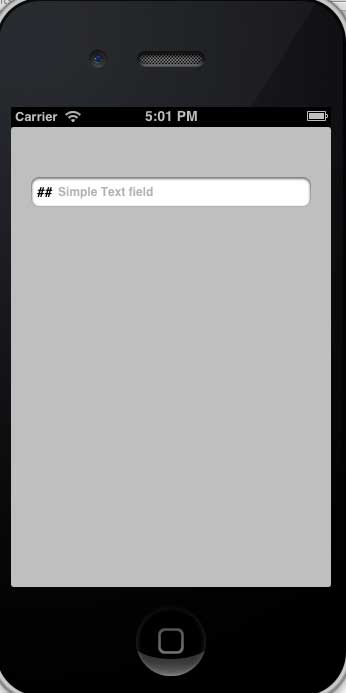
The delegate methods are called based on user actions. To know when the delegate is called, please refer to the console output.
Other Extensions