iOS Location Operations
Introduction
In iOS, positioning via CoreLocation can obtain the user's current location and also get device movement information.
Example Steps
1. Create a simple View-based application (view application).
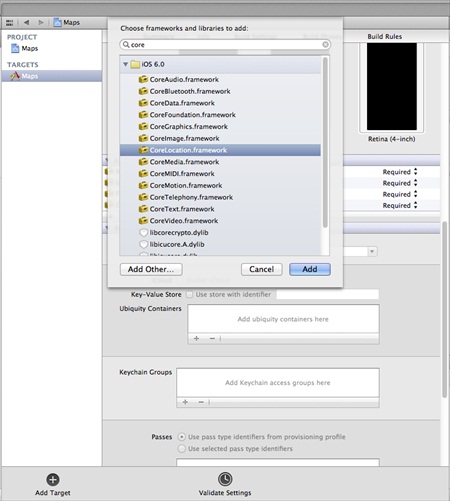
2. Select the project file, then select the target, and then add CoreLocation.framework, as shown below.
3. Add two labels in ViewController.xib, create labels with IBOutlet names latitudeLabel and longitudeLabel.
4. Now by selecting " File-> New -> File... -> " choose "Objective C class" and click Next.
5. Set "sub class of" as NSObject, and name the class LocationHandler.
6. Select Create.
7. Update LocationHandler.h as shown below.
#import <Foundation/Foundation.h>
#import <CoreLocation/CoreLocation.h>

@protocol LocationHandlerDelegate <NSObject>

@required
-(void) didUpdateToLocation:(CLLocation*)newLocation
 fromLocation:(CLLocation*)oldLocation;
@end

@interface LocationHandler : NSObject<CLLocationManagerDelegate>
{
    CLLocationManager *locationManager;
}
@property(nonatomic,strong) id<LocationHandlerDelegate> delegate;

+(id)getSharedInstance;
-(void)startUpdating;
-(void) stopUpdating;

@end
8. Update LocationHandler.m as shown below.
#import "LocationHandler.h"
static LocationHandler *DefaultManager = nil;

@interface LocationHandler()

-(void)initiate;

@end

@implementation LocationHandler

+(id)getSharedInstance{
    if (!DefaultManager) {
        DefaultManager = [[self allocWithZone:NULL]init];
        [DefaultManager initiate];
    }
    return DefaultManager;
}
-(void)initiate{
    locationManager = [[CLLocationManager alloc]init];
    locationManager.delegate = self;
}

-(void)startUpdating{
    [locationManager startUpdatingLocation];
}

-(void) stopUpdating{
    [locationManager stopUpdatingLocation];
}
-(void)locationManager:(CLLocationManager *)manager didUpdateToLocation:
 (CLLocation *)newLocation fromLocation:(CLLocation *)oldLocation{
    if ([self.delegate respondsToSelector:@selector
    (didUpdateToLocation:fromLocation:)])
    {
        [self.delegate didUpdateToLocation:oldLocation
        fromLocation:newLocation];

    }
}

@end
9. Update ViewController.h as shown below.
#import <UIKit/UIKit.h>
#import "LocationHandler.h"
@interface ViewController : UIViewController<LocationHandlerDelegate>
{
    IBOutlet UILabel *latitudeLabel;
    IBOutlet UILabel *longitudeLabel;
}
@end
10. Update ViewController.m as shown below.
#import "ViewController.h"

@interface ViewController ()

@end

@implementation ViewController

- (void)viewDidLoad
{
    [super viewDidLoad];
    [[LocationHandler getSharedInstance]setDelegate:self];
    [[LocationHandler getSharedInstance]startUpdating];
}

- (void)didReceiveMemoryWarning
{
    [super didReceiveMemoryWarning];
    // Dispose of any resources that can be recreated.
}

-(void)didUpdateToLocation:(CLLocation *)newLocation
 fromLocation:(CLLocation *)oldLocation{
    [latitudeLabel setText:[NSString stringWithFormat:
    @"Latitude: %f",newLocation.coordinate.latitude]];
    [longitudeLabel setText:[NSString stringWithFormat:
    @"Longitude: %f",newLocation.coordinate.longitude]];

}

@end
Output
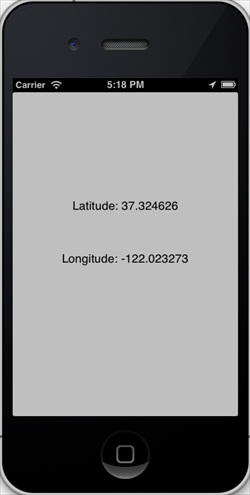
When we run the application, we will get the following output: