iOS Introduction
iOS was previously known as iPhone OS, and is a mobile operating system developed by Apple Inc.
The first version of iOS was released in 2007, which included iPhone and iPod Touch.
On January 27, 2010, the iPad (first generation) was released, and in November 2012, the iPad mini was released.
iOS devices are released quite frequently; based on past experience, at least one version of iPhone and iPad is launched every year.
Now the iPhone 6s has been released; previously the iPhone, iPhone 3GS, iPhone 4, iPhone 4s, iPhone 5, iPhone 5s, and iPhone 6 were also launched.
Similarly, the iPad has been updated from the first-generation iPad to the fourth-generation iPad, as well as a special iPad mini.
The iOS SDK has been updated from 1.0 to 6.0. The latest iOS SDK 6.0 is the only version that supports Xcode 4.5 and higher versions.
Rich Apple documentation allows us to find many methods and libraries for our deployment targets. In the current version of Xcode, we can choose between deployment targets of iOS 4.3, 5.0, and 6.0.
The influence of iOS can be seen from the following features:
Facebook and Twitter, accelerometer, GPS, high-end processors, camera, Safari browser, powerful APIs, Game Center, in-app purchases, reminders, a wide range of gestures- Maps
- Siri
- Facebook and Twitter
- Multi-Touch (multi-touch)
- Accelerometer (acceleration sensor)
- GPS
- High-performance processor
- Camera
- Safari browser
- Powerful APIs
- Game Center
- In-app purchases
- Reminders
- Gestures
The number of iPhone and iPad users is increasing day by day, which creates money-making opportunities for developers of the iPhone and iPad App Store.
The latest point about iOS is that Apple has developed the App Store, allowing users to purchase applications to enhance their iOS devices.
Developers can publish both free and paid application software in the App Store.
To develop applications and publish them to the App Store, developers need to register for the iOS Developer Program, update Xcode for development, and pay $99 per year plus have Mac Mountain Lion or higher.
Register as an Apple Developer
For users with Apple devices, it is very necessary to have an Apple ID. Moreover, to become a developer, you must use an Apple ID. Getting an Apple ID is free, and there is no need to worry about charges.
Having an Apple account has the following benefits:
- Easy access to development tools;
- Global developer video conferences;
- Invited to join iOS developer teams;
Register an Apple Account
1. Click (https://developer.apple.com/programs/register/) and select Create Apple ID

2. Enter personal information
3. Return to email to confirm and activate the account
4. Download development tools, Xcode and the iOS Simulator, iOS SDK, and other development resources it contains.
Apply for App Developer
1. Click (https://developer.apple.com/programs/ios/)

2. Click the registration page
3. Log in to your account (if you have one) or register an Apple ID
4. Choose a personal account or company account. Developer teams use a company account; a personal account cannot add other users.
5. New users go to the personal information page and use a credit card to purchase and join the development program.
6. Select the Member Center to use developer resources.
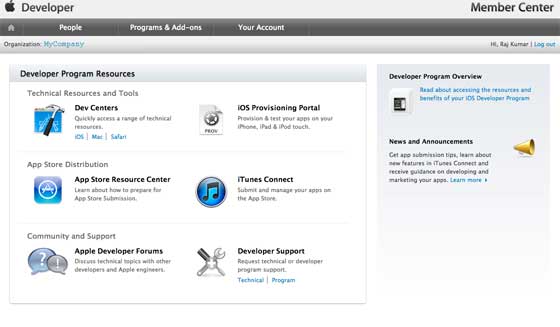
7. Here you can perform the following operations:
- Create provisioning profiles
- Manage teams and devices
- Manage apps through iTunes Connect
- Get forums and technical support