テキストフィールドの使用
テキストフィールドは、アプリケーションがユーザー入力を取得するためのユーザーインターフェース要素です。
UITextFieldは次のようになります:

重要なテキストフィールドの属性
- ユーザー入力がない場合にプレースホルダーを表示
- 通常テキスト
- 自動修正タイプ
- キーボードタイプ
- リターンキータイプ
- クリアボタンモード
- 配置
- デリゲート
xibの属性を更新
Utility area(ユーティリティエリア、ウィンドウの右側)の属性インスペクタで、xibのテキストフィールドの属性を変更できます。
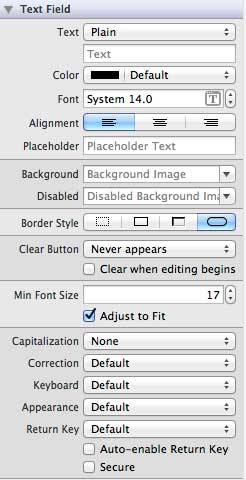
テキストフィールドのデリゲート
UIElementインターフェースビルダーで右クリックしてデリゲートを設定し、ファイルのオーナーに接続できます。次のようになります:
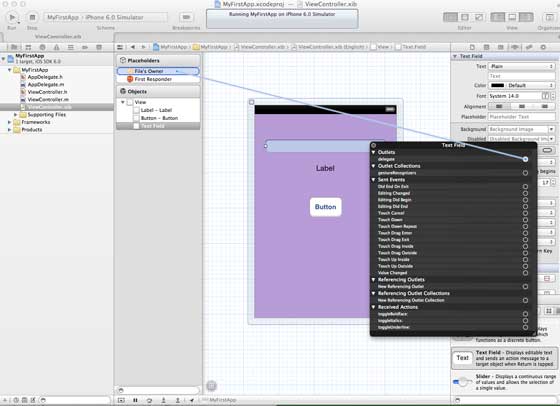
デリゲートを使用する手順:
- 1. 上図のようにデリゲートを設定します
- 2. デリゲートをレスポンダークラスに追加します
- 3. テキストフィールドのデリゲートを実装します。重要なテキストフィールドのデリゲートは次のとおりです:
- (void)textFieldDidBeginEditing:(UITextField *)textField
- (void)textFieldDidEndEditing:(UITextField *)textField
インスタンス
以下では、簡単なインスタンスを使用してUI要素を作成します。
ViewControllerクラスはUITextFieldDelegateを採用します。ViewController.hファイルを次のように変更します:
addTextFieldメソッドをViewController.mファイルに追加します。
次に、viewDidLoadメソッド内でこのメソッドを呼び出します。
ViewController.mのviewDidLoadを次のように更新します。
#import "ViewController.h"
@interface ViewController ()

@end

@implementation ViewController

- (void)viewDidLoad
{
    [super viewDidLoad];
    //The custom method to create our textfield is called
    [self addTextField];
    // Do any additional setup after loading the view, typically from a nib.
}

- (void)didReceiveMemoryWarning
{
    [super didReceiveMemoryWarning];
    // Dispose of any resources that can be recreated.
}

-(void)addTextField{
   // This allocates a label
   UILabel *prefixLabel = [[UILabel alloc]initWithFrame:CGRectZero];
   //This sets the label text
   prefixLabel.text =@"## ";
   // This sets the font for the label
   [prefixLabel setFont:[UIFont boldSystemFontOfSize:14]];
   // This fits the frame to size of the text
   [prefixLabel sizeToFit];

   // This allocates the textfield and sets its frame
   UITextField *textField = [[UITextField  alloc] initWithFrame:
   CGRectMake(20, 50, 280, 30)];

   // This sets the border style of the text field
   textField.borderStyle = UITextBorderStyleRoundedRect;
   textField.contentVerticalAlignment =
   UIControlContentVerticalAlignmentCenter;
   [textField setFont:[UIFont boldSystemFontOfSize:12]];

   //Placeholder text is displayed when no text is typed
   textField.placeholder = @"Simple Text field";

   //Prefix label is set as left view and the text starts after that
   textField.leftView = prefixLabel;

   //It set when the left prefixLabel to be displayed
   textField.leftViewMode = UITextFieldViewModeAlways;

   // Adds the textField to the view.
   [self.view addSubview:textField];

   // sets the delegate to the current class
   textField.delegate = self;
}

// pragma mark is used for easy access of code in Xcode
#pragma mark - TextField Delegates

// This method is called once we click inside the textField
-(void)textFieldDidBeginEditing:(UITextField *)textField{
   NSLog(@"Text field did begin editing");
}

// This method is called once we complete editing
-(void)textFieldDidEndEditing:(UITextField *)textField{
   NSLog(@"Text field ended editing");
}

// This method enables or disables the processing of return key
-(BOOL) textFieldShouldReturn:(UITextField *)textField{
    [textField resignFirstResponder];
    return YES;
}

- (void)viewDidUnload {
   label = nil;
   [super viewDidUnload];
}

@end
アプリケーションを実行すると、次のような出力が表示されます。
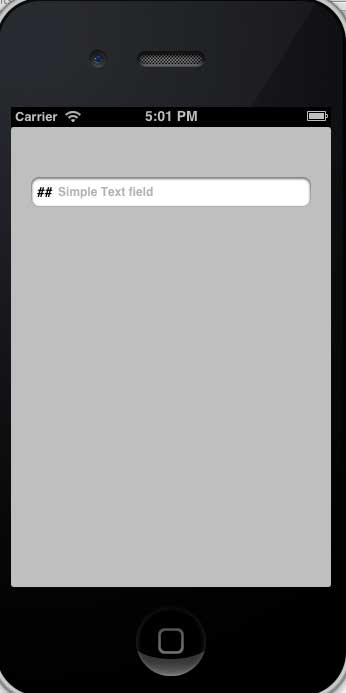
デリゲートによって呼び出されるメソッドはユーザー操作に基づきます。デリゲートが呼び出されたことを確認するには、コンソール出力を参照してください。
その他の拡張