iOS iAD Integration
Introduction
iAD is an advertising platform launched by Apple that helps developers generate revenue from applications.
Example Steps
1. Create a simple View-based application
2. Select the project file, then select the target, then select Frameworks and add iAd.framework.
3. Update ViewController.h as shown below
#import <UIKit/UIKit.h>
#import <iAd/iAd.h>
@interface ViewController : UIViewController<ADBannerViewDelegate>
{
    ADBannerView *bannerView;
}
@end
4. Update ViewController.m, as shown below
#import "ViewController.h"

@interface ViewController ()

@end

@implementation ViewController

- (void)viewDidLoad
{
    [super viewDidLoad];
    bannerView = [[ADBannerView alloc]initWithFrame:
    CGRectMake(0, 0, 320, 50)];
    // Optional to set background color to clear color
    [bannerView setBackgroundColor:[UIColor clearColor]];
    [self.view addSubview: bannerView];
}

- (void)didReceiveMemoryWarning
{
    [super didReceiveMemoryWarning];
    // Dispose of any resources that can be recreated.
}

#pragma mark - AdViewDelegates

-(void)bannerView:(ADBannerView *)banner
 didFailToReceiveAdWithError:(NSError *)error{
    NSLog(@"Error loading");
}

-(void)bannerViewDidLoadAd:(ADBannerView *)banner{
    NSLog(@"Ad loaded");
}
-(void)bannerViewWillLoadAd:(ADBannerView *)banner{
    NSLog(@"Ad will load");
}
-(void)bannerViewActionDidFinish:(ADBannerView *)banner{
    NSLog(@"Ad did finish");

}
@end
Output
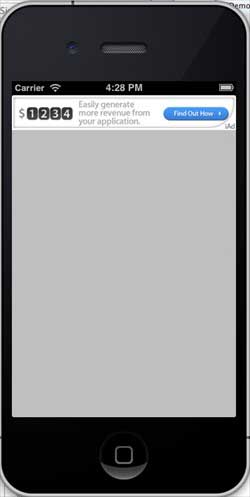
Run the application, and you will get the following output: