Использование текстовых полей
Текстовое поле — это элемент пользовательского интерфейса, используемый приложениями для получения ввода пользователя.
UITextField выглядит следующим образом:

Важные свойства текстового поля
- Placeholder, отображаемый при отсутствии пользовательского ввода
- Обычный текст
- Тип автокоррекции
- Тип клавиатуры
- Тип клавиши Return
- Режим кнопки очистки
- Выравнивание
- Делегат
Обновление свойств в xib
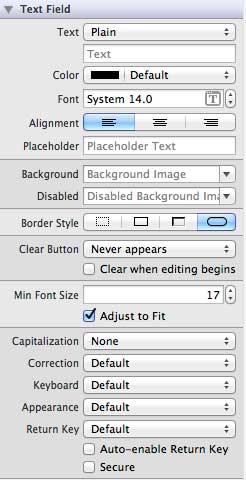
Вы можете изменить свойства текстового поля в xib в инспекторе атрибутов в области утилит (справа от окна).
Делегат текстового поля
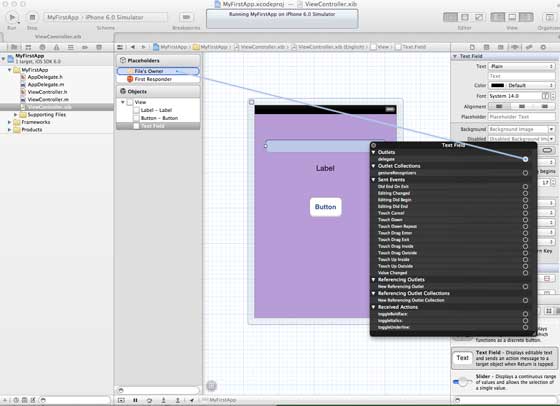
Мы можем задать делегат в Interface Builder, щёлкнув правой кнопкой мыши по UI-элементу и подключив его к File's Owner, как показано ниже:
Шаги по использованию делегата:
- 1. Задайте делегат, как показано на рисунке выше
- 2. Добавьте делегат в ваш класс responder
- 3. Реализуйте делегат текстового поля. Важные методы делегата текстового поля приведены ниже:
- (void)textFieldDidBeginEditing:(UITextField *)textField
- (void)textFieldDidEndEditing:(UITextField *)textField
Пример
Ниже мы на простом примере создадим элемент UI.
Класс ViewController будет реализовывать UITextFieldDelegate. Измените файл ViewController.h, как показано ниже:
Добавьте метод addTextField в наш файл ViewController.m
Затем вызовите этот метод в методе viewDidLoad
Обновите viewDidLoad в ViewController.m, как показано ниже
#import "ViewController.h"
@interface ViewController ()

@end

@implementation ViewController

- (void)viewDidLoad
{
    [super viewDidLoad];
    //The custom method to create our textfield is called
    [self addTextField];
    // Do any additional setup after loading the view, typically from a nib.
}

- (void)didReceiveMemoryWarning
{
    [super didReceiveMemoryWarning];
    // Dispose of any resources that can be recreated.
}

-(void)addTextField{
   // This allocates a label
   UILabel *prefixLabel = [[UILabel alloc]initWithFrame:CGRectZero];
   //This sets the label text
   prefixLabel.text =@"## ";
   // This sets the font for the label
   [prefixLabel setFont:[UIFont boldSystemFontOfSize:14]];
   // This fits the frame to size of the text
   [prefixLabel sizeToFit];

   // This allocates the textfield and sets its frame
   UITextField *textField = [[UITextField  alloc] initWithFrame:
   CGRectMake(20, 50, 280, 30)];

   // This sets the border style of the text field
   textField.borderStyle = UITextBorderStyleRoundedRect;
   textField.contentVerticalAlignment =
   UIControlContentVerticalAlignmentCenter;
   [textField setFont:[UIFont boldSystemFontOfSize:12]];

   //Placeholder text is displayed when no text is typed
   textField.placeholder = @"Simple Text field";

   //Prefix label is set as left view and the text starts after that
   textField.leftView = prefixLabel;

   //It set when the left prefixLabel to be displayed
   textField.leftViewMode = UITextFieldViewModeAlways;

   // Adds the textField to the view.
   [self.view addSubview:textField];

   // sets the delegate to the current class
   textField.delegate = self;
}

// pragma mark is used for easy access of code in Xcode
#pragma mark - TextField Delegates

// This method is called once we click inside the textField
-(void)textFieldDidBeginEditing:(UITextField *)textField{
   NSLog(@"Text field did begin editing");
}

// This method is called once we complete editing
-(void)textFieldDidEndEditing:(UITextField *)textField{
   NSLog(@"Text field ended editing");
}

// This method enables or disables the processing of return key
-(BOOL) textFieldShouldReturn:(UITextField *)textField{
    [textField resignFirstResponder];
    return YES;
}

- (void)viewDidUnload {
   label = nil;
   [super viewDidUnload];
}

@end
Запуск приложения покажет следующий вывод
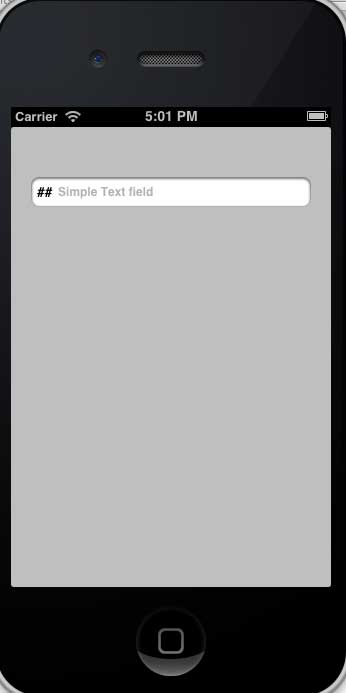
Методы делегата вызываются в зависимости от действий пользователя. Чтобы узнать, когда вызывается делегат, обратитесь к выводу консоли.
Другие расширения