Claude Code Plugins
Plugins (Plugin) are, in Claude Code,the highest-level extension mechanism,used to take capabilities such as commands, agents, Skills, hooks, MCP, LSP andpackage, version, share, and distribute.。
A plugin = a reusable collection of Claude Code extension capabilities
A plugin can contain:
- Slash Commands
- Subagents (Agents)
- Skills (capability descriptions)
- Hooks (event hooks)
- MCP servers (external tools/services)
- LSP servers (code intelligence)
The core goal of plugins is only one:
Make Claude Code's capabilities reusable like a toolbox, rather than reconfiguring in every project.
Plugins vs Standalone Configuration (How to Choose)
Claude Code supports two extension methods:
| Method | Command form | Suitable scenarios |
|---|---|---|
Standalone configuration(.claude/) |
/hello |
Personal use, single project, quick experiments |
Plugin(.claude-plugin/) |
/plugin-name:hello |
Team sharing, cross-project, versioned |
When to use standalone configuration?
- Only used in the current project
- Personal workflow
- Experimental configuration not yet stable
- Want a short command name (such as
/review)
When to use plugins?
- Need toreuse in multiple projects
- wantShare with team or community
- Needversion control, upgrades, rollbacks
- Plan to distribute through a marketplace
- Can accept namespace commands (to avoid conflicts)
Best practices:
First, in
.claude/the configuration, iterate → once stable, package as a plugin.
Minimal plugin structure (must remember)
my-plugin/
├── .claude-plugin/
│   └── plugin.json     # 插件清单(必需)
├── commands/           # 斜杠命令
├── agents/             # 子代理
├── skills/             # Skills
├── hooks/              # 钩子
├── .mcp.json           # MCP 配置
└── .lsp.json           # LSP 配置
Important rules
.claude-plugin/In the directory,can only containplugin.json- Other directories must be in the plugin root directory.
Plugin manifest (plugin.json)
The plugin's "ID card", determining:
- Plugin name
- Command namespace
- Version
- Author information
Example:
{
  "name": "my-first-plugin",
  "description": "A greeting plugin to learn the basics",
  "version": "1.0.0",
  "author": { "name": "Your Name" }
}
Key field descriptions:
| Field | Purpose |
|---|---|
| name | Unique identifier + command namespace |
| description | Displayed in the plugin marketplace |
| version | Semantic versioning |
| author | Optional, attribution description |
Slash commands (most commonly used plugin capability)
1. Command definition method
- Located in
commands/directory - Each command = one Markdown file
- Filename = command name
Example:
commands/hello.md
Corresponding command:
/my-first-plugin:hello
2. Command content example
---
description: Greet the user with a friendly message
---

Greet the user warmly and ask how you can help them today.
3. Command arguments
Usage$ARGUMENTSCapture user input:
Greet the user named "$ARGUMENTS" warmly.
Invoke:
/my-first-plugin:hello Alex
Local plugin testing (essential for development)
Usage--plugin-dirLoad plugin directory directly:
claude --plugin-dir ./my-plugin
Features:
- No installation required
- Restart Claude Code after modifications
- Supports loading multiple plugins simultaneously
claude --plugin-dir ./plugin-a --plugin-dir ./plugin-b
What else can plugins do?
| Capability | Use case |
|---|---|
| Commands | Custom slash commands |
| Agents | Dedicated subagents |
| Skills | Teach Claude when to use a certain capability |
| Hooks | Automation (e.g., run commands after writing files) |
| MCP | Connect to external services (GitHub, DB, API) |
| LSP | Code intelligence (navigation, type checking) |
Plugin Marketplace
Plugins are distributed throughthe marketplace; essentially, it is a plugin directory repository.
Official marketplace
- Added by default
- Run
/plugin→ Discover
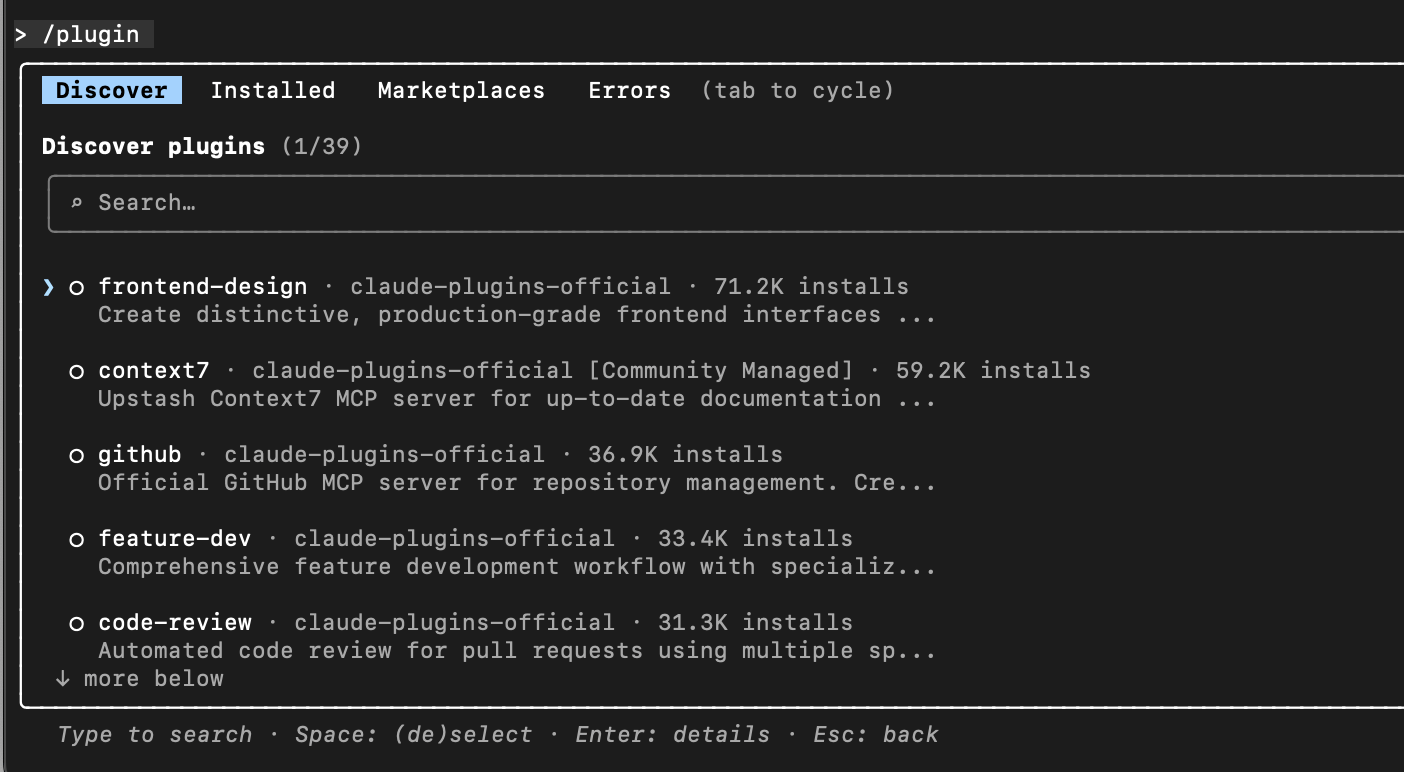
Install plugin:
/plugin install plugin-name@claude-plugins-official
Plugin installation scope
| Scope | Description |
|---|---|
| User scope | Only you, all projects |
| Project scope | Current repository, shared with the team |
| Local scope | Current repository, only you |
Recommendation:
- Team tools →Project scope
- Personal productivity tools →User scope
Typical plugin categories
1. Code intelligence (LSP)
- TypeScript, Python, Go, Rust, etc.
- Provides definition navigation, references, and type errors
Requires local installation of the corresponding language server
2. External integration (MCP)
- GitHub / GitLab
- Jira / Notion
- Slack / Figma
- Vercel / Supabase
Essence:Plugin = MCP server + configuration
3. Development workflow
- Git commits, PRs
- Code review agent
- Plugin development tools
Common commands for plugin management
/plugin                # 打开插件管理器
/plugin install         # 安装插件
/plugin uninstall       # 卸载
/plugin enable/disable  # 启用 / 禁用
/plugin marketplace add # 添加市场
/plugin marketplace rm  # 移除市场
from.claude/Migrating to plugins (core ideas)
| Before | After migration |
|---|---|
.claude/commands |
plugin/commands |
.claude/agents |
plugin/agents |
settings.json hooks |
plugin/hooks/hooks.json |
After migration:
- Plugin version takes effect first
- Can delete old
.claude/Configuration avoids duplication
When must you definitely use plugins?
- You already havestable Claude workflows
- You arerepeatedly copying
.claude/ - Team members start asking you: "How do I configure this?"
- You want Claude to be as controllable as IDE plugins
Other extensionsPlugins are the watershed moment for Claude Code transitioning from a "personal AI assistant" to an "engineering-grade tool"