Claude Code DeepSeek Configuration
Claude CodeClaude Code is an AI programming assistant launched by Anthropic that runs in the terminal, supports configuring third-party compatible APIs via environment variables, and can thus connect to models such as DeepSeek.
This article describes how to combine Claude Code withDeepSeekused together to obtain powerful AI-assisted programming capabilities at a lower cost.
Key points:
- Claude Code usesANTHROPIC_BASE_URLenvironment variables to point to the DeepSeek-compatible interface.
- DeepSeek provides an API compatible with the Anthropic API, with the path
https://api.deepseek.com/anthropic。 - Through a set of environment variables, different tier models (Opus / Sonnet / Haiku) can be mapped to corresponding DeepSeek models.
- After the configuration is complete, directly run in the project directory
claudethe command to use it.
In simple terms:Claude Code + DeepSeek = Terminal AI programming assistant + high cost-performance large model
- Claude Code: Provides a complete terminal AI programming interaction experience, supporting code generation, refactoring, debugging, explanation, etc.
- DeepSeek API: Provides an Anthropic-compatible interface, supporting calls to DeepSeek series models.
- Environment variable bridge: Connects the two through standard environment variables, without modifying any Claude Code source code.
Prerequisites
If you have already installed Claude Code, you can skip this step.
- InstalledNode.jsversion 18 or above.
- Windows users also need to installGit for Windows(provides bash environment).
- AlreadyDeepSeek Platformregistered an account and created an API Key.
Run the following command in the command line interface to install Claude Code:
curl -fsSL https://claude.ai/install.sh | bash
After installation, run the following command to verify. If the version number is output normally, the installation is successful:
claude --version
If you encounter permission issues, Linux / macOS users can add
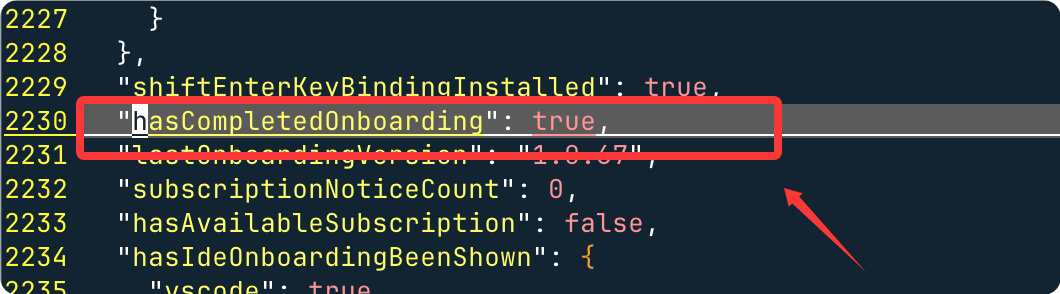
sudo。If there is a login verification, you can find the file in the user directory.claude.json:
- macOS/Linux:~/.claude.json
- Windows:C:\Users\YourUsername\.claude.json
{
  "hasCompletedOnboarding": true
}
After saving, restart the terminal, and then run:
claudeAt this point, the pop-upLogin to claude.aiwindow / prompt will no longer appear.
Get DeepSeek API Key
Go toDeepSeek PlatformAfter logging in, create an API Key and save it properly. It will be needed when configuring environment variables.
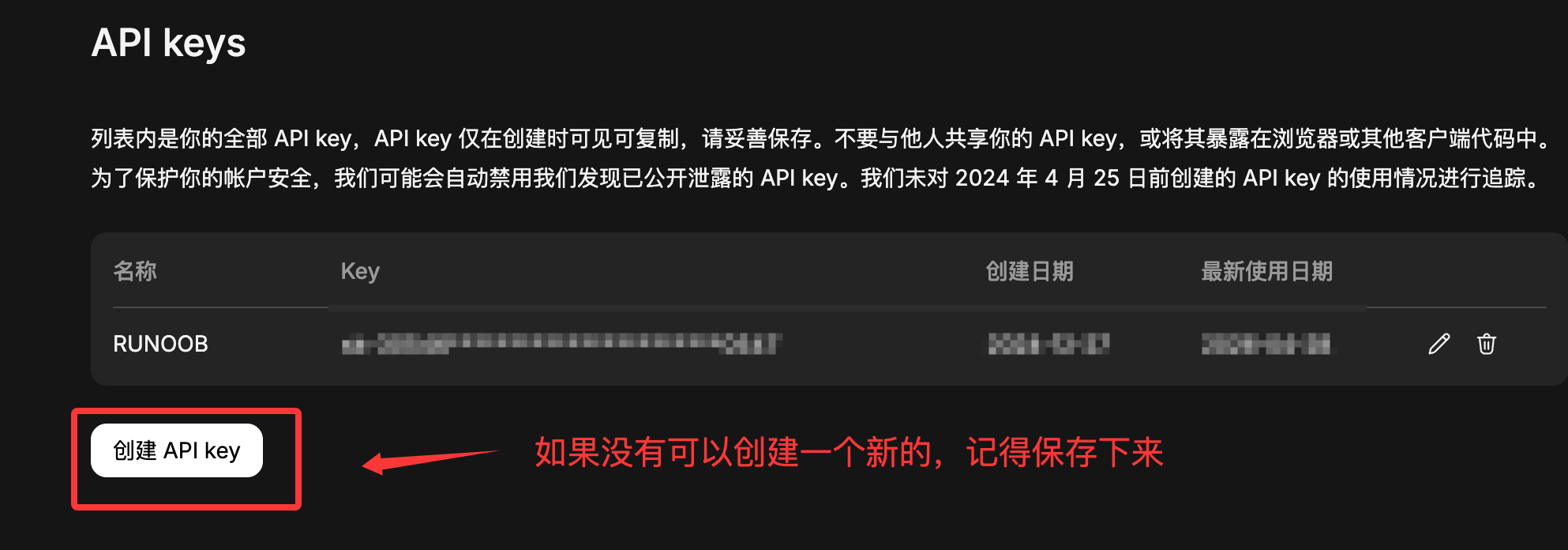
The API Key has account operation permissions. Do not commit it to a code repository or share it with others. It is recommended to use the operating system's key management tool or an environment variable file (such as
.env) for management, and add the relevant files to.gitignore。
Configure Environment Variables
Claude Code connects to the DeepSeek API through the following environment variables. The meanings of each variable are as follows:
| Environment Variable | Description |
|---|---|
ANTHROPIC_BASE_URL |
Points to the DeepSeek interface address compatible with the Anthropic protocol |
ANTHROPIC_AUTH_TOKEN |
Your DeepSeek API Key |
ANTHROPIC_MODEL |
The model used by default |
ANTHROPIC_DEFAULT_OPUS_MODEL |
The model used for mapping the Opus tier (complex reasoning tasks) |
ANTHROPIC_DEFAULT_SONNET_MODEL |
The model used for mapping the Sonnet tier (daily programming tasks) |
ANTHROPIC_DEFAULT_HAIKU_MODEL |
The model used for mapping the Haiku tier (fast lightweight tasks) |
CLAUDE_CODE_SUBAGENT_MODEL |
The model used by subtask agents (a faster model is recommended) |
CLAUDE_CODE_EFFORT_LEVEL |
Thinking depth, optionallow / medium / max |
Linux / macOS
Run the following command in the terminal (replace<你的 DeepSeek API Key>Replace with your actual Key):
export ANTHROPIC_BASE_URL=https://api.deepseek.com/anthropic
export ANTHROPIC_AUTH_TOKEN=<你的 DeepSeek API Key>
export ANTHROPIC_MODEL=deepseek-v4-pro[1m]
export ANTHROPIC_DEFAULT_OPUS_MODEL=deepseek-v4-pro[1m]
export ANTHROPIC_DEFAULT_SONNET_MODEL=deepseek-v4-pro[1m]
export ANTHROPIC_DEFAULT_HAIKU_MODEL=deepseek-v4-flash
export CLAUDE_CODE_SUBAGENT_MODEL=deepseek-v4-flash
export CLAUDE_CODE_EFFORT_LEVEL=max
The above
exportcommand only takes effect in the current terminal session.For permanent effect, append the above command to the end of the
~/.bashrc(Bash) or~/.zshrc(Zsh) file, then runsource ~/.bashrcto make it take effect immediately.
Windows(PowerShell)
Execute the following command in PowerShell:
$env:ANTHROPIC_BASE_URL="https://api.deepseek.com/anthropic"
$env:ANTHROPIC_AUTH_TOKEN="<你的 DeepSeek API Key>"
$env:ANTHROPIC_MODEL="deepseek-v4-pro[1m]"
$env:ANTHROPIC_DEFAULT_OPUS_MODEL="deepseek-v4-pro[1m]"
$env:ANTHROPIC_DEFAULT_SONNET_MODEL="deepseek-v4-pro[1m]"
$env:ANTHROPIC_DEFAULT_HAIKU_MODEL="deepseek-v4-flash"
$env:CLAUDE_CODE_SUBAGENT_MODEL="deepseek-v4-flash"
$env:CLAUDE_CODE_EFFORT_LEVEL="max"
PowerShell's
$env:assignment only takes effect in the current session. For permanent effect, add the corresponding user environment variable in "System Properties → Environment Variables", or write the above command into the PowerShell Profile file ($PROFILE)。
Verify whether it takes effect
After the configuration is complete, start Claude Code and run the/statuscommand to verify:
$ cd 你的项目目录
$ claude
/status
If the configuration is correct, you will see output similar to the following:
Base URL: https://api.deepseek.com/anthropic
Model: deepseek-v4-pro[1m]
Small fast model: deepseek-v4-flash
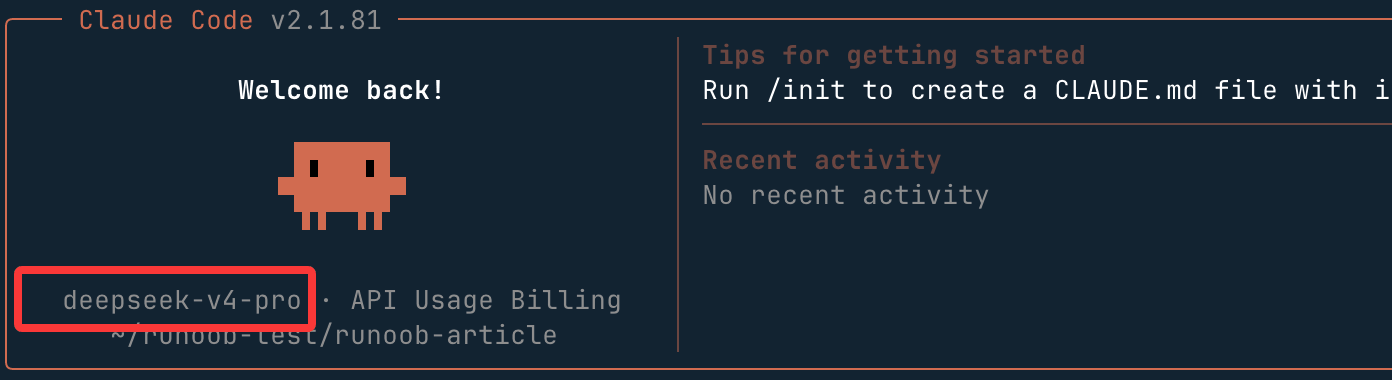
Seeing this information means the configuration is successful, and Claude Code is now using DeepSeek V4 for reasoning.
If the displayed information is not the above, check item by item: whether the environment variables are set correctly, whether the API Key is valid, and whether the variable names have spelling errors.
Start Using
Enter your project directory and run theclaudecommand to start Claude Code:
cd /path/to/my-project
claude
After successful startup, the terminal will enter Claude Code's interactive interface, where you can directly describe programming needs in natural language, for example:
# 让 Claude Code 解释当前项目结构
> 帮我梳理一下这个项目的目录结构和主要模块的作用

# 生成代码
> 给 user.go 新增一个根据邮箱查询用户的方法,并补充单元测试

# 调试问题
> 运行 npm test 后报错,帮我分析原因并修复
Reference Configuration
Complete Environment Variables
| Environment Variable | Value | Required | Description |
|---|---|---|---|
| ANTHROPIC_BASE_URL | https://api.deepseek.com/anthropic | Yes | API endpoint address, pointing to DeepSeek's Anthropic-compatible interface |
| ANTHROPIC_AUTH_TOKEN | sk-your-api-key | Yes | DeepSeek API Key, used for identity authentication |
| ANTHROPIC_MODEL | deepseek-v4-pro[1m] | Yes | Main model name, [1m] indicates a 1M context window |
| ANTHROPIC_SMALL_FAST_MODEL | deepseek-v4-flash | Yes | Fast model used by sub-agents |
Model Name Quick Reference
| Model Name | Capability | Context Window | Applicable Scenarios |
|---|---|---|---|
| deepseek-v4-pro[1m] | Strongest reasoning | 1M tokens | Complex architecture design, deep code review, difficult debugging |
| deepseek-v4-flash | Fast reasoning | 1M tokens | Batch file generation, simple CRUD, documentation writing |
Shell Configuration File Path Quick Reference
| Shell | Configuration file path | Command to apply |
|---|---|---|
| zsh (macOS default) | ~/.zshrc | source ~/.zshrc |
| bash (Linux default) | ~/.bashrc | source ~/.bashrc |
| PowerShell (Windows) | System environment variable settings | Restart PowerShell |
Claude Code Configuration File Quick Reference
| File | Path | Purpose |
|---|---|---|
| CLAUDE.md | Project root directory | Project-level specifications, telling the AI the tech stack, code style, and constraints |
| .claudeignore | Project root directory | Ignore rules, preventing the AI from reading or modifying specified files |
| settings.json | ~/.claude/settings.json | Global settings, including MCP servers, permissions, etc. |
Model Selection Recommendations
Different DeepSeek models have different trade-offs between performance and cost. Below are the recommended configurations for common scenarios:
| Scenario | Recommended Model | Description |
|---|---|---|
| Complex architecture design, deep code refactoring | deepseek-v4-pro[1m] |
Strong reasoning ability, suitable for tasks that require holistic understanding |
| Daily feature development, code completion | deepseek-v4-pro[1m] |
Good overall performance, covering most programming scenarios |
| Quick Q&A, simple modifications, subtasks | deepseek-v4-flash |
Fast response, low cost, suitable for high-frequency lightweight tasks |