Claude Code Basic Usage
This chapter introduces the core features most commonly used in daily development with Claude Code, including how to converse with Claude, read and modify code, run commands, handle files, and some practical tips that can greatly improve efficiency.
Basic Conversation Methods
1. Interactive Mode (Most Commonly Used)
Start Claude Code in the project directory, and once you enter interactive mode, you can directly input questions or instructions:
cd /path/to/your/project
claude
In interactive mode, simply enter natural language directly—no special formatting is required:
What does this project do?
帮我找出 src/auth.ts 里的 bug
给 UserService 添加一个 getUserById 方法
use@You can also specify files. For example, we have a test.html in the claude-test directory.
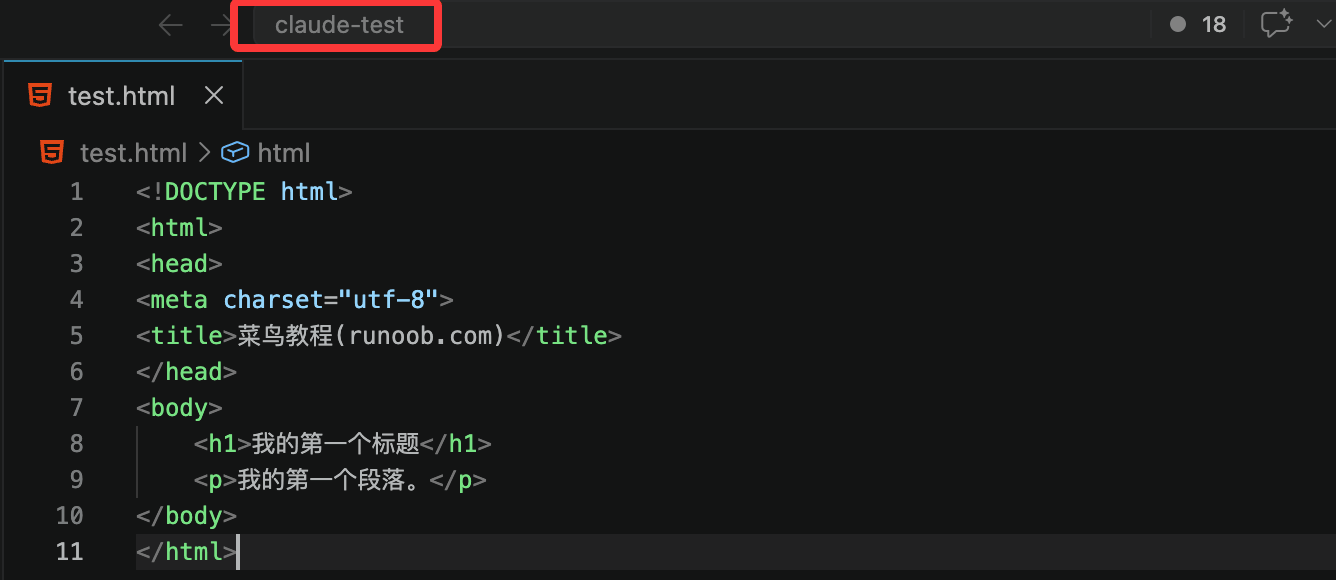
We can enter claude-test:
cd claude-test
Then ask:
@test.html 这个文件是干嘛的
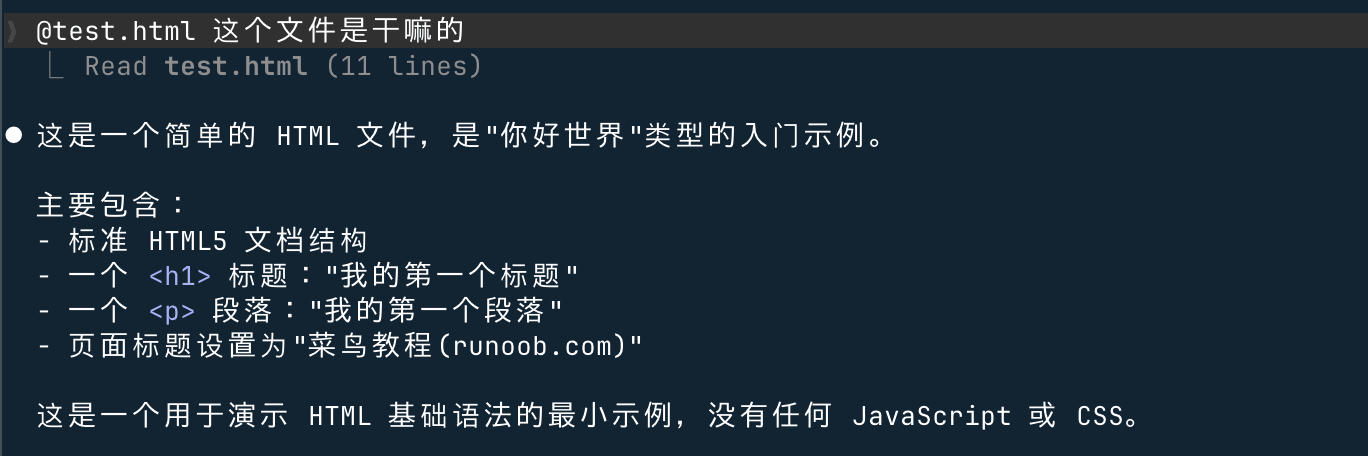
2. One-time Task Mode
If you only need to execute a single task and don't need to enter interactive mode, you can append the task description directly after the command:
claude "解释一下 package.json 里的 scripts 字段"
It automatically exits after execution, making it suitable for use in shell scripts or quick queries.
3. Single Query Mode (-p)
Use the-pparameter to execute a one-time query. Claude's response is directly output to the terminal, making it suitable for combining with other commands:
claude -p "这段代码有什么问题" < src/utils.ts
# 将 Claude 的分析结果保存到文件
claude -p "分析项目依赖的安全风险" > security-report.md
4. Continue Previous Conversation (-c)
Claude Code saves conversation history. Use the-cparameter to continue the most recent unfinished conversation in the current directory, without needing to rebuild context:
claude -c
Understanding and Analyzing Code
1. Understand the Overall Project Situation
When you first enter an unfamiliar project, you can ask Claude to do an overall analysis:
What is the architecture of this project?
What main technologies and dependencies does the project use?
Please introduce the project's directory structure.
Claude Code will automatically read project files for analysis.You don't need to manually specify which files to read.It will determine on its own what content needs to be examined.
2. Analyze a Specific File or Module
解释一下 src/middleware/auth.ts 的工作原理
UserRepository 类里有哪些方法?分别是做什么的?
这个 SQL 查询语句是什么意思?
3. Trace Code Call Chains
When a user logs in, what is the code execution flow? List everything from the entry point to the database.
findUserByEmail 这个函数在哪里被调用?
Which database table does the data from this interface ultimately end up in?
4. Understand Complex Logic
What does this recursive function mean? Can you give an example to illustrate?
为什么这里要用 useCallback?不用会怎样?
What format of strings can this regular expression match?
Modifying Code
1. Add a New Feature
Describe the feature you need, and Claude will find the right place and implement it:
在 UserService 里添加一个 updatePassword 方法,需要验证旧密码
给登录接口添加请求频率限制,同一 IP 每分钟最多 5 次
创建一个 formatCurrency 工具函数,支持传入货币代码参数
2. Fix a Bug
Describe the problem symptoms, and Claude will locate the cause and provide a fix:
After the user logs out, refreshing the page still shows the logged-in state. Help me find the cause and fix it.
This function errors when the input is an empty array. Fix it.
控制台报错 "Cannot read properties of undefined (reading 'map')",帮我定位并修复
3. Refactor Code
把这个 500 行的组件拆分成更小的子组件
将 callback 风格的异步代码改为 async/await
These functions contain a lot of duplicate code. Help me extract it into a common utility function.
4. Review Modifications
Claude Code shows the diff before every file change for your review. You can discuss after Claude proposes changes:
Don't change the code yet. Just tell me how you plan to modify it.
There's a problem with your previous modification: it doesn't handle concurrency. Start over.
这个方案可以,但把函数名改成 validateUserCredentials
Claude Code displays the changes and asks for your confirmation before making any file modifications. You can choose toAccept (yes)、Reject (no), or continue discussing before confirming. Don't feel you must accept all changes at once—take a look first, and confirm only when you're satisfied.
Running Commands and Tests
1. Let Claude Run Commands
Claude Code can execute commands directly in the terminal. You can describe what you want to do in natural language:
Run the tests and see if any fail.
安装 dayjs 这个依赖
Build the project and see if there are any errors.
Claude will, based on the project configuration (such aspackage.jsonthe scripts in, orCLAUDE.mdthe commands in) select the correct command to execute.
2. Run Specific Tests
运行 auth 模块的测试
Run all tests and generate a coverage report.
Why did this test fail? Help me fix it.
3. View Command Output
Claude treats command output as context and directly suggests next steps based on the output:
运行 npm run build,如果有报错帮我修复
跑一下 lint,把所有警告都修复掉
File Operations
1. Create New Files
创建 src/utils/date.ts,实现日期格式化相关的工具函数
新建一个 Docker Compose 配置文件,包含 PostgreSQL 和 Redis 服务
创建 .github/workflows/ci.yml,配置 GitHub Actions 自动运行测试
2. Find Files and Content
Is there any code in the project that handles file uploads? Where is it?
哪些地方用到了 localStorage?
找出所有使用了 console.log 的文件
3. Batch Modifications
把所有文件里的 http://api.example.com 替换成 https://api.example.com
把 src/components/ 下所有组件的 PropTypes 改为 TypeScript 类型定义
给 src/api/ 目录下所有接口函数添加 JSDoc 注释
Git Operations
Claude Code has deep Git integration, allowing you to perform almost all Git operations using natural language.
1. View Changes
Which files did I change?
What does this change include?
最近 10 次提交都改了什么?
2. Commit Code
Commit this change.
把这次的修改提交,commit 信息说明修复了登录验证的 bug
Claude automatically generates a proper commit message based on the actual changes. You can also use a quick command:
claude commit
3. Branch Management
新建一个 feature/user-profile 分支
切换到 develop 分支
把 main 分支的最新改动合并进来
4. Resolve Merge Conflicts
Help me resolve the merge conflict.
This file has conflicts. Help me check which version is correct.
Context Management Tips
1. Manually Specify Files
Use@file pathsyntax to explicitly tell Claude which file to reference, avoiding guesswork:
参考 @src/types/user.ts 里的类型定义,给 UserService 添加类型注解
对照 @docs/api-spec.md 里的规范,检查接口实现是否符合要求
2. Clear Context
If the conversation has been going on for a long time, or you've switched to a completely different task, it's recommended to clear the context and start over:
/clear
After clearing, Claude's "memory" returns to its initial state, and the new session is unaffected by previous conversation content.
3. Compress Context
When Claude seems to start "forgetting" earlier content or the conversation becomes very long, you can compress the context:
/compact
This causes Claude to summarize the current conversation into a compact digest, freeing up context space while retaining key information to continue working.
4. Split Tasks Reasonably
Don't describe a complex task all at once; breaking it into several steps and completing them sequentially works better:
❌ Bad practice: throwing too many requirements at Claude at once:
Help me refactor the entire user module, including adding type annotations, splitting files, optimizing database queries, adding caching, writing tests, and updating documentation.
✅ Good practice: splitting into independent steps in logical order:
第一步:"分析 src/user/ 目录的现有结构,告诉我有哪些问题"
第二步:"先给所有函数添加 TypeScript 类型注解"
第三步:"把超过 200 行的文件拆分成更小的模块"
第四步:"优化数据库查询,添加必要的索引"
Common Slash Commands
In interactive mode, type/to bring up a list of all available commands. Here are the most commonly used slash commands:
| Command | Function | Use case |
|---|---|---|
/help |
View all available commands and their descriptions | When you're not sure what features are available |
/clear |
Clear conversation history and start a fresh session | When switching to a new task |
/compact |
Compress the current conversation context to free up space | When the conversation is long and Claude starts to forget |
/init |
Analyze the project and generate a CLAUDE.md file | When using for the first time in a new project |
/resume |
Select and resume a previous conversation from history | Continue a task left unfinished yesterday |
/undo |
Undo the last file modification | When Claude's changes are not correct |
/redo |
Redo the undone modification | When you find the original was better after undoing |
/login |
Log in or switch accounts | When you need to switch to another account |
/config |
View and modify configuration | Adjust Claude Code behavior settings |
/cost |
View the token usage for this session | Monitor costs when using an API account |
Practical Tips
1. Let Claude Analyze First, Then Take Action
For complex problems, ask Claude to explain its approach first, and proceed only after confirming the direction is correct.
Don't modify the code. First analyze the possible causes of login failure and list your troubleshooting approach.
How do you plan to implement this feature? Describe the approach first, and I'll confirm before you write the code.
2. Provide Error Messages and Logs
When you encounter an error, paste the error message directly into the conversation. Claude will locate the problem based on the error content:
运行时报了这个错误,帮我分析原因:
TypeError: Cannot read properties of null (reading 'userId')
    at getUserProfile (src/services/user.ts:42:18)
    at async ProfileController.getProfile (src/controllers/profile.ts:15:20)
3. Describe UI Issues with Screenshots
Claude Code supports multimodal input. You can paste screenshots directly into the conversation to describe UI-related issues:
[Paste screenshot] This button does not respond when clicked, but there are no errors in the console. Help me investigate.
[粘贴设计稿截图] 按照这个设计实现 Header 组件
4. Make Good Use of "Continue"
If Claude's response is truncated, or you feel it hasn't finished speaking, just say "continue":
Continue.
Anything else?
Implement the remaining parts as well.
5. Ask for Explanations of Modifications
For important code changes, you can ask Claude to explain the reason for each change:
After making the changes, explain the purpose of each change to me.
这里为什么要用 Promise.allSettled 而不是 Promise.all?
6. Limit Claude's Operation Scope
When you don't want Claude to modify other files arbitrarily, you can explicitly limit the scope:
只修改 src/auth.ts 这一个文件,不要改其他地方
Only read the code, don't modify it. Help me analyze the performance bottleneck of this module.
Common Workflow Examples
Workflow 1: Quickly Understand a New Project
Example
> What does this project do? What technologies does it use?
# Step 2: Understand the directory structure
> Introduce the project's directory structure, focusing on core modules
# Step 3: Learn how to run it
> How do I run this project locally?
# Step 4: Generate a project description file
> Help me generate a CLAUDE.md file summarizing the project's key information
Workflow 2: Fix a Bug
Example
> User feedback: After modifying personal information, the username at the top of the page does not update in real time
# Step 2: Have Claude analyze the cause
> First analyze the possible causes; don't modify the code
# Step 3: Fix after confirming the approach
> The second cause you mentioned seems more likely. Fix it along that line of thinking
# Step 4: Verify the fix
> Run the relevant tests to confirm the fix is effective
Workflow 3: Add a New Feature
Example
> Need to add a status-based filter to the order list. Statuses: pending payment, paid, shipped, completed
# Step 2: Understand the existing code
> First look at the existing code structure for orders
# Step 3: Implement the feature
> Implement the filter feature without affecting existing functionality
# Step 4: Add tests
> Write test cases for this new feature
# Step 5: Commit the code
> Commit this change
Workflow 4: Code Review
# 审查特定文件
> 帮我审查 src/payment/processor.ts 这个文件,
> 重点关注错误处理、边界情况和安全风险

# 审查 git 改动
> 审查我这次的所有改动,看看有没有明显的问题

# 针对性检查
> 这段代码有没有 SQL 注入的风险?
Notes
About file modifications:Claude Code will show the diff and request confirmation before making changes.Don't blindly accept everything, especially for changes involving core logic. Please read the diff content carefully before deciding whether to accept.
About sensitive files: InCLAUDE.mdor.claude/settings.jsonclearly mark files that Claude is not allowed to read or modify (e.g.,.env, key files) to avoid accidental exposure.
About large tasks: Don't pile up too many unfinished tasks in one conversation; it can easily cause Claude to lose focus. Finish one task before starting another, or use/clearto restart.
About code quality: Code generated by Claude is not always the optimal solution. For important modules, after execution, it is recommended to do a round of code review, understand the purpose of each change, and ensure it conforms to the project's design principles.
Other extensions