Claude Code MCP
If Claude Code is an excellent typist (code generation) and tester (code verification), then adding MCP (Model Context Protocol) gives Claude real external senses and limbs—it is no longer limited to the code files of the current project, but can actively connect to resources and tools in the outside world, becoming your end-to-end development collaboration partner.

What is MCP (Model Context Protocol)?
MCP is an open standardized protocol introduced by Anthropic, designed to solve the core pain points of collaboration between AI and external tools.
The core logic of MCP overturns the traditional approach: instead of having AI learn the usage rules of every tool one by one, all tools provide a unified interface to AI.
This logic is like a universal power outlet in real life—instead of making appliances adapt to different sockets, as long as the sockets are standardized, all appliances can be used directly.
After connecting an MCP server, you can let Claude Code:
- Fetch requirements from JIRA/ticketing systems and develop features, create GitHub PRs
- Analyze Sentry monitoring data, locate production environment errors
- Query database data such as PostgreSQL/MySQL
- Update code based on Figma designs, automatically generate email drafts, etc.
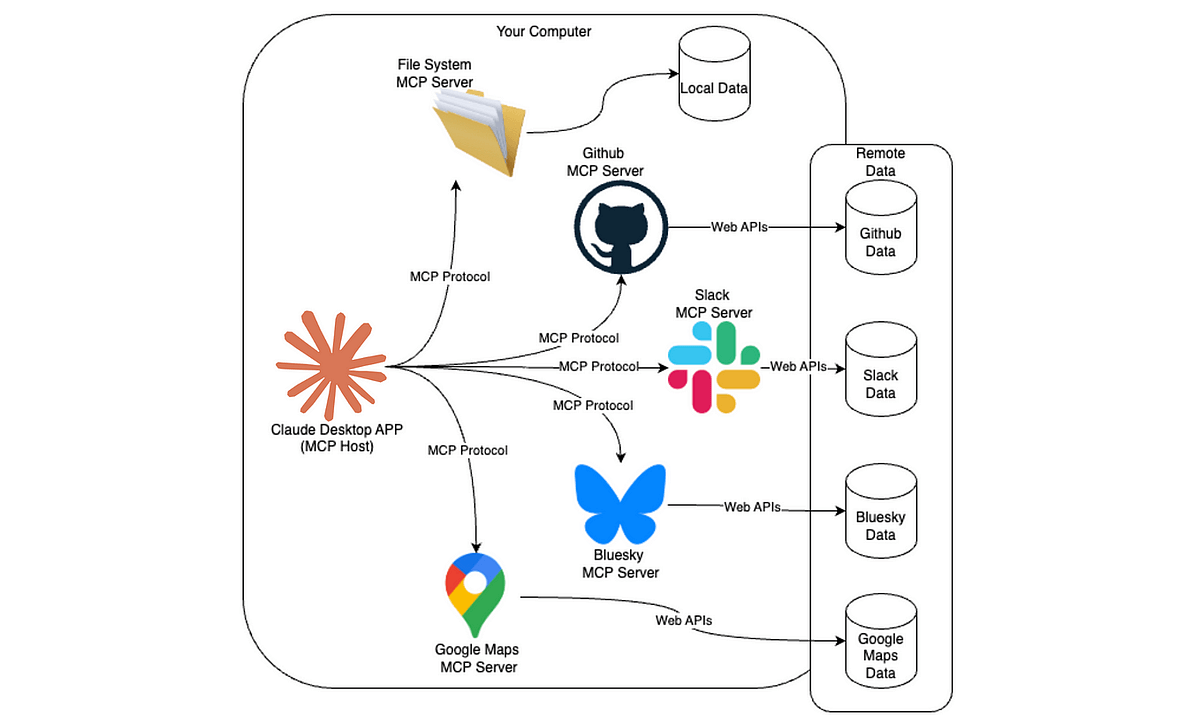
Why does Claude Code need MCP?
Before MCP, Claude Code's capabilities were strictly limited to the project folder you currently have open, like an assistant looking at the sky from the bottom of a well—it could only see the code in front of it and could not perceive any information outside the project. The emergence of MCP completely breaks this information silo, allowing Claude to deeply participate in the entire development process:
Here are a few intuitive scenario comparisons to help you quickly understand the value of MCP:
| Scenario | Without MCP | With MCP |
|---|---|---|
| Cross-repository analysis | Can only analyze code in the current folder, cannot link to other repositories | Cross-repository collaboration: "Help me analyze the API documentation of repository A, then write the corresponding calling methods in repository B." |
| Requirements/discussion synchronization | You need to manually copy and paste requirement documents and team discussion records into the chat | Real-time collaboration information synchronization: "Check the discussion records in the #feature-x channel on Slack and see everyone's suggestions for modifying this feature." |
| Database validation | Cannot directly verify compatibility between code and database; can only manually inspect table structures | Direct database integration: "Go check the structure and the first 5 rows of the users table in MySQL, and determine whether the user query interface I wrote matches." |
| Automation workflows | Can only generate code snippets for you to manually copy and use | Automated execution: "Help me write a browser automation script and use MCP to call Puppeteer to run it, verifying the interaction logic of the login page." |
In short, MCP transforms Claude Code from an assistant that passively receives information into a collaboration partner that actively obtains information and executes actions.
Basic usage of MCP in Claude Code
Claude Code has built-in complete MCP management capabilities, with only one core command:
claude mcp
Common subcommands:
| Command | Description |
|---|---|
claude mcp add |
Add an MCP server |
claude mcp list |
View all configured servers |
claude mcp get <name> |
View details of a specific server |
claude mcp remove <name> |
Delete a server |
/mcp |
View status / authentication in Claude Code |
Installing MCP servers
MCP servers support three connection methods: HTTP/SSE/stdio. HTTP is recommended (SSE is deprecated).
1. Remote HTTP server (recommended)
Suitable for cloud service tools; it is the most universal method:
# 基础语法
claude mcp add --transport http <服务器名称> <服务器URL>

# 示例1:连接Notion
claude mcp add --transport http notion https://mcp.notion.com/mcp

# 示例2:带身份验证的HTTP服务器
claude mcp add --transport http secure-api https://api.example.com/mcp \
  --header "Authorization: Bearer 你的令牌"
2. Remote SSE server (deprecated)
Only compatible with legacy tools; prefer HTTP instead:
# 基础语法(仅兼容用)
claude mcp add --transport sse <服务器名称> <服务器URL>
# 示例:连接Asana
claude mcp add --transport sse asana https://mcp.asana.com/sse
3. Local stdio server
Suitable for tools that require local system access (such as local databases, custom scripts):
# 基础语法(注意:--前是Claude参数,--后是服务器命令)
claude mcp add --transport stdio [--env 环境变量] <服务器名称> -- <启动命令>

# 示例:连接Airtable(需替换自己的API密钥)
claude mcp add --transport stdio --env AIRTABLE_API_KEY=你的密钥 airtable \
  -- npx -y airtable-mcp-server
Key notes:
--transport/--envParameters such as ... must be placed at the server name'sfront,--Used to separate Claude parameters from server commands to avoid parameter conflicts.
Managing MCP servers
After configuration is complete, you can manage servers with the following commands:
# 列出所有已配置的服务器
claude mcp list

# 查看指定服务器详情(如github)
claude mcp get github

# 删除指定服务器
claude mcp remove github

# 在Claude Code中检查服务器状态
/mcp
Configuration scope (controlling server visibility)
You can specify the effective scope of the MCP server to suit personal/team usage scenarios:
| Scope | Purpose | Configuration command example |
|---|---|---|
| local (default) | Only available to the current project; private configuration (e.g., sensitive keys) | claude mcp add --scope local ... |
| project | Team-shared (stored in .mcp.json, can be committed to the repository) | claude mcp add --scope project ... |
| user | Available to all projects (personal global configuration) | claude mcp add --scope user ... |
Priority: local > project > user (for servers with the same name, local configuration overrides shared configuration)
Practical examples
Example 1: GitHub code review
claude mcp add --transport http github https://api.githubcopilot.com/mcp/
In Claude Code:
> Review PR #456 and suggest improvements
> Show me all open PRs assigned to me
Example 2: Sentry production troubleshooting
claude mcp add --transport http sentry https://mcp.sentry.dev/mcp
> /mcp   # 完成 OAuth 登录
> What are the most common errors in the last 24 hours?
Example 3: Querying PostgreSQL directly
claude mcp add --transport stdio db \
  -- npx -y @bytebase/dbhub \
  --dsn "postgresql://readonly:[email protected]:5432/analytics"
> Show me the schema for the orders table
> Which users haven't purchased in 90 days?
Advanced ways to use MCP in conversations
1. Using@Referencing MCP resources
> Analyze @github:issue://123 and suggest a fix
Supports comparison of multiple resources:
> Compare @postgres:schema://users with @docs:file://user-model
2. MCP prompts as slash commands
MCP can expose commands:
/mcp__github__list_prs
/mcp__jira__create_issue "Login bug" high
Claude will execute them just like built-in commands.
Key considerations
- Authentication: Remote MCP servers (such as GitHub/Sentry) need to execute in Claude Code
/mcpto complete OAuth 2.0 authorization; - Windows compatibility: If using npx for local stdio servers, you need to add
cmd /ca wrapper (such as-- cmd /c npx -y 包名), otherwise a "Connection closed" error will be reported; - Third-party risk: When using unofficial MCP servers, confirm the source is trustworthy to avoid prompt injection/security risks;
- Parameter order: When configuring a stdio server,
--the parameters before and after must not be reversed, otherwise execution will fail.