R Loops
Sometimes, we may need to execute the same block of code multiple times. In general, statements are executed sequentially: the first statement in a function is executed first, followed by the second statement, and so on.
Programming languages provide various control structures that allow for more complicated execution paths.
Loop statements allow us to execute a statement or group of statements multiple times. Below is a flowchart of loop statements in most programming languages:
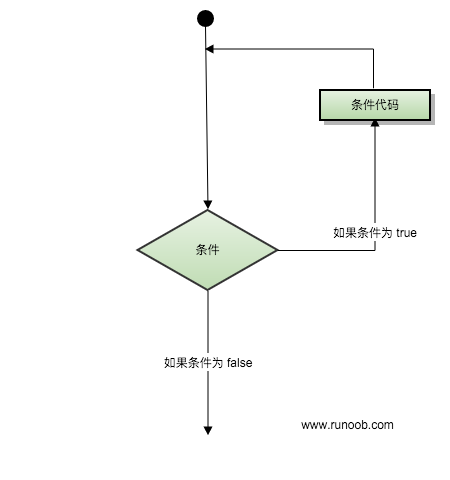
The loop types provided by R language are:
- repeat loop
- while loop
- for loop
The loop control statements provided by R language are:
- break statement
- Next statement
Loop control statements change the execution order of your code, and you can use them to implement code jumps.
Loop Types
repeat
The repeat loop keeps executing the code until the condition statement becomes true, and you need to use the break statement to exit the loop.
The syntax format is as follows:
repeat {
    // 相关代码
    if(condition) {
       break
    }
}
The following example exits the loop when the variable cnt is 5, where cnt is a counter variable:
Example
cnt <- 2
repeat {
print(v)
cnt <- cnt+1
if(cnt > 5) {
break
}
}
After executing the above code, the output result is:
[1] "Google" "Example"
[1] "Google" "Example"
[1] "Google" "Example"
[1] "Google" "Example"
while
As long as the given condition is true, the while loop statement in R will repeatedly execute a target statement.
The syntax format is as follows:
while(condition)
{
   statement(s);
}
Here, statement(s) can be a single statement or a code block composed of several statements.
condition can be any expression, and it is true when it is any non-zero value. When the condition is true, the loop is executed. When the condition is false, the loop is exited, and the program flow will continue with the next statement immediately following the loop.
The following example outputs the contents of the while statement block when the variable cnt is less than 7, where cnt is a counter variable:
Example
cnt <- 2
while (cnt < 7) {
print(v)
cnt = cnt + 1
}
After executing the above code, the output result is:
[1] "Google" "Example"
[1] "Google" "Example"
[1] "Google" "Example"
[1] "Google" "Example"
[1] "Google" "Example"
for
In the R programming language, the for loop statement can repeatedly execute specified statements, and the number of repetitions can be controlled in the for statement.
The syntax format is as follows:
for (value in vector) {
    statements
}
The for loop in R is particularly flexible; it can not only loop over integer variables, but also iterate over data types such as character vectors, logical vectors, and lists.
The following example outputs the first four letters of the 26 letters:
Example
for ( i in v) {
print(i)
}
After executing the above code, the output result is:
[1] "A"
[1] "B"
[1] "C"
[1] "D"
Loop Control
break
The break statement in R is inserted into the loop body to exit the current loop or statement and begin executing the next statement in the script.
If you use nested loops, the break statement will stop the execution of the innermost loop and begin executing the outer loop statement.
break is also commonly used in switch statements.
The syntax format is as follows:
break
The following example uses break to exit the loop when the variable cnt is 5, where cnt is a counter variable:
Example
cnt <- 2
repeat {
print(v)
cnt <- cnt+1
if(cnt > 5) {
break
}
}
After executing the above code, the output result is:
[1] "Google" "Example"
[1] "Google" "Example"
[1] "Google" "Example"
[1] "Google" "Example"
next
The next statement is used to skip the current loop and start the next loop (similar to continue in other languages).
The syntax format is as follows:
next
The following example outputs the first 6 letters of the 26 letters. When the letter is D, it skips the current loop and proceeds to the next loop:
Example
for ( i in v) {
if (i == "D") { # D will not be output, skip this loop and go to the next one
next
}
print(i)
}
After executing the above code, the output result is:
[1] "A"
[1] "B"
[1] "C"
[1] "E"
[1] "F"
Other Extensions