R Arrays
Arrays are also objects in R language. R language can create one-dimensional or multi-dimensional arrays.
R language arrays are a collection of the same type. The matrix we learned earlier is actually a two-dimensional array.
The relationship between vectors, matrices, and arrays can be seen in the following diagram:
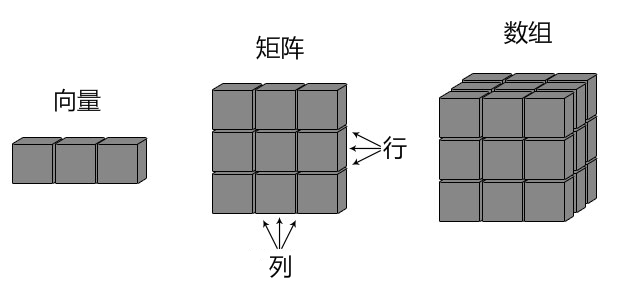
R language arrays are created using the array() function, which uses vectors as input parameters and can use dim to set the dimensions of the array.
The syntax of the array() function is as follows:
array(data = NA, dim = length(data), dimnames = NULL)
Parameter description:
- data- Specifies the data source of the array, which can be a vector, matrix, or list.
- dim- Specifies the dimensions of the array, which can be an integer vector or a tuple representing dimensions. The default is a one-dimensional array. For example,dim = c(2, 3, 4)means creating a2x3x4three-dimensional array.
- dimnames- Optional parameter, used to specify the names of each dimension of the array. It can be a list containing dimension names.
In R, array indexing starts at 1, which is different from the convention in other programming languages.
In addition, R provides rich functions and operators for processing array data, such as indexing, slicing, reshaping, aggregation, etc.
In R, you can useMatrixorListto represent multi-dimensional arrays.
Matrix:Matrix is the most commonly used form to represent arrays in R. It is a two-dimensional structure with fixed numbers of rows and columns.
You can usematrix()function to create a matrix, specifying data elements and dimensions.
Example
my_matrix <- matrix(c(1, 2, 3, 4, 5, 6, 7, 8, 9), nrow = 3, ncol = 3)
print(my_matrix)
List: List is a more general form of multi-dimensional array in R. It can contain elements of different types, and each element can be a matrix, vector, or other data structure.
Example
my_list <- list(matrix(c(1, 2, 3, 4), nrow = 2), c(5, 6, 7))
print(my_list)
Example
my_list <- list(matrix(c(1, 2, 3, 4), nrow = 2), c(5, 6, 7))
print(my_list)
In addition to matrices and lists, R also provides other data structures to represent multi-dimensional arrays, such as Array and Data Frame.
Example
The following are some examples to demonstratearray()the use of the function:
Create a one-dimensional array using a vector:
Example
my_array <- array(my_vector, dim = c(4))
print(my_array)
In the following example, we create a two-dimensional array with 3 rows and 3 columns:
Example
vector1 <- c(5,9,3)
vector2 <- c(10,11,12,13,14,15)
# Create the array
result <- array(c(vector1,vector2),dim = c(3,3,2))
print(result)
The output of the above code is:
, , 1

     [,1] [,2] [,3]
[1,]    5   10   13
[2,]    9   11   14
[3,]    3   12   15

, , 2

     [,1] [,2] [,3]
[1,]    5   10   13
[2,]    9   11   14
[3,]    3   12   15
Use the dimnames parameter to set the names of each dimension:
Example
vector1 <- c(5,9,3)
vector2 <- c(10,11,12,13,14,15)
column.names <- c("COL1","COL2","COL3")
row.names <- c("ROW1","ROW2","ROW3")
matrix.names <- c("Matrix1","Matrix2")
# Create the array and set the names of each dimension
result <- array(c(vector1,vector2),dim = c(3,3,2),dimnames = list(row.names,column.names,matrix.names))
print(result)
The output of the above code is:
, , Matrix1

     COL1 COL2 COL3
ROW1    5   10   13
ROW2    9   11   14
ROW3    3   12   15

, , Matrix2

     COL1 COL2 COL3
ROW1    5   10   13
ROW2    9   11   14
ROW3    3   12   15
Accessing Array Elements
In R language, you can use the indexing operator[ ]to access elements of a multi-dimensional array.
The indexing operator allows you to get specific elements in the array according to the specified index position.
If you want to get array elements, you can use the column index and row index of the element, similar to coordinate form.
Accessing a single element:
Example
element <- my_array[1, 2, 1] # Access the element whose first dimension is 1, second dimension is 2, and third dimension is 1
print(element)
Accessing multiple elements:
Example
elements <- my_array[c(1, 2), c(2, 3), c(1, 2)] # Access multiple elements, where the indices of each dimension are 1 and 2 respectively
print(elements)
Accessing elements of a two-dimensional array:
Example
vector1 <- c(5,9,3)
vector2 <- c(10,11,12,13,14,15)
column.names <- c("COL1","COL2","COL3")
row.names <- c("ROW1","ROW2","ROW3")
matrix.names <- c("Matrix1","Matrix2")
# Create the array
result <- array(c(vector1,vector2),dim = c(3,3,2),dimnames = list(row.names, column.names, matrix.names))
# Display the elements in the third row of the second matrix of the array
print(result[3,,2])
# Display the element at the first row and third column of the first matrix of the array
print(result[1,3,1])
# Output the second matrix
print(result[,,2])
The output of the above code is:
COL1 COL2 COL3
   3   12   15
[1] 13
     COL1 COL2 COL3
ROW1    5   10   13
ROW2    9   11   14
ROW3    3   12   15
Filtering using logical conditions:
Example
filtered_elements <- my_array[my_array > 5] # Select elements greater than 5
print(filtered_elements) # Output: 6 7 8 9 10 11 12
Operating on Array Elements
Since an array is composed of matrices of multiple dimensions, we can access array elements by accessing matrix elements.
Example
vector1 <- c(5,9,3)
vector2 <- c(10,11,12,13,14,15)
# Create the array
array1 <- array(c(vector1,vector2),dim = c(3,3,2))
# Create two vectors of different lengths
vector3 <- c(9,1,0)
vector4 <- c(6,0,11,3,14,1,2,6,9)
array2 <- array(c(vector3,vector4),dim = c(3,3,2))
# Create matrices from the array
matrix1 <- array1[,,2]
matrix2 <- array2[,,2]
# Add the matrices
result <- matrix1+matrix2
print(result)
The output of the above code is:
     [,1] [,2] [,3]
[1,]    7   19   19
[2,]   15   12   14
[3,]   12   12   26
In addition, we can useapply()elements to perform cross-dimensional calculations on array elements. The syntax format is as follows:
apply(X, MARGIN, FUN, ...)
Parameter description:
X: The array or matrix to which the function is applied.MARGIN: Specifies the dimensions on which the function is applied. 1 means rows, 2 means columns, or c(1, 2) means applying to both rows and columns.FUN: The function to be applied, can be a built-in function (such asmean、sumetc.) or a custom function....: Optional parameter, used to pass other parameters to the function.
Below we use the apply() function to calculate the sum of numbers in each row of the two matrices in the array.
Example
vector1 <- c(5,9,3)
vector2 <- c(10,11,12,13,14,15)
# Create the array
new.array <- array(c(vector1,vector2),dim = c(3,3,2))
print(new.array)
# Calculate the sum of numbers in the first row of all matrices in the array
result <- apply(new.array, c(1), sum)
print(result)
The output of the above code is:
, , 1

     [,1] [,2] [,3]
[1,]    5   10   13
[2,]    9   11   14
[3,]    3   12   15

, , 2

     [,1] [,2] [,3]
[1,]    5   10   13
[2,]    9   11   14
[3,]    3   12   15

[1] 56 68 60
Apply built-in functions to rows or columns of a matrix:
Example
my_matrix <- matrix(1:9, nrow = 3)
# Apply the sum function to each column
col_sums <- apply(my_matrix, 2, sum)
print(col_sums)
The output of the above code is:
[1] 6 15 24
Apply custom functions to rows or columns of a matrix:
Example
my_matrix <- matrix(1:9, nrow = 3)
# Custom function: calculate the average of each row
row_mean <- function(x) {
return(mean(x))
}
# Apply the row_mean function to each row
row_means <- apply(my_matrix, 1, row_mean)
print(row_means)
The output of the above code is:
[1] 4 5 6
Apply a function to multiple dimensions of an array simultaneously:
Example
my_array <- array(1:12, dim = c(2, 3, 2))
# Apply the mean function to the first and third dimensions simultaneously
result <- apply(my_array, c(1, 3), mean)
print(result)
The output of the above code is:
     [,1] [,2]
[1,]    3    9
[2,]    4   10
Other Extensions