Maven Environment Configuration
Maven is a Java-based tool, so the first thing to do is install the JDK.
Download JDK (recommended JDK 8/11/17):
If you haven't installed JDK yet, you can refer to ourJava Development Environment Configuration。
System Requirements
| Project | Requirements |
|---|---|
| JDK | Maven 3.3 requires JDK 1.7 or above Maven 3.2 requires JDK 1.6 or above Maven 3.0/3.1 requires JDK 1.5 or above |
| Memory | No minimum requirement |
| Disk | Maven itself requires about 10 MB of space for installation. In addition, extra disk space will be used for your local Maven repository. The size of your local repository depends on usage, but expect at least 500 MB. |
| Operating System | No minimum requirement |
Check Java Installation
| Operating System | Task | Command |
|---|---|---|
| Windows | Open command console | c:\> java -version |
| Linux | Open command terminal | # java -version |
| Mac | Open terminal | $ java -version |
Maven Download
Maven download address:http://maven.apache.org/download.cgi
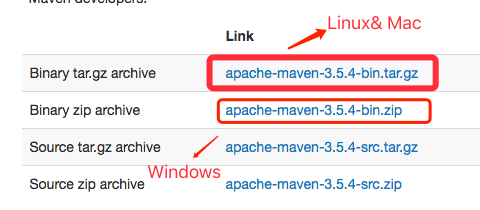
Download the corresponding package for different platforms:
| System | Package name |
|---|---|
| Windows | apache-maven-3.3.9-bin.zip |
| Linux | apache-maven-3.3.9-bin.tar.gz |
| Mac | apache-maven-3.3.9-bin.tar.gz |
After downloading the package, extract it to the corresponding directory:
| System | Storage location (can be configured according to your situation) |
|---|---|
| Windows | E:\Maven\apache-maven-3.3.9 |
| Linux | /usr/local/apache-maven-3.3.9 |
| Mac | /usr/local/apache-maven-3.3.9 |
Set Maven Environment Variables
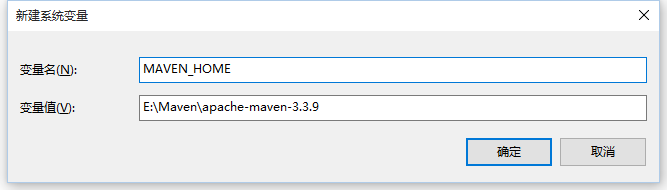
Add environment variable MAVEN_HOME:
| System | Configuration |
|---|---|
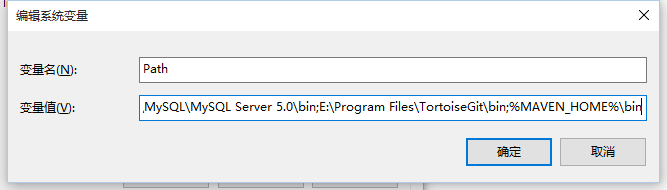
| Windows | Right-click "Computer", select "Properties", then click "Advanced System Settings", click "Environment Variables" to set environment variables. The following system variables need to be configured: Create a new system variableMAVEN_HOME, variable value:E:\Maven\apache-maven-3.3.9
Edit system variablePath, add variable value:;%MAVEN_HOME%\bin
Note:Note that multiple values need to be separated by semicolons, then click OK. |
| Linux | Download and extract: # wget http://mirrors.hust.edu.cn/apache/maven/maven-3/3.3.9/binaries/apache-maven-3.3.9-bin.tar.gz # tar -xvf apache-maven-3.3.9-bin.tar.gz # sudo mv -f apache-maven-3.3.9 /usr/local/ Edit/etc/profilefilesudo vim /etc/profile, add the following code at the end of the file: export MAVEN_HOME=/usr/local/apache-maven-3.3.9
export PATH=${PATH}:${MAVEN_HOME}/bin
Save the file and run the following command to make the environment variables take effect: # source /etc/profile Enter the following command in the console. If you can see Maven version information, Maven has been installed successfully: # mvn -v |
| Mac | Download and extract: $ curl -O http://mirrors.hust.edu.cn/apache/maven/maven-3/3.3.9/binaries/apache-maven-3.3.9-bin.tar.gz $ tar -xvf apache-maven-3.3.9-bin.tar.gz $ sudo mv -f apache-maven-3.3.9 /usr/local/ Edit/etc/profilefilesudo vim /etc/profile, add the following code at the end of the file: export MAVEN_HOME=/usr/local/apache-maven-3.3.9
export PATH=${PATH}:${MAVEN_HOME}/bin
Save the file and run the following command to make the environment variables take effect: $ source /etc/profile Enter the following command in the console. If you can see Maven version information, Maven has been installed successfully: $ mvn -v Apache Maven 3.3.9 (bb52d8502b132ec0a5a3f4c09453c07478323dc5; 2015-11-11T00:41:47+08:00) Maven home: /usr/local/apache-maven-3.3.9 Java version: 1.8.0_31, vendor: Oracle Corporation Java home: /Library/Java/JavaVirtualMachines/jdk1.8.0_31.jdk/Contents/Home/jre Default locale: zh_CN, platform encoding: ISO8859-1 OS name: "mac os x", version: "10.13.4", arch: "x86_64", family: "mac" |
Verify Installation
mvn -v # 应输出 Maven 版本和 Java 信息
Configure Maven Local Repository
Maven downloads dependencies from remote repositories by default and stores them locally:
Default local repository path:
Windows:
C:\Users\<用户名>\.m2\repositoryLinux/macOS:
~/.m2/repository
Change the repository location (optional):
Modify it in MAVEN_HOME/conf/settings.xml:
<localRepository>/path/to/your/repo</localRepository>
First Maven Project
Create a Project with Maven
Run the following command to generate a standard Java project:
mvn archetype:generate \
    -DgroupId=com.example \
    -DartifactId=my-first-app \
    -DarchetypeArtifactId=maven-archetype-quickstart \
    -DinteractiveMode=false
This will generate a standard Maven project structure:
my-first-app/
├── pom.xml           # 项目配置文件
├── src/
│   ├── main/         # 主代码
│   │   └── java/     # Java 源代码
│   └── test/         # 测试代码
│       └── java/     # 测试类
Understanding pom.xml
Example of the generated pom.xml:
<project>
    <modelVersion>4.0.0</modelVersion>
    <groupId>com.example</groupId>      <!-- 组织名 -->
    <artifactId>my-first-app</artifactId>  <!-- 项目名 -->
    <version>1.0-SNAPSHOT</version>     <!-- 版本号 -->

    <dependencies>
        <dependency>
            <groupId>junit</groupId>    <!-- 测试依赖 -->
            <artifactId>junit</artifactId>
            <version>4.12</version>
            <scope>test</scope>         <!-- 仅用于测试 -->
        </dependency>
    </dependencies>
</project>
Compile and Run
mvn compile    # 编译项目
mvn test       # 运行测试
mvn package    # 打包成 .jar 文件
java -jar target/my-first-app-1.0-SNAPSHOT.jar  # 运行(如果可执行)
Other Extensions