Maven Automated Build
Automated build defines a scenario: after a project is successfully built, its related dependent projects begin building, thus ensuring the stability of its dependent projects.
For example, a team is developing a project bus-core-api, and there are two other projects, app-web-ui and app-desktop-ui, that depend on this project.
The app-web-ui project uses the 1.0 snapshot of the bus-core-api project:
The app-desktop-ui project uses the 1.0 snapshot of the bus-core-api project:
The bus-core-api project:
Now the teams of the app-web-ui and app-desktop-ui projects require that no matter when the bus-core-api project changes, their build process should be able to start.
Using snapshots ensures the latest bus-core-api project is used, but to achieve the above requirement, we still need to do some extra work.
Two methods can be used:
- Add a post-build goal operation in the pom file of the bus-core-api project to trigger the builds of the app-web-ui and app-desktop-ui projects.
- Use a continuous integration (CI) server, such as Hudson, to manage build automation on its own.
Using Maven
Modify the pom.xml file of the bus-core-api project.
Open the command console, switch to the C:\ > MVN > bus-core-api directory, and then execute the following command.
C:\MVN\bus-core-api>mvn clean package -U
After the command is executed, Maven will start building the bus-core-api project.
[INFO] Scanning for projects...
[INFO] ------------------------------------------------------------------
[INFO] Building bus-core-api
[INFO]    task-segment: [clean, package]
[INFO] ------------------------------------------------------------------
...
[INFO] [jar:jar {execution: default-jar}]
[INFO] Building jar: C:\MVN\bus-core-ui\target\
bus-core-ui-1.0-SNAPSHOT.jar
[INFO] ------------------------------------------------------------------
[INFO] BUILD SUCCESSFUL
[INFO] ------------------------------------------------------------------
After bus-core-api is successfully built, Maven will start building the app-web-ui project.
[INFO] ------------------------------------------------------------------
[INFO] Building app-web-ui
[INFO]    task-segment: [package]
[INFO] ------------------------------------------------------------------
...
[INFO] [jar:jar {execution: default-jar}]
[INFO] Building jar: C:\MVN\app-web-ui\target\
app-web-ui-1.0-SNAPSHOT.jar
[INFO] ------------------------------------------------------------------
[INFO] BUILD SUCCESSFUL
[INFO] ------------------------------------------------------------------
After app-web-ui is successfully built, Maven will start building the app-desktop-ui project.
[INFO] ------------------------------------------------------------------
[INFO] Building app-desktop-ui
[INFO]    task-segment: [package]
[INFO] ------------------------------------------------------------------
...
[INFO] [jar:jar {execution: default-jar}]
[INFO] Building jar: C:\MVN\app-desktop-ui\target\
app-desktop-ui-1.0-SNAPSHOT.jar
[INFO] -------------------------------------------------------------------
[INFO] BUILD SUCCESSFUL
[INFO] -------------------------------------------------------------------
Using a Continuous Integration (CI) Server
If a CI server is used, when a new project, such as app-mobile-ui in the example, is added as a dependency of the bus-core-api project, developers do not need to update the bus-core-api project's pom. Hudson will use Maven's dependency management features to automate project creation.
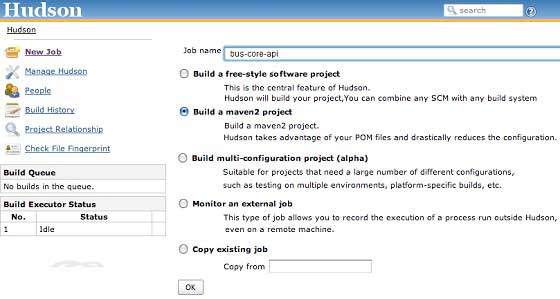
Hudson treats each project build as a task. After a project's code is committed to SVN (or any source control tool mapped to Hudson), Hudson will start the project's build task, and once this build task completes, Hudson will automatically start other dependent build tasks (builds of other dependent projects).
In the above example, when the bus-core-ui source code is updated in SVN, Hudson starts the project build. Once the build succeeds, Hudson automatically looks for dependent projects, then starts building the app-web-ui and app-desktop-ui projects.
Other Extensions