Maven Build Java Project
Maven Uses ArchetypesarchetypeThe plugin creates projects. To create a simple Java application, we will usemaven-archetype-quickstartthe plugin.
In the example below, we will create a Maven-based Java application project in the C:\MVN folder.
The command format is as follows:
mvn archetype:generate "-DgroupId=com.companyname.bank" "-DartifactId=consumerBanking" "-DarchetypeArtifactId=maven-archetype-quickstart" "-DinteractiveMode=false"
Parameter description:
- -DgroupId: Organization name, reverse of the company website URL + project name
- -DartifactId: Project name - module name
- -DarchetypeArtifactId: Specify ArchetypeId, maven-archetype-quickstart, creates a simple Java application
- -DinteractiveMode: Whether to use interactive mode
The generated folder structure is as follows:
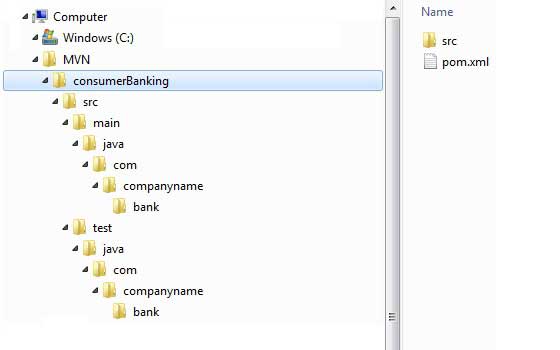
Explanation of each folder:
| Folder structure | Description |
|---|---|
| consumerBanking | Contains src folder and pom.xml |
| src/main/java contains | Java code files are under the package structure (com/companyName/bank). |
| src/main/java test | Test code files are under the package structure (com/companyName/bank). |
| src/main/resources | Contains image / property files (in the example above, we need to manually create this structure). |
InC:\MVN\consumerBanking\src\main\java\com\companyname\bankIn the folder, you can see an App.java, the code is as follows:
App.java
OpenC:\MVN\consumerBanking\src\test\java\com\companyname\bankthe folder, you can see the Java test file AppTest.java.
AppTest.java
In the subsequent development process, we only need to place files according to the structure mentioned in the table above, and Maven will handle the rest for us.
Other Extensions