LaTeX Text Formatting and Lists
This article deals with the "flesh and blood" of the body text: how to switch font styles, adjust font sizes, use the three list environments, and control alignment.
The principle remains: these are semantic commands. You tell LaTeX "this is emphasis"; the actual appearance is determined by the document class.
Font Styles
There are five common styles, all in the form of "command + curly braces", applying to the text inside the braces.
| Effect | Command | Description |
|---|---|---|
| Bold | \textbf{...} | bold face |
| Italic | \textit{...} | Chinese is automatically mapped to KaiTi |
| Underline | \underline{...} | Use sparingly in formal typesetting; Western convention prefers italics instead. |
| Monospaced | \texttt{...} | typewriter, for code, commands, and file names |
| Emphasis | \emph{...} | Smart emphasis: becomes italic in normal text, upright in italic text. |
Example: Font Styles
\begin{document}
\textbf{Bold text}、\textit{Italic text}、\underline{Underlined text}、\texttt{Monospaced text}。
For Chinese emphasis, use\emph{key point}, and for English emphasis use\emph{emphasis}。
Combined usage:\textbf{Bold and\textit{italic}},\texttt{Also in code you can\textbf{bold}}。
\end{document}
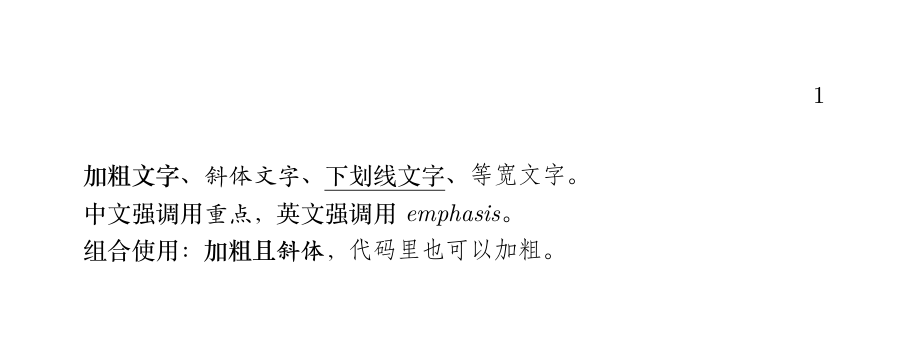
Note one detail in the output: Chinese "italic" actually appears asKaiTi—Chinese characters have no italic tradition; ctex automatically uses KaiTi to perform the "oblique" emphasis function. This is correct localization.
The difference between \emph and \textit lies in "smartness": inside text that is already italic, \emph automatically switches back to upright, creating contrastive emphasis. In papers, prefer \emph.
Don't use underlining to emphasize content—that is a legacy of the typewriter era. In academic typesetting, italics or bold are sufficient for emphasis.
Font Size Adjustment
Western font sizes are a set of "declaration-style" commands, from \tiny to \Huge, ten levels in total, scaled proportionally relative to \normalsize.
| From small to large | Command |
|---|---|
| Levels 1–5 (small) | \tiny、\scriptsize、\footnotesize、\small、\normalsize |
| Levels 6–10 (large) | \large、\Large、\LARGE、\huge、\Huge |
Example: Font Sizes and Chinese Font Sizes
\begin{document}
{\tinytiny, footnote-level}、{\scriptsize scriptsize}、{\footnotesize footnotesize}、
{\small small}, and body text defaults to normalsize.
{\large large}、{\Large Large}、{\LARGE LARGE}、{\huge huge}、{\Huge Huge}。
% Chinese papers more commonly specify directly by "size number": \zihao{size number}
Chinese font sizes:{\zihao{5}No. 5 (common for body text)}、{\zihao{-4}Small No. 4 (thesis body text)}、
{\zihao{4}No. 4 (section headings)}。
\end{document}
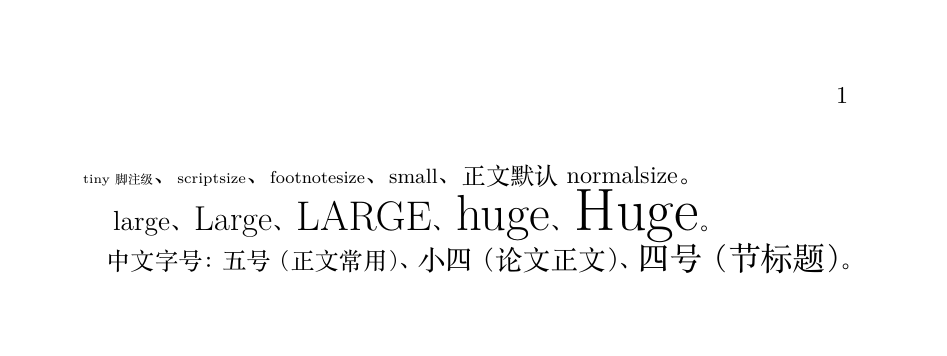
Font size commands are "switches" not "scopes"—all text after \large becomes larger, until the group ends. So be sure to enclose with braces: {\large big text}, so subsequent small text is not affected.
For Chinese documents, it is recommended to use \zihao{size number} directly: adding a minus sign before the number indicates a smaller size number; \zihao{-4} is the famous "Small No. 4"—the standard body text size for theses in domestic universities.
Three List Environments
Lists are the most common "environments" in LaTeX (\begin and \end appear in pairs); the three environments correspond to three semantics.
| Environment | Purpose | Label |
|---|---|---|
| itemize | Parallel points, no order | Symbols such as bullets, en dashes, etc. |
| enumerate | Ordered steps | 1. 2. 3. numbering |
| description | Glossary/term explanation | Custom term names |
Example: Three Lists and Nesting
\begin{document}
Unordered list itemize:
\begin{itemize}
\itemFirst item
\itemSecond item
\begin{itemize}
\itemNested subitem, symbol changes automatically
\itemAnother subitem
\end{itemize}
\end{itemize}
Ordered list enumerate:
\begin{enumerate}
\itemInstall a distribution
\itemChoose an editor
\itemCompile the first document
\end{enumerate}
Description list description:
\begin{description}
\item[LaTeX]A typesetting system based on TeX
\item[Package]Plug-and-play feature extension package
\end{description}
\end{document}
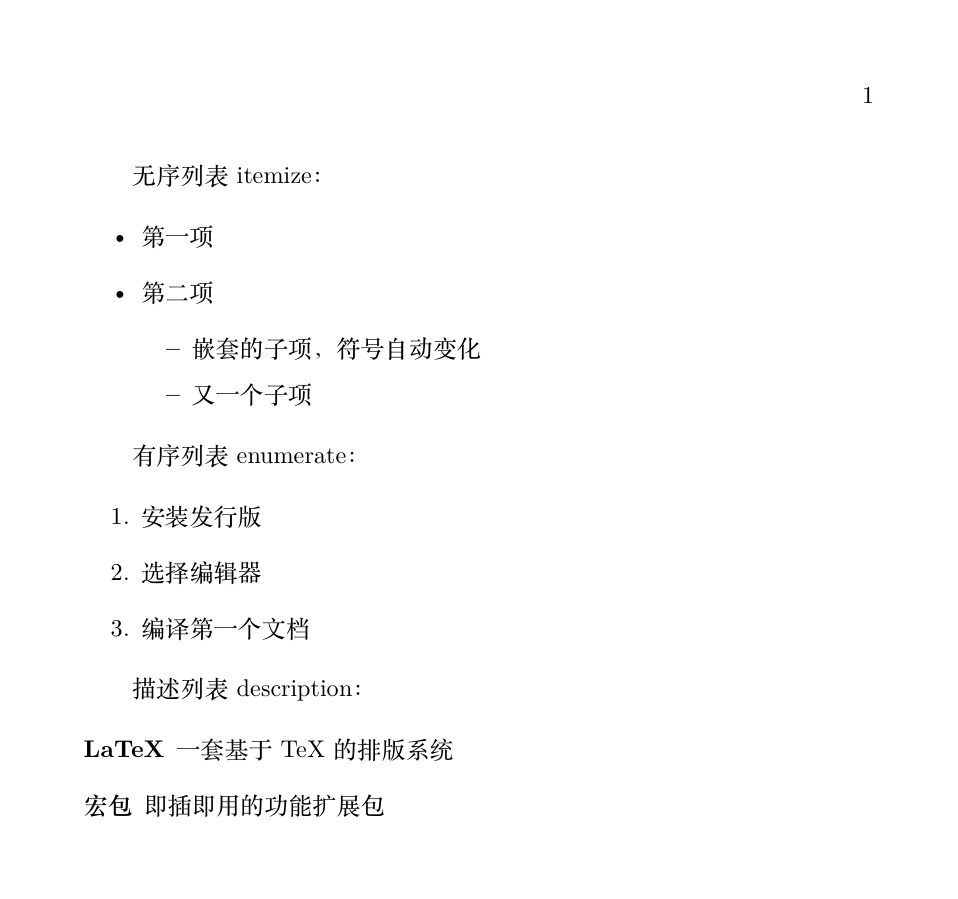
Nested lists require no extra setup: each level is indented automatically, and symbols change level by level (bullet, en dash, asterisk, ...). Nesting is supported up to four levels.
Default lists have rather loose line spacing, which is often considered a waste of space in papers. The enumitem package provides fine-grained control:
Example: Customizing Lists with enumitem
\begin{itemize}[label=\textsquare, noitemsep] % Square label + remove extra spacing between items
\itemCompact unordered list
\itemSuitable for space-constrained situations
\end{itemize}
\begin{enumerate}[label=(\alph*)] % Change numbering style to (a) (b) (c)
\itemFirst point
\itemSecond point
\end{enumerate}
Alignment
Body text is justified by default; this is the standard practice for long documents in typography and requires no settings.
To change alignment locally, use three environments: center, flushleft, flushright.
Example: Centering and Right Alignment
\begin{document}
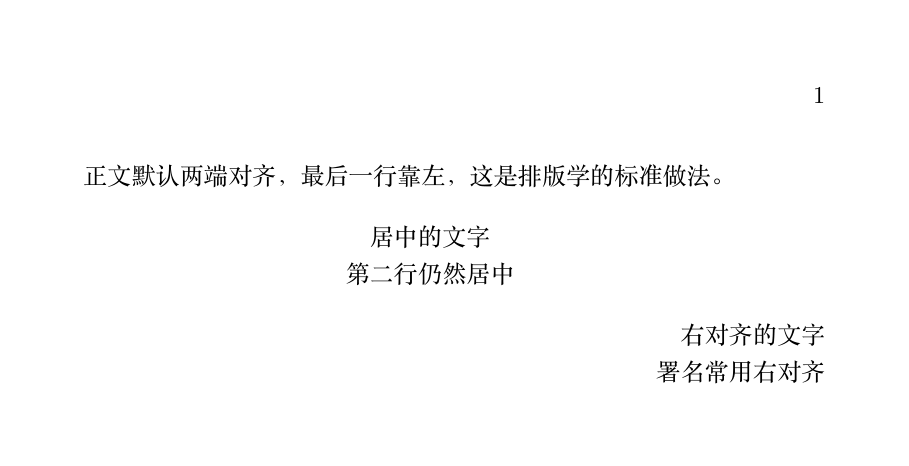
Body text is justified by default, with the last line left-aligned; this is the standard typographic practice.
\begin{center}
Centered text\\The second line is still centered
\end{center}
\begin{flushright}
Right-aligned text\\Signatures often use right alignment
\end{flushright}
\end{document}
| Syntax | Features | Applicable scenarios |
|---|---|---|
| \begin{center}...\end{center} | Environment form, with built-in vertical spacing | Centering as an independent paragraph in the body text |
| \centering | Declaration command, adds no extra spacing | Inside figure/table floats, see Article 8 |
| \begin{flushright}... | Right-alignment environment | Signatures, dates |
Summary
| Requirement | Command | Common pitfalls |
|---|---|---|
| Bold / Italic / Monospaced | \textbf / \textit / \texttt | Commands only affect the contents of the curly braces |
| Emphasis | \emph | Chinese mapping to KaiTi is normal |
| Change font size | {\large ...} or \zihao{n} | Forgetting braces causes everything after to become larger |
| Lists | itemize / enumerate / description | When nesting, \begin and \end must be paired |
| Centering | center environment or \centering | The two differ in spacing behavior |