LaTeX Advanced Mathematical Formulas
The previous article covered single-line formulas; this one deals with the "big stuff": matrices, equation systems, multi-line derivations, and formula numbering.
They all come from the amsmath package — which is why the preamble of every mathematical document should include the line \usepackage{amsmath}.
Matrices: The matrix Family
Matrices are expressed with environments: & separates columns, \\ starts a new line, and the environment name determines the outer bracket style.
| Environment | Outer Style | Typical Use |
|---|---|---|
| matrix | No brackets | Concatenating data blocks |
| pmatrix | Parentheses ( ) | Ordinary matrix |
| bmatrix | Square brackets [ ] | Coefficient matrices, linear algebra |
| Bmatrix | Curly braces { } | Set representation |
| vmatrix | Single vertical bars | | | Determinant |
| Vmatrix | Double vertical bars ‖ ‖ | Norm |
pmatrix (parenthesized matrix)
bmatrix (bracketed matrix)
vmatrix (determinant)
Example: A Matrix of Order n with Ellipses
\begin{pmatrix}
a_{11} & \cdots & a_{1n} \\
\vdots & \ddots & \vdots \\
a_{n1} & \cdots & a_{nn}
\end{pmatrix}
\]
The three types of ellipses each serve their own role: \cdots is horizontal, \vdots is vertical, and \ddots is diagonal. When a matrix has many elements, be sure to use ellipses rather than typing in all dozens of elements.
When an inline formula cannot fit a large matrix, you can use the smallmatrix environment, which compresses line spacing and font size.
Multi-line Derivation: The align Environment
align is the main environment for mathematical derivations: multiple lines of formulas are aligned at the positions marked by &, and each line is numbered automatically.
Example: A Two-line Derivation
(a+b)^2 &= a^2 + 2ab + b^2 \\
&= a^2 + b^2 + 2ab
\end{align}
There are only two rules: place & at the "alignment anchor" (usually before the equals sign), which splits the line into two columns; \\ starts a new line. Each line is automatically numbered.
Example: Evaluating a Definite Integral
\int_0^1 x^2 \,\mathrm{d}x
&= \left[ \frac{x^3}{3} \right]_0^1 \notag \\[2pt]
&= \frac{1}{3}
\end{align}
Two new notations appear here: \notag makes a line unnumbered (use it when an intermediate line in a derivation does not need a number); the [2pt] after \\ fine-tunes line spacing and can be omitted.
When no numbering is needed at all, use the starred align* environment — this is consistent with the logic of the section command \section*: the star means "no numbering, no entry in the table of contents."
Equation Systems and Piecewise Functions: The cases Environment
The cases environment generates a grouped structure with a single large curly brace on the left; it is the standard way to write equation systems and piecewise functions.
Example: A System of Two Linear Equations in Two Unknowns
\begin{cases}
x + y = 5 \\
2x - y = 1
\end{cases}
\]
Example: A Piecewise Function
f(x) =
\begin{cases}
-x, & x < 0 \\
x, & x \geq 0
\end{cases}
\]
In a piecewise function, the role of & changes: it splits the "function value" and the "condition" into two columns, and the second column of conditions is automatically aligned to the right.
Formula Numbering and Referencing
Display formulas \[...\] are not numbered; for formulas that need to be referenced, use the equation environment, which numbers them automatically.
Example: Numbering and Referencing
\usepackage{amsmath} % align, equation, and cases all need it
\begin{document}
From equation\eqref{eq:pyth}we know that the hypotenuse of a right triangle satisfies
\begin{equation} \label{eq:pyth} % \label assigns the label, for \eqref to reference
a^2 + b^2 = c^2,
\end{equation}
And the first$n$terms of an arithmetic sequence sum to
\begin{equation}
S_n = \frac{n(a_1 + a_n)}{2}.
\end{equation}
\end{document}
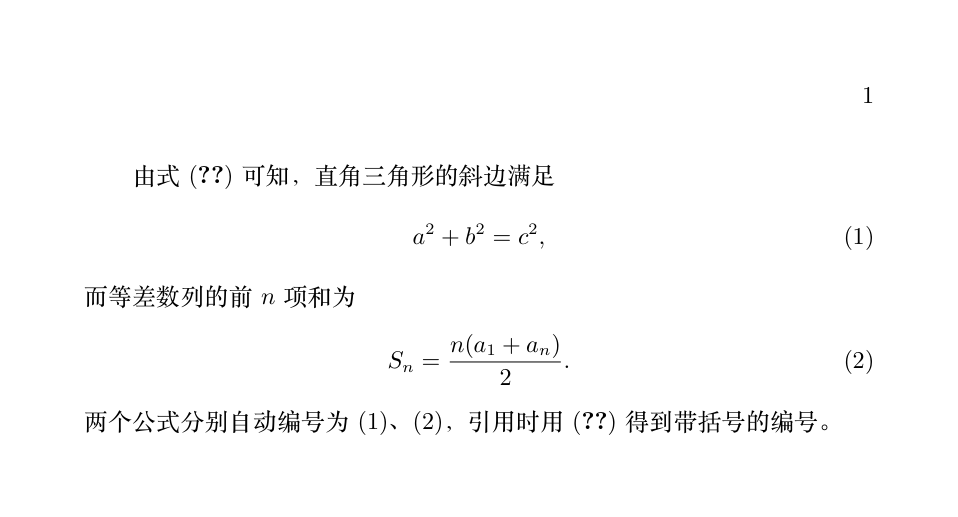
Remember it in three steps: equation handles numbering, \label{key} assigns the label, and \eqref{key} references it (automatically with parentheses).
For label names, the suggestion is "type:content", such as eq:pyth and eq:sum — once there are many formulas, names like eq:3 will be unrecognizable even to yourself.
If the reference displays as (??), it means the .aux file has not been updated yet; compile again (an old friend).
Wrapping Overlong Formulas: The split Environment
When a formula is longer than the text width, put it in equation and use split to wrap it — the whole block keeps a single number.
Example: Wrapping a Long Formula
\begin{split}
\sum_{i=1}^{n} (x_i - \bar{x})(y_i - \bar{y})
&= \sum_{i=1}^{n} x_i y_i - n\bar{x}\bar{y} \\
&= \frac{1}{n}\sum_{i=1}^{n} x_i y_i - \bar{x}\bar{y}
\end{split}
\end{equation}
The difference between split and align: align is for "multiple formulas," each numbered separately; split is for "one formula" wrapped over several lines, sharing a single number. The nesting relationship also makes this clear — split must live inside equation (or \[...\]).
Troubleshooting Common Formula Errors
Errors from math mode account for more than half of beginners' errors; the most common ones are as follows.
| Incorrect writing | Problem | Correct writing |
|---|---|---|
| Using \alpha directly in text | Math commands can only be used in math mode | $\alpha$ |
| $a_1 + b_$ | Missing content after _ or ^ | Add it: $a_1 + b_2$ |
| \[ x = \frac{1}{2} \] | Using \dfrac etc. without loading amsmath | In the preamble: \usepackage{amsmath} |
| \[ a & b \\ c & d \] | Using & in an ordinary display formula | & belongs only to environments such as matrix, align, etc. |
| Embedding Chinese explanations in a formula | Fonts and line breaks all messed up | Put the explanatory text outside $, or use \text{Chinese} |
| Forgetting \\ in align | Multiple lines squeezed into one line | Add \\ at the end of each line (except the last line) |
Among them, \text{...} (provided by amsmath) deserves an extra note: occasionally you need to embed a short piece of text in a formula (such as the condition "when x > 0" or units); wrapping it with \text keeps it upright with normal spacing.
Summary
| Requirement | Environment / Command |
|---|---|
| Matrix | pmatrix / bmatrix / vmatrix (& separates columns, \\ starts a new line) |
| Multi-line derivation (each line numbered) | align (starred version: unnumbered) |
| Equation system / piecewise function | cases |
| Single numbered formula | equation + \label |
| Referencing a formula number | \eqref{key} |
| Wrapping a long formula | split embedded in equation |